EasyManua.ls Logo

KNZ Technology GoDuo - User Manual

KNZ Technology GoDuo
3 pages
Print Icon
To Next Page IconTo Next Page
Loading...
10/31/2018 GoDuo Speakers - True Wireless Stereo Speakers | KNZ Technology USA | GoDuo-Manual
https://www.knztech.com/goduo-manual 1/3
GoDuo Wireless Speakers
User Manual
Quick Reference
to Frequent Operations
Specifications
Model: GoDuo-RED
FCC ID: 2AMTF-GODUO
Paring name: KNZ GoDuo
Bluetooth version: V4.2
Support Profiles: AVRCP /A2DP/ HFP/HSP
Frequency range: 2.4 GHz ~ 2.48 GHz
Sensitivity: -92dBm
Speaker output power: 5W ×2
Work range: Up to 50 feet (15 meters)
Dimensions (each speaker): 3.6”×2.4” ×2.4”
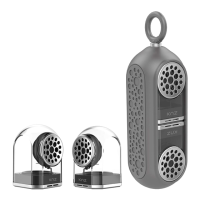
Dimensions (whole product): 9.1” ×2.6” ×2.6”
Weight (speaker): 210 grams per speaker
Weight (carrying case): 106 grams
Music time: Up to 18 hours (at medium volume)
Talk time: 18 hours
Charging time: 2 ~ 3 hours
Battery type: 3.7V rechargeable Lithium polymer battery
Battery capacity: 1200mAh
Working temperature: -10~50°C
Operation Instructions
Power On/Off
Power On: Press and hold MFB for 3 seconds until blue LED flashes with a voice prompt "power on"
Power Off: Press and hold MFB for 3 seconds until red LED flashes with a voice prompt "power off"
LED status: When speaker is being charged, the LED indicator is in solid green color. The LED turns off when speaker is fully charged. If
when charging cable is plugged in, the LED turns green for a few seconds and then turns off, or does not turn green at all, it means the
speaker is already fully charged and does not need to be charged any longer.
GoDuo SoundFlux Dock'nRoll Press Support
Question and Answer IconNeed help?

Do you have a question about the KNZ Technology GoDuo and is the answer not in the manual?

Summary

Quick Reference to Frequent Operations

Power and Call Operations

Covers powering on/off, answering, ending, and rejecting calls.

Media and Voice Assistant Control

Manage music playback, language prompts, and activate Siri.

Bluetooth Connectivity and Usage

Pairing and Connecting Speakers

Instructions for pairing two speakers and connecting to devices.

Individual Speaker Use

Guide on using a single speaker for Bluetooth connection.

Audio and Feature Management

Call Handling and Music Control

Operations for managing handsfree calls and music playback.

Auxiliary Input and Siri Activation

Using AUX input and activating voice assistant features.

System Status and Troubleshooting

Battery and LED Status Indicators

Information on checking battery levels and LED indicator meanings.

Speaker Reset Procedure

Steps to reset the speakers in case of errors or issues.

KNZ Technology GoDuo Specifications

General IconGeneral
BrandKNZ Technology
ModelGoDuo
CategorySpeakers
TypePortable Bluetooth Speaker
ConfigurationStereo
Battery Life10 hours
Charging Time2 hours
Water ResistanceIPX5
Driver Size40 mm
ConnectivityBluetooth
FeaturesBuilt-in microphone
Frequency Response20kHz
Output Power5W