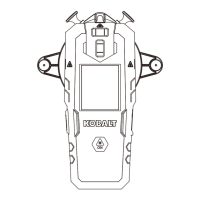
The KOBALT Rechargeable Multi-Surface Laser Level (Model #SMD-RM20UG-Li, Item #5173268) is a versatile tool designed for projecting laser lines for various leveling and alignment tasks. It features a compact and robust design, making it suitable for both indoor and outdoor use within its specified range.
Function Description:
This device projects a laser line to assist in tasks requiring precise horizontal or angled alignment. It is equipped with a rechargeable battery, offering convenience and portability. The multi-surface cradle allows for various mounting options, enhancing its adaptability to different work environments and materials. The laser level is designed to be user-friendly, with clear controls and indicators.
Important Technical Specifications:
- Laser Line Range: Up to 20 ft (approximately 6.09 m)
- Laser Line Accuracy: ±1/4-in at 10 ft (approximately ±6.35 mm at 3.04 m)
- Operating Temperature: 23 °F to 122 °F (-5 °C to 50 °C)
- Operating Humidity: 45% to 75% RH
- Storage Temperature: 14 °F to 158 °F (-10 °C to 70 °C)
- Storage Humidity: 45% to 75% RH
- Laser Class: 2
- Laser Type: 510-530nm, <1mW
- Battery Capacity: 1400mAh (5.18Wh) 3.7V
- Input: 5V 550mA
- Date of Manufacture: 2022-12
The device complies with 21 CFR 1040.10 and 1040.11, except for conformance with IEC 60825-1 Ed. 3., as described in Laser Notice No. 56, dated May 8, 2019. It also complies with part 15 of the FCC Rules, ensuring it does not cause harmful interference and accepts any interference received.
Usage Features:
The laser level offers multiple mounting options to suit diverse applications:
-
Turning ON/OFF: The on/off switch is located on the front of the laser level. Press the switch to turn the laser ON; press it again to turn the laser OFF.
-
Using the Laser Level:
- Always turn the laser beam off when mounting the laser level.
- Two bubble levels allow for either horizontal or vertical leveling.
- The laser level and cradle are preinstalled onto the protractor base.
- To remove the protractor base for other applications, loosen the knob that holds it in place.
- The cradle provides hands-free use, but the laser level may be used alone.
- The protractor base with push pins can be used on either a smooth or non-smooth surface.
-
Mounting with the Protractor Base:
- For projecting the laser beam at an angle from 0° to 90°.
- Remove the push pins from the storage area.
- Place the protractor base flat against the desired surface. It may be helpful to place a push pin at 90° to hold the base steady while leveling the base at 0°.
- Use the bubble levels to set the base horizontally at 0°.
- Push a pin into the lower hole at 0°.
- Turn the laser on to project the laser beam.
- Pivot the laser level to set the laser beam to the desired angle.
-
Mounting with the Magnet:
- Remove the protractor base.
- Attach the magnet to a clean metal surface.
- Use the bubble levels to level the unit.
- Turn the laser on to project the laser beam.
-
Mounting with the Suction Cups:
- For mounting to smooth surfaces.
- Remove the protractor base.
- Place the unit onto a smooth, non-textured surface but do not press the suction cups into place initially.
- Use the bubble levels to level the unit.
- Hold the laser level in place and press the suction cups onto a non-textured surface until they are securely in place.
- Turn the laser on to project the laser beam.
- To release suction cups from the surface, lift the tabs on the sides of the suction cups. Pulling on the unit without first loosening the suction cups could damage the multi-surface cradle.
-
Mounting with the Push Pins:
- For securing the laser level on non-smooth surfaces.
- Remove the protractor base.
- Remove the push pins from the storage area.
- Place the laser level onto the desired surface and use the bubble levels to level the unit.
- Insert a push pin into each hole on the sides of the cradle and push the pins into the mounting surface.
- Turn the laser on to project the laser beam.
-
Mounting with the Adhesive Putty:
- For mounting to drywall, wood, and other suitable surfaces.
- Remove the release liner before use.
- The adhesive putty may be washed and used repeatedly. To maintain good adhesion, wash the putty frequently and ensure it is clean of any dust or debris before operation.
- Do not use the adhesive putty to fasten onto the wall if the wall surface is loose or wet. Always keep the target wall surface clean.
- Remove from the wall slowly after using; any residue of the adhesive putty remaining on the wall can be cleaned by rolling the adhesive putty over the residue.
Charging:
- Connect the USB cable to charge the laser level.
- The charging light turns red when charging.
- The charging light turns green when charging is completed. Remove the USB cable.
Maintenance Features:
- Storage: Store the laser level indoors.
- Cleaning: Keep the laser level free of dust and liquids. Use a damp cloth and mild soap to clean the outside casing. Avoid using solvents when cleaning plastic parts, as most plastics are susceptible to damage from various types of commercial solvents.
- Laser Lens Cleaning: To clean the laser lens, if needed, use ONLY a soft cloth or cotton swab moistened with glass cleaner.
- Disassembly: Do not disassemble the laser level, as this could cause exposure to hazardous laser radiation. Do not attempt to change any part of the laser lens.
Safety Instructions:
- Always read and understand the operator's manual before use.
- Failure to follow instructions may result in electric shock, fire, and/or serious personal injury.
- Use of controls or adjustments other than specified may result in hazardous radiation exposure.
- Using an optical instrument with this product will increase eye hazard.
- Always be aware of the laser light emission location.
- Ensure bystanders are aware of the dangers of looking directly into the laser beam.
- Avoid direct eye exposure and do not project the laser beam into others' eyes to prevent serious eye injury.
- Do not remove or deface product labels, as this increases the risk of exposure to laser radiation.
- Do not place the laser level in a position where anyone might stare into the laser beam intentionally or unintentionally.
- Do not operate the laser level around children or allow children to operate the tool.
- Always turn the laser level off when not in use.
- Do not operate in combustible areas (flammable liquids, gasses, or dust).
- Ensure the laser beam is aimed at a non-reflective surface.
- Handle the laser level with care, like any other optical device.
- Avoid exposing the laser level to shock, continuous vibration, or extreme temperatures.
- Save these instructions for frequent reference and to instruct others.
Warranty:
The product is warranted for 3 years from the date of purchase against defects in material and workmanship for the original purchaser. This warranty does not cover damage due to abuse, normal wear, improper maintenance, neglect, unauthorized repair/alteration, or expendable parts. If the product meets the warranty criteria, it can be returned to the place of purchase with valid proof for repair or replacement at no charge.

 Need help?
 General

 To Next Page