EasyManua.ls Logo

KOCASO MX9200 - Task Bar; Notification & Status Bar

Default Icon
14 pages
Print Icon
To Next Page IconTo Next Page
To Previous Page IconTo Previous Page
Loading...
- 4 -
2.3 Task Bar
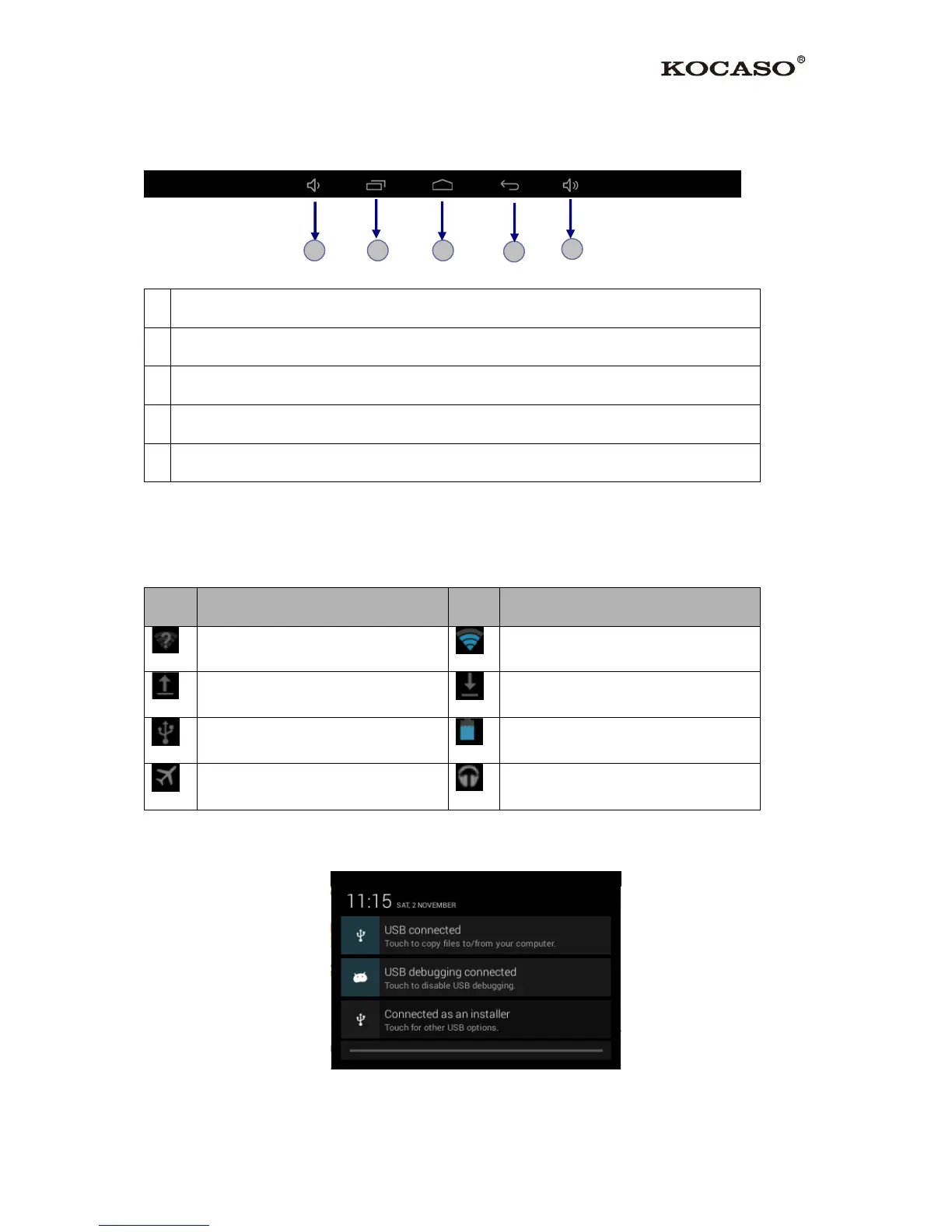
The task bar is shown at the bottom of the screen. It displays commonly used option buttons.
1
Adjust the device volume lower
2
View recent applications
3
Return to home screen
4
Return to previous screen
5
Adjust the device volume higher
2.4 Notification & Status Bar
It is located at the top of the screen. It displays battery power level, wifi signal strength, time,
and so on.
Icon
Definition
Icon
Definition
Open Wi-Fi Available
Wi-Fi Connected
Uploading Data
Downloading Data
Connected to PC
Battery Power Level
Flight Mode Activated
Music Being Played
To show a pull-down list of the recent notifications, drag the left area of the notification bar
downward.
1
2
3
4
5

Related product manuals