EasyManua.ls Logo

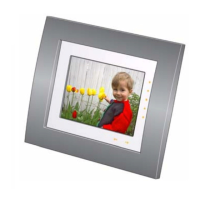
Kodak EasyShare EX-1011 - User Manual

Kodak EasyShare EX-1011
53 pages
Print Icon
To Next Page IconTo Next Page
Loading...
Kodak EasyShare
digital picture frame
User’s guide
for SV-710, SV-811, EX-811, EX-1011
www.kodak.com
For help with your picture frame, www.kodak.com/go/digitalframesupport

Table of Contents

Questions and Answers

  • T
    Thomas DiazJul 28, 2025
    Why Kodak Digital Photo Frame cannot connect to wireless network?
    • D
      Dale JonesJul 28, 2025
      To resolve the issue of your Kodak Digital Photo Frame not connecting to the wireless network and displaying the message "Wireless network not found", ensure that you have a wireless router broadcasting the SSID, or manually enter the SSID. Also, make sure your frame and computer are both powered on. Verify that you have Windows Media Player 11 installed and sharing is enabled. Ensure the wireless router and network are running before the frame scans for a network. Confirm you are within the network's operating range, and check for interference from devices like microwave ovens or cordless phones. Consider updating your router's firmware and ensuring your frame has the latest firmware.
  • W
    wandersonAug 1, 2025
    What to do if Kodak EasyShare EX-1011 shows 'Create file failed'?
    • C
      Crystal BeckerAug 1, 2025
      If your Kodak Digital Photo Frame is unable to create a file and you receive an error, it may be because the device you are trying to copy to is write-protected. To resolve this, consult your device's documentation to remove write protection. Alternatively, try inserting or connecting a different device.
  • R
    Ronald AllisonAug 6, 2025
    What to do if Kodak EasyShare EX-1011 shows 'Printer unavailable'?
    • L
      lawrencejesseAug 6, 2025
      If your Kodak Digital Photo Frame displays "Printer unavailable. Unable to connect to printer", ensure that your printer is powered on and that the USB cable is securely connected. Also, verify that you have changed your USB connection mode from computer to printer.
  • B
    Brenda MillerAug 10, 2025
    What to do if Kodak EasyShare EX-1011 asks to enter SSID?
    • J
      jacksonmargaretAug 10, 2025
      If your Kodak Digital Photo Frame displays the message "Please enter your SSID", you need to enter the name of your network. If you do not know the SSID, contact your system administrator or the person who set up your wireless network.
  • C
    Cassandra YoungAug 14, 2025
    What to do if Kodak EasyShare EX-1011 shows 'Unable to create file'?
    • Y
      ygonzalezAug 15, 2025
      If your Kodak Digital Photo Frame is unable to create a file and displays the message "Device write protected or full", insert a different card or device, or change the picture location setting. Alternatively, remove write protection or unlock the card. You can also try deleting pictures from the card to free up space.
  • N
    Nathan PerezAug 19, 2025
    What does 'Write failed' mean on Kodak Digital Photo Frame?
    • A
      Andre JohnsonAug 19, 2025
      If your Kodak Digital Photo Frame displays the message "Write failed. Select another location" it means that the frame was unable to copy the picture. To solve this, insert a different card or device, or change the picture location setting.
  • R
    Raymond BaldwinAug 23, 2025
    What to do if Kodak EasyShare EX-1011 shows 'Error attempting to open file or directory'?
    • J
      Jenna MaynardAug 23, 2025
      If your Kodak Digital Photo Frame displays an error when attempting to open a file or directory, turn off the frame and then turn it back on.

Summary

Getting started

Installing the software

Steps to install the Kodak EasyShare software.

Using the remote control

Information on using the remote control.

Activating the remote control

Instructions to activate the remote control.

Storing the remote control

How to store the remote control.

Using the remote control buttons

Details on remote control buttons and their functions.

Setting up your picture frame

Steps to set up the picture frame.

Buttons and controls

Overview of frame buttons and controls.

Connecting the power cable

Instructions for connecting the power cable.

Inserting a card or camera

How to insert memory cards or connect cameras.

Turning on the frame

Steps to turn on the digital picture frame.

Setting your language

How to select the display language.

Viewing your first slide show!

How to view the initial slide show.

Viewing pictures and videos

Running a slide show

How to start and manage slide shows.

Viewing thumbnails

How to view pictures in thumbnail format.

Viewing a single picture

How to view a single picture full-screen.

Playing a video

Steps to play video content on the frame.

Choosing a different picture location

How to select different sources for viewing pictures.

Doing more with your frame

Copying pictures on your frame

How to copy pictures between locations on the frame.

Copying between your frame and computer

Copying pictures between frame and PC.

Connecting to your computer

Instructions for connecting the frame to a computer.

Copying pictures to;from your computer

Transferring pictures between frame and computer.

Copying pictures from EasyShare software

How to copy pictures from Kodak software.

Deleting pictures;videos

Steps to delete pictures and videos.

Selecting multiple pictures;videos

How to select multiple items for actions.

Selecting one at a time

How to select individual pictures.

Selecting all

How to select all pictures displayed.

Printing pictures

Information on printing pictures.

Connecting the frame to a PictBridge enabled printer

How to connect to a PictBridge printer.

Printing from a PictBridge enabled printer

Steps for printing from a PictBridge printer.

Manually changing connection mode

How to change USB connection modes.

Playing music

How to play music files on the frame.

Changing frame settings

Settings menus

Details on the available settings menus.

Viewing options

Settings for slide duration, orientation, and transitions.

Brightness

How to adjust screen brightness.

Clock and timer

Settings for automatic on/off and time.

Kodak Gallery

Setup for Kodak Gallery account.

Network

Setup for wireless network operation.

Device configuration

Settings for frame name and USB connection.

Language

Setting the display language.

About

Information about frame model and firmware.

Upgrading your firmware

Steps to download and install firmware updates.

Using Wi-Fi mode-EX models only

What are some of the wireless features of my frame?

Overview of wireless capabilities.

Wireless networking and the Internet

Information on wireless networking basics.

Setting up your frame for wireless operation

Initial setup for wireless connectivity.

Before you start

Prerequisites for wireless setup.

Perform the setup

Step-by-step guide for wireless setup.

Set up your network at a later time

How to configure wireless later.

Viewing pictures over your wireless network

How to view pictures wirelessly.

Setting up your Gallery account

Steps to link to Kodak Gallery account.

Viewing pictures from the Gallery

How to view pictures from Kodak Gallery.

Creating My Slideshow

Designating a slideshow to run automatically.

Copying pictures to your computer-wirelessly

Wireless transfer of pictures to PC.

Access point

Definition of a wireless network transceiver or hub.

Ad Hoc

Client setting for direct wireless device communication.

Bridge

Connects local area networks using the same protocol.

Client

Network application requesting services from another device.

DHCP

Utility for dynamically assigning IP addresses.

DNS

Translates domain names to IP addresses.

Encryption key

Alphanumeric series for encrypting/decrypting data.

Infrastructure

Network setup using a central access point or router.

IP

Technology supporting data transmission via IP networks.

IP address

Number identifying sender/receiver of Internet information.

Network name

Identifies the wireless network for shared components.

Passphrase

Text string used for WPA security on Wi-Fi networks.

Router

Access point or hub sending data between networks.

SSID

Service Set Identifier; network name for wireless networks.

SSL

Encryption scheme for online financial transactions.

TCP;IP

Protocol for Internet and network communications.

URL

Uniform Resource Locator, also known as a Web address.

WEP

Wired Equivalent Privacy; basic wireless security.

WEP key

Text string used for WEP security on Wi-Fi networks.

WPA

Wi-Fi Protected Access; high-level security standard.

Wi-Fi

Wireless Fidelity; standard for wireless networks.

Troubleshooting and support

Picture frame problems

Common frame issues and solutions.

Picture frame;computer communications

Issues with frame and computer connectivity.

Wireless network connection (EX models)

Troubleshooting wireless network issues.

Screen messages

Explanations for common screen messages.

Appendix

Digital frame specifications

Technical specifications of the digital picture frame.

Important safety instructions

Essential safety precautions for using the product.

Downloading your software and firmware

Instructions for downloading software and firmware.

Additional care and maintenance

Guidelines for cleaning and maintaining the frame.

Limited warranty

Details on the product's warranty coverage.

Limitations

Conditions not covered by the product warranty.

Your rights

Consumer rights regarding the warranty.

Outside the United States and Canada

Warranty conditions for international users.

FCC compliance and advisory

Regulatory compliance information for FCC.

FCC and Industry Canada

Compliance with FCC and Industry Canada regulations.

CE

Declaration of conformity with EU directives.

Canadian DOC statement

Canadian DOC Class B compliance statement.

Waste Electrical and Electronic Equipment labeling

Information on product disposal and recycling.

Australian C-Tick

Australian compliance marking.

MPEG-4

Usage restrictions related to MPEG-4 standard.

Licensing

Information on content distribution licensing.

Kodak EasyShare EX-1011 Specifications

General IconGeneral
BrandKodak
ModelEasyShare EX-1011
CategoryDigital Photo Frame
LanguageEnglish

Related product manuals