www.kodak.com/go/support 7
ENGLISH
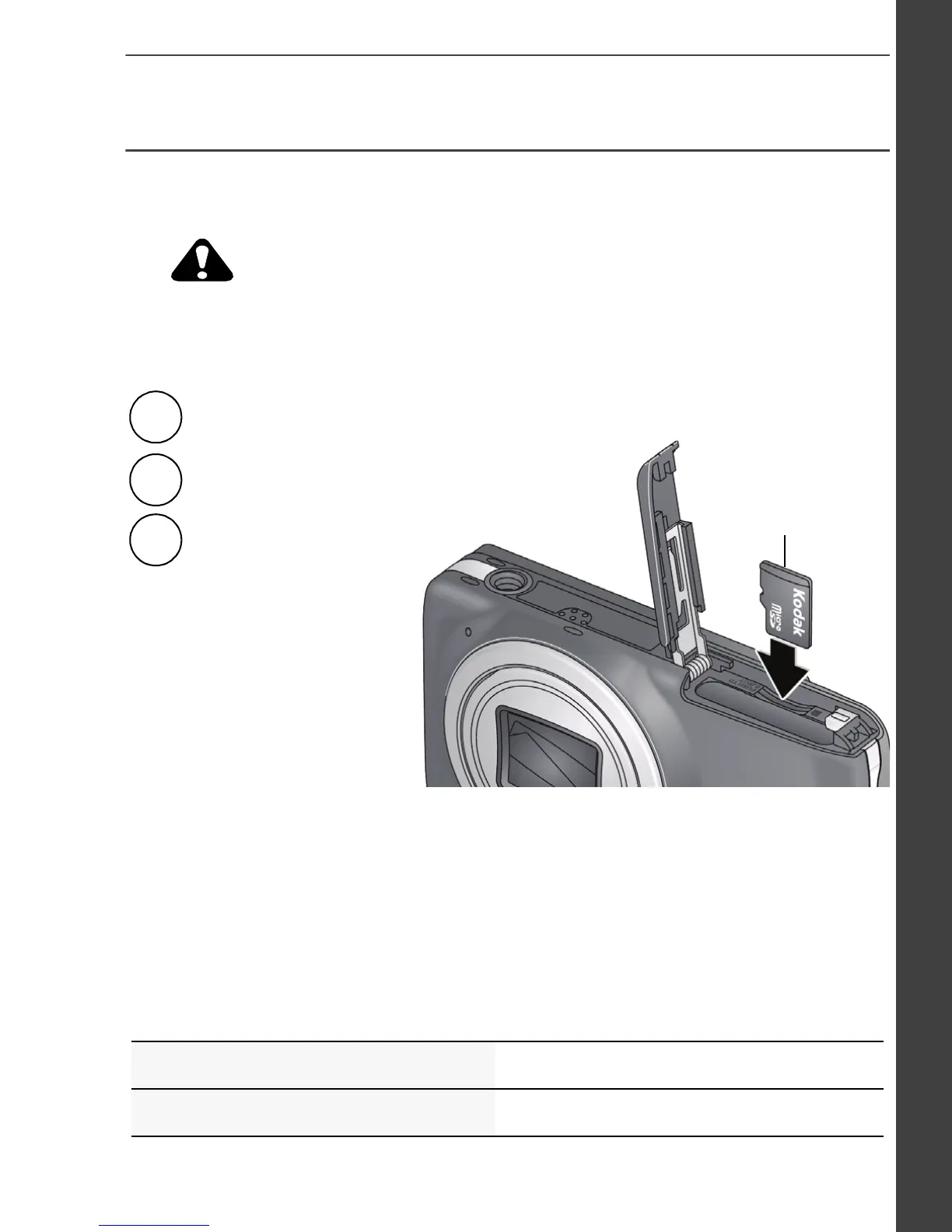
Use an MicroSD/MicroSDHC Card
Your camera has internal memory. We recommend purchasing a
MicroSD or MicroSDHC Card to store more pictures/videos.
A card can only be inserted one way; forcing it may cause damage.
Inserting or removing a card while the camera is on may damage the
pictures, the card, or the camera.
IMPORTANT:
When you turn on the camera, it checks to see if a card is
inserted. If so, new pictures/videos are stored on the card. If no card is
inserted, new pictures/videos are stored in the camera’s internal memory.
If pictures/videos are detected in internal memory and a card is inserted, the
camera prompts you to move the pictures to the card (and erase those in
internal memory).
See the Extended user guide www.kodak.com/go/M583manuals
Purchase cards www.kodak.com/go/accessories
1
Turn off the camera.
2
3
Turn on the camera.
Accessory
To remove a card,
press and release it.
Insert a card until it clicks.
urg_01245.book Page 7 Thursday, February 17, 2011 6:25 AM










 To Next Page