EasyManua.ls Logo

Kodak SIX-20 - Page 8

Kodak SIX-20
26 pages
Print Icon
To Next Page IconTo Next Page
To Previous Page IconTo Previous Page
Loading...
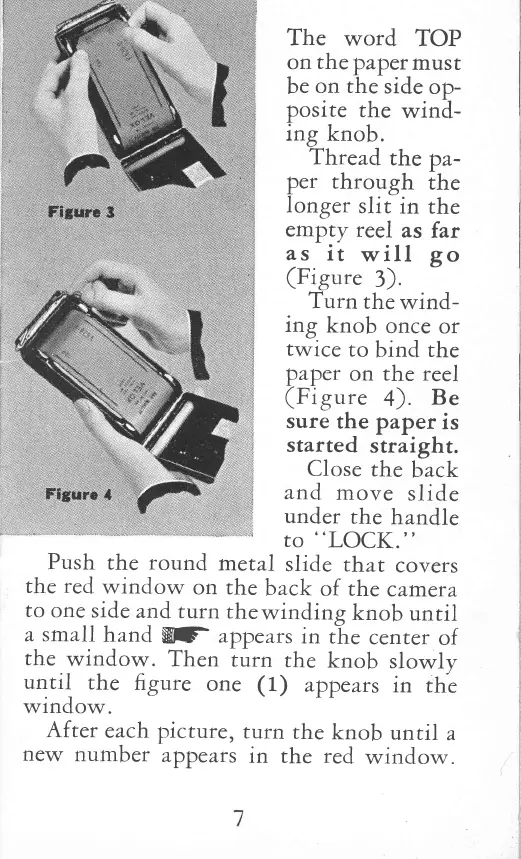
The
word
TOP
on
the
papet
rnusr
be
on the
side
op-
posite
the
wind-
irg
knob.
Thread
the pa-
per
through
the
longer
slit
in
the
empy
reel
as
far
as
it
will
go
(Figure
3).
Turn
the
wind-
itg
knob
once
or
twice
to
bind
the
paper
on the
reel
(Figure
4).
Be
sure
the paper
is
started
straight.
Close
the
back
and
rnove
slide
under
the
handle
to
"LOCK."
Push
the
round
metal
slide
that
covers
the
red
window
on the
back
of
the
camera
to
one
side
and
rurn
the
windirg
knob
until
a srnall
hand
W
appears
in
rhe
cenrer
of
the
window.
Then
rurn
the
knob
slowly
until
the
figure
one
( 1)
appears
in
the
window.
After
each
picrure,
rurn
the
knob
until
a
new
number
appe
ars
in
the
red
window.

Related product manuals