EasyManua.ls Logo

Kodak SIX-20 - Page 9

Kodak SIX-20
26 pages
Print Icon
To Next Page IconTo Next Page
To Previous Page IconTo Previous Page
Loading...
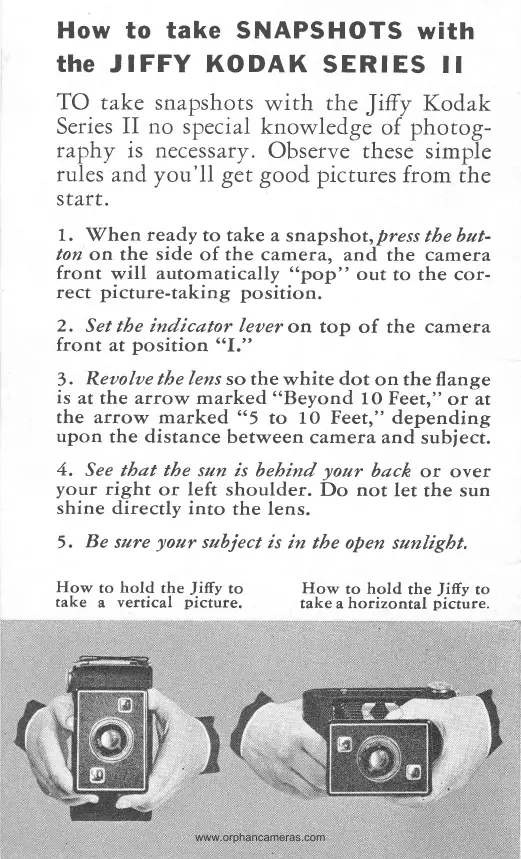
TO take
Series
II
nphy is
rules
and
s taf t.
How
to take SNAPSHOTS
with
the
JIFFY
KODAK
SERIES
ll
snapshots
no
special
necess
afY
.
you'll
get
1.
When
ready
to take
a
snapshot,
press
tbe
but-
ton
on the side
of the
cameta,
and
the
carrl'era
front
will
automatically
"pop"
out
to the
cor-
rect
picture-taking
position.
2.
Set
tbe
indicator leuer
on top
of
the
camera
front
at
position
"I."
3
.
Reaolae
the
lens
so the
white
dot
on the
flange
is
at the arrow marked
"Beyond
1O Feetr"
ot
at
the arrow
marked
"
5
to
10
Feetr" depending
upon
the distance
between camera and
subject.
4.
See
tbat tbe sun
is bebind
your
back
or over
your
right
or left shoulder.
Do not
let
the
sun
shine
directly into
the lens.
5.
Be
sure
your
subject is
in
tbe open
sunligbt,
with
the
Jitry
Kodak
knowledge
of
photog-
Observe
these
simple
good pictures
frorn the
How
to
hold
the
Jiffy
to
take
a
vertical
picture.
How
to
hold
the
Jiffy
to
take a
hofizontal
picture.

Related product manuals