EasyManua.ls Logo

KODINIS IMB5 - User Manual

KODINIS IMB5
3 pages
Print Icon
To Next Page IconTo Next Page
Loading...
"KODINIS""KODINIS" IMB5, IMB5.1IMB5, IMB5.1
User manual
THE SET
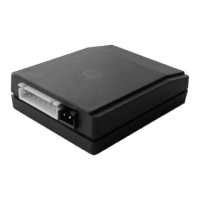
The system includes a system unit – an electronic module (Fig. 1.), it should be hidden by installer inside a vehicle passenger
compartment during installation, and ID card (Fig. 2) an electronic key that should be inside drivers pocket or handbag. The
ID card supports 2-way radio communication with the system unit. There are two ID cards in the set, but it is available to
learn up to five ID cards.
There are a button and LED hole on the ID card case (Fig. 2). Power supply 3V CR2032 type battery, it is recommended to
replace the battery every 12 months. The ID card is not intended to use as key fob and should be placed separately
from car keys. To you there will be no advantage of the immobilizer if during a robbery together with car keys will give
and ID card. The ID card is necessary for protecting from a rain and snow!
The system unit supports 2-way radio communication with ID card, decodes received information and converts it to the
control signals. If the driver identification fails, the system unit transfers an immobilization signal intended for an external
immobilization equipment. A car alarm system, GSM/GPS system, other equipment can be used as external immobilization
equipment.
Press the ID card button shortly. The LED makes a flash. A colour shows ID card and system unit status:
green colour – ID card is turned ON (active status);
orange colour – ID card is turned OFF (stand by status);
red colour ID card is turned OFF and the system unit is turned OFF by this card (stand by status, performs no control).
It is available to turn ON the ID card only near or inside the car. Press and hold pressed down the ID card button:
To check yourself shortly press the ID card button. If the LED makes flash of green colour, all is executed correctly.
It is available to turn OFF the ID card anywhere. It is advisable for battery saving. Press and hold pressed down the ID
card button:
To check yourself shortly press the ID card button. If the LED makes flash of orange colour, all is executed correctly.
It is available to turn OFF the ID card and the system unit only near or inside the car. Press and hold pressed down the
ID card button:
To check yourself shortly press the ID card button. If the LED makes flash of red colour, all is executed correctly.
Please have the turned ON ID card with yourself. The system will make all automatically.
THE ID CARD
THE SYSTEM UNIT
ID CARD AND SYSTEM STATUS
ID CARD TURNING ON
ID CARD TURNING OFF
ID CARD AND SYSTEM UNIT TURNING OFF
USING OF THE IMMOBILIZER
Orange
0,1 second
2 seconds 2 seconds
Goes OFF,
2 seconds
Orange
Green
Goes OFF
Release
the button
Green
0,1 second
2 seconds 2 seconds
Goes OFF,
2 seconds
Green
Orange
Goes OFF
Release
the button
Green
0,1 second
2 seconds
2 seconds 2 seconds 2 seconds
Goes OFF,
2 seconds
Green
Orange
Goes OFF,
2 seconds
Green
Red
Goes OFF,
the buzzer
sound signal
is audible
Release
the button
Vehicle immobilizer
THE IMMOBILIZER PURPOSE
The purpose of the immobilizer 'KODINIS' is
the identification of the driver. The driver is
identified, when the person with ID card comes
inside the communication area. If the person
has no ID card, the immobilizer regards, the
vehicle is under unauthorized use and transfers
the signal for engine immobilization.
Fig. 1. System unit.
Fig. 2. ID card.
LED hole
Button
Question and Answer IconNeed help?

Do you have a question about the KODINIS IMB5 and is the answer not in the manual?

Overview

The "KODINIS" IMB5/IMB5.1 is a vehicle immobilizer system designed to enhance car security by identifying the driver and preventing unauthorized use.

Function Description

The primary purpose of the "KODINIS" immobilizer is driver identification. When a person with a registered ID card enters the communication area of the vehicle, the system identifies them as an authorized driver. If no ID card is detected, the system considers the vehicle to be under unauthorized use and activates an engine immobilization signal. This signal is then transferred to external immobilization equipment, which can include a car alarm system, GSM/GPS system, or other compatible devices.

The system operates using a two-way radio communication between the system unit and the ID card. The ID card acts as an electronic key, which should be kept in the driver's pocket or handbag, not as a key fob attached to car keys. This separation is crucial for the immobilizer's effectiveness, especially in scenarios like robbery, where handing over both car keys and the ID card would defeat the security purpose.

The system unit, an electronic module, is designed to be hidden within the vehicle's passenger compartment by the installer. It decodes information received from the ID card and converts it into control signals.

The "Anti-carjack" feature provides protection against robbery. Several variants of this feature exist, some of which are legal in EU countries and others intended for non-EU member countries that do not apply UNECE Regulation No. 97. These variants differ in how they trigger immobilization (e.g., ignition ON with no ID card, ID card loss with ignition ON, or door opening with ignition ON and ID card loss) and how the immobilization signal is transferred (immediate stop or "soft" gradual stop). The system provides audible buzzer signals and LED flashes to indicate the 'Anti-carjack' process stages, such as 25 seconds left, 15 seconds left (continuous buzzer), and 0 seconds (engine immobilization signal ON). Cancelling or preventing the 'Anti-carjack' process requires placing a turned ON ID card within the communication area and turning ON the ignition. An authorization button can also be used, if configured, to turn off the immobilization signal within a 5-second window before or after turning on the ignition.

Important Technical Specifications

  • Components: System unit (electronic module), ID card (electronic key).
  • ID Cards: The set includes two ID cards, but the system can learn up to five ID cards.
  • ID Card Power Supply: 3V CR2032 type battery.
  • Communication: 2-way radio communication between the system unit and ID card.
  • External Immobilization: The system transfers an immobilization signal to external equipment (car alarm, GSM/GPS, etc.) if driver identification fails.
  • Override Mode: Activated by a PIN code, useful when the ID card is lost, discharged, or the car is being repaired. The factory preset PIN is on the immobilizer sticker.
  • PIN Code: User-changeable for security.
  • Warranty: 24 months.
  • Compliance: Complies with essential requirements of EU Directives and UNECE Regulation No. 97.
  • Battery Disposal: CR2032 batteries are covered by European Directive 2006/66/EC and must be collected and disposed of separately from normal household waste.
  • Product Disposal: Covered by European Directive 2002/96/EC; must be disposed of separately from normal household waste.

Usage Features

ID Card Status Indication: Pressing the ID card button briefly causes the LED to flash, indicating its status:

  • Green: ID card is turned ON (active).
  • Orange: ID card is turned OFF (standby).
  • Red: ID card is turned OFF, and the system unit is turned OFF by this card (standby, no control).

ID Card Turning ON: This action can only be performed near or inside the car.

  1. Press and hold the ID card button.
  2. The LED sequence is: Orange (0.1 sec) -> Goes OFF (2 sec) -> Orange (2 sec) -> Green (2 sec) -> Goes OFF.
  3. Release the button.
  4. To verify, briefly press the button; a green flash confirms it's ON.

ID Card Turning OFF: This action can be performed anywhere, advisable for battery saving.

  1. Press and hold the ID card button.
  2. The LED sequence is: Green (0.1 sec) -> Goes OFF (2 sec) -> Green (2 sec) -> Orange (2 sec) -> Goes OFF.
  3. Release the button.
  4. To verify, briefly press the button; an orange flash confirms it's OFF.

ID Card and System Unit Turning OFF: This action can only be performed near or inside the car.

  1. Press and hold the ID card button.
  2. The LED sequence is: Green (0.1 sec) -> Goes OFF (2 sec) -> Green (2 sec) -> Orange (2 sec) -> Green (2 sec) -> Red (2 sec) -> Goes OFF, with an audible buzzer sound signal.
  3. Release the button.
  4. To verify, briefly press the button; a red flash confirms it's OFF.

Turning ON the Override Mode: Used when the ID card is unavailable (lost, discharged) or during car repair.

  1. Enter the PIN code by turning the ignition ON and OFF and counting flashes of the system LED (not ID card LED).
    • Example for PIN 2113: ON -> OFF (Double flashes for '2') -> ON -> OFF (Double flashes for '1') -> ON -> OFF (Double flashes for '1') -> ON -> OFF (Triple flashes for '3').
  2. The system LED will show frequent flashes, then quadruple flashes, indicating override mode.

Turning OFF the Override Mode:

  1. Enter the PIN code (same as turning ON).
  2. Wait 3 seconds.
  3. If override mode is not yet turned OFF (system LED still flashing frequently), enter code 11 using the same ignition ON/OFF method as the PIN.

Changing the PIN:

  1. Enter the current PIN code (as for turning ON override mode).
  2. Wait 3 seconds until the system LED finishes flashing with triple flashes.
  3. Enter code 81 (analogous to PIN entering); a short buzzer confirms.
  4. Enter the new PIN twice consecutively within 8 minutes. If both entries match, the system stores it and confirms with a buzzer sound.

Checking Learned ID Cards:

  1. Turn OFF the ignition.
  2. Press the ID card button and observe the system LED.
  3. The number of LED flash packets indicates the number of learned ID cards. The number of flashes within each packet corresponds to the communication channel number (1 to 5).

Maintenance Features

Battery Replacement (ID Card):

  • Recommended replacement every 12 months.
  • To replace: Find the cave on the side of the ID card case, open it with a flat-tip screwdriver, remove the board, pull out the old CR2032 battery, and replace with a new one.
  • Ensure correct battery polarity; incorrect polarity will prevent the ID card from operating.
  • Dispose of old batteries according to European Directive 2006/66/EC, separately from household waste.

Troubleshooting:

  • Four double buzzer sounds with 1.7-second intervals (ignition ON): ID card battery is low. Replace the battery.
  • Buzzer sounds every 5 seconds for 3 minutes: Communication lost between ID card and system unit. Check ID card presence, location, and battery.
  • Short buzzer sound (ignition ON): ID card and system unit are OFF.
  • 'Anti-carjack' triggered, car immobilized: Communication lost. Check ID card presence, location, and battery.
  • Continuous short buzzer signals (ignition ON): ID card and system unit are OFF, or another learned and turned ON ID card was brought. Turn ON the system unit or turn OFF the ID card.
  • For complex issues, contact the immobilizer installer's company.

KODINIS IMB5 Specifications

General IconGeneral
BrandKODINIS
ModelIMB5
CategoryAutomobile Accessories
LanguageEnglish