External Connection
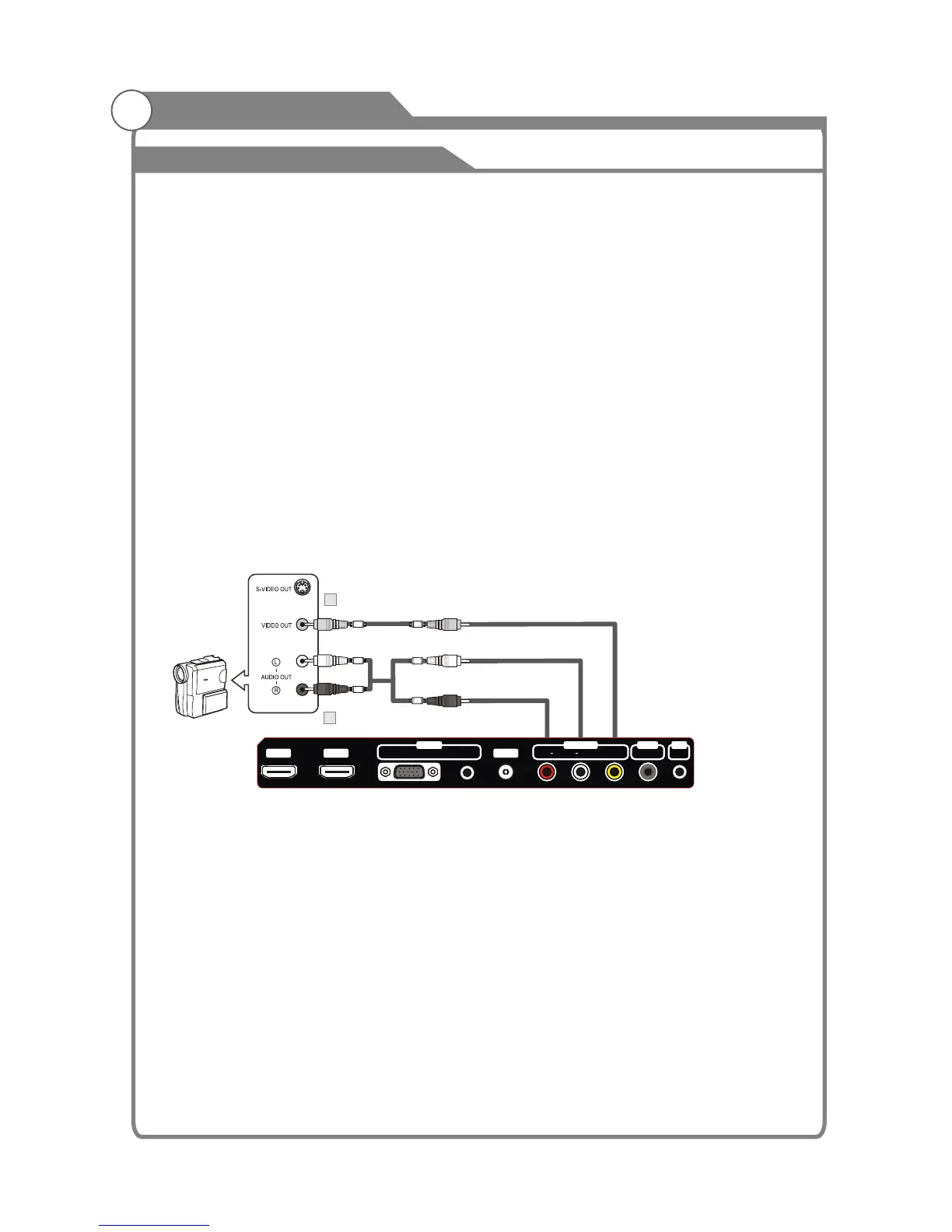
Connecting a Camcorder
The rear panel jacks on your TV make it easy to connect a camcorder to your TV. They
allow you to view the camcorder tapes without using a VCR.
18
Each Camcorder has a different back panel configuration.
When connecting a Camcorder, match the color of the connection terminal to
the cable.
1. Connect a Video Cable between the AV1 VIDEO jacks on the TV
and the VIDEO OUT jack on the camcorder.
2. Connect Audio Cables between the AUDIO L and AUDIO R jacks on
the TV and the AUDIO OUT jacks on the camcorder.
Note:
1. Whenever you connect an external device to your TV, make sure that
power on the unit is turned off.
2. When connecting an external device, match the color of the connection
terminal to the cable.
Video Cable (Not supplied)
1
Audio Cable (Not supplied)
2
Camcorder
White
lYel ow
Red
eR d
White
Yellow
HDMI2 HDMI1
AUDIOVGA
IN
ANT
AV1 IN
VIDEO
OUT
SPDIF
OUT
AV
L
AUDIO
R













 To Next Page