42
Digital Media Player
Play Control menu
Key operation
Left, Right: Select Options
OK button: the selected function key to enter
the selected Living the secondary function
key menu.
Play
Play / Pause: Play / Pause Picture.
Prev: Play on a picture.
Next: Play the next picture.
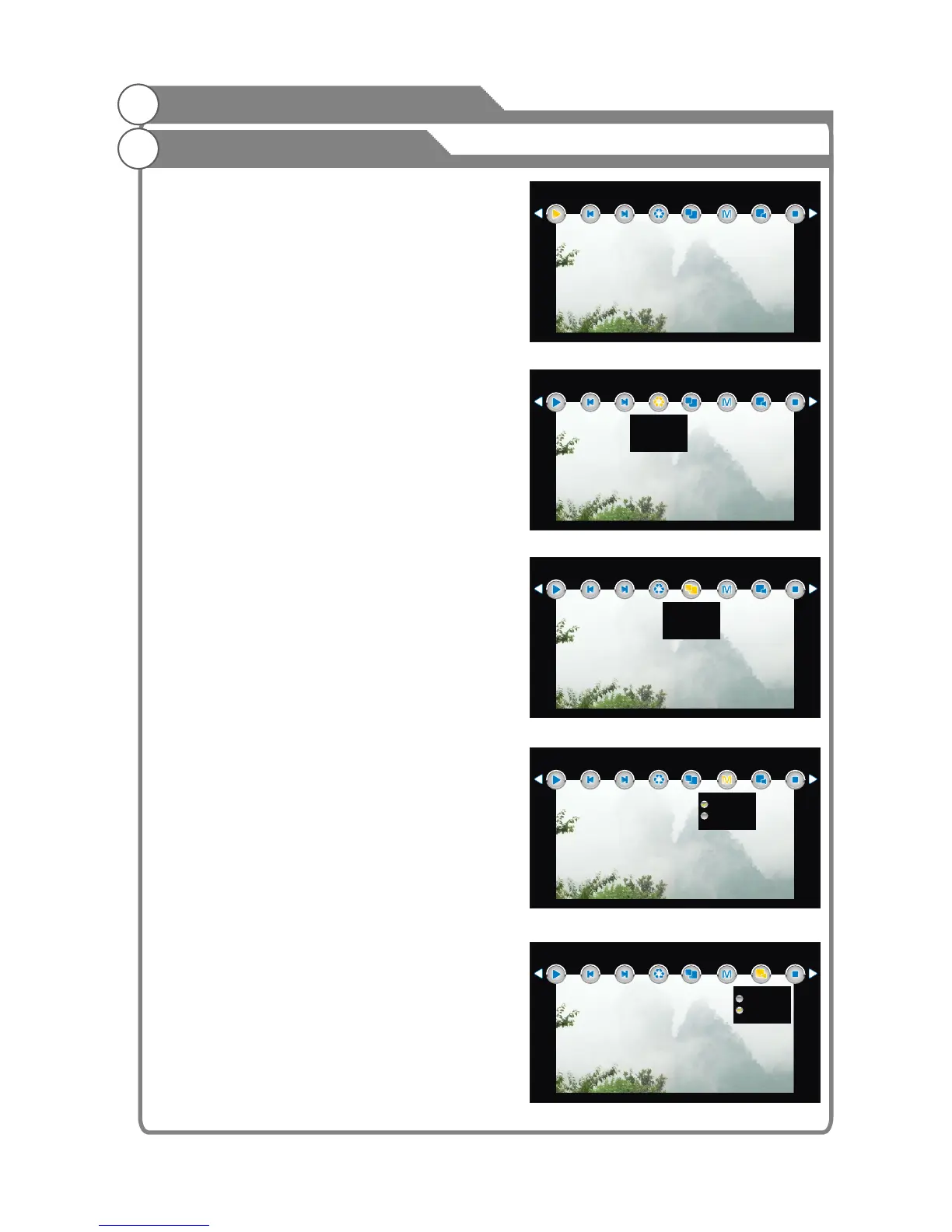
Rotate: Rotate the image counter-clockwise
along. (Shown as Figure 6)
Proportion
1. Zoom In: enlarge image(1X,2X,4X,8X)
2. Zoom Out: shrink images(1/2,1/4)
3. Move View: Mobile pictures.
press
the arrow keys to move a picture, press the
Escape key to return to the previous menu, as
shown in Figure 7.
PlayMode: Shown as Figure 8
1. Filmstrip: loop all the pictures.
2. Single: Repeat the current picture.
Music: Shown as Figure 9
Is set to open when the user is playing the
most recently played songs. If the user is
set to open when not playing a song recently,
the default entry to play music all the music
under.
Stop: Exit Slideshow
When the picture
have been magnified over the role of screen size,
Press OK to display the arrow guide OSD,
<Figure 5>
Play
Prev Next Rotate
Proportion
Music
Stop
PlayMode
<Figure 6>
Play
Prev Next Rotate
Proportion
Music
Stop
PlayMode
Pos-Spin
Neg-Spin
<Figure 7>
Play
Prev Next Rotate
Proportion
Music
Stop
PlayMode
Zoom In
Zoom Out
Move View
<Figure 8>
Play
Prev Next Rotate
Proportion
Music
Stop
PlayMode
Filmstrip
Single
<Figure 9>
Play
Prev Next Rotate
Proportion
Music
Stop
PlayMode
On
Off
USB support character
1.JPEG
1.JPEG
1.JPEG
1.JPEG
1.JPEG













 To Next Page