EasyManua.ls Logo

Kogan KARVMWDNRCA - Operating the Dash Camera; Basic Operation Guide; Video Recording Procedures; Photo Capture Function

Kogan KARVMWDNRCA
8 pages
Print Icon
To Next Page IconTo Next Page
To Previous Page IconTo Previous Page
Loading...
Basic Operation
Press the power button for 2 seconds to start up and press the power button again to shut
down.
Video Recording
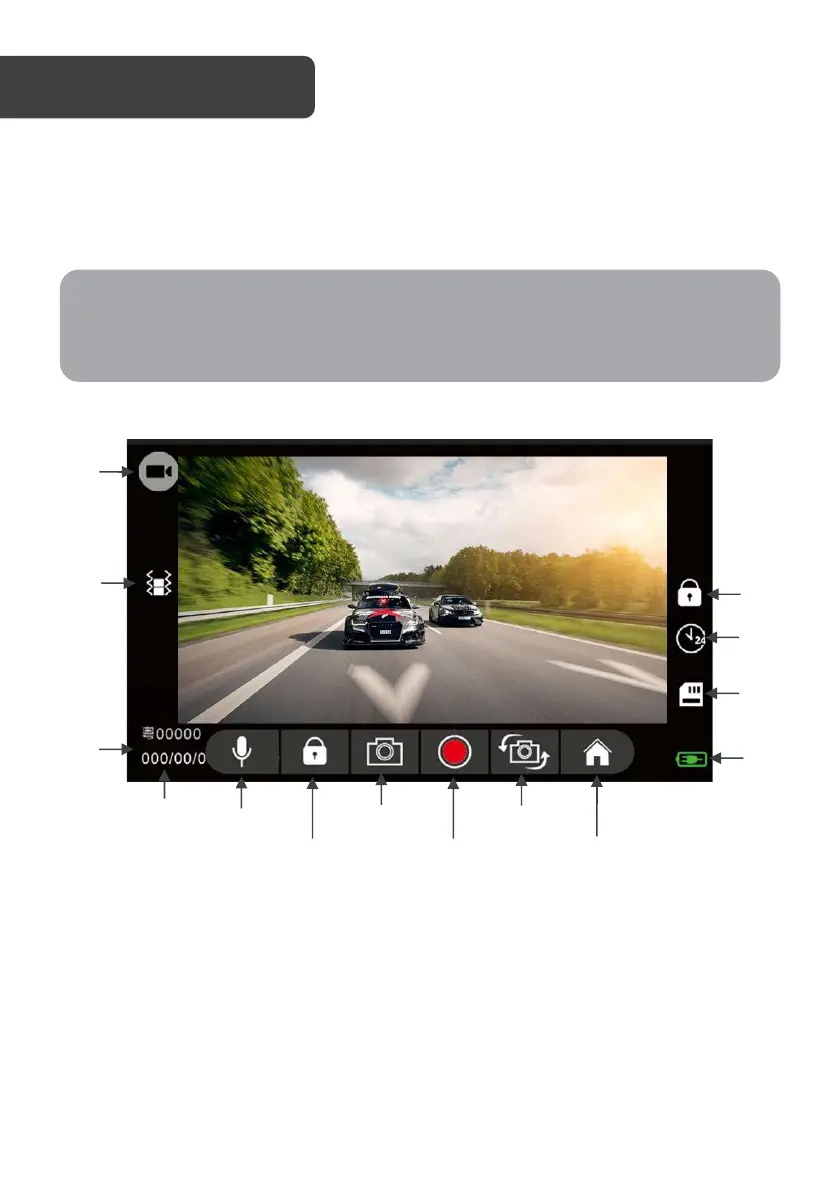
Press the recording button to start recording. The recording icon will appear on the top-left
corner.
Photo Capture
Press the camera button to capture a single image.
OPERATION
Note:
When the battery is low, the camera will prompt “low battery” and shut down
automatically.
Recording
Icon
G-sensor
License
Plate
Number
Date/Time
Power
Status
SD
Card
Parking
Monitor
Recording
Lock
Audio
Recording
Recording
Lock
Photo
Capture
Video
Recording
Front/Rear
Camera
Menu

Other manuals for Kogan KARVMWDNRCA