Game Console:
1. Connect the game console the projector using included HDMI cable.
2. Turn on both the projector and game console.
3. Select “HDMI” on the input select screen.
Headphones/Speakers:
• Connect your headphones or speakers to the 3.5mm audio output on the projector.
• Turn on the projector.
• The projector will output all audio to the connected device.
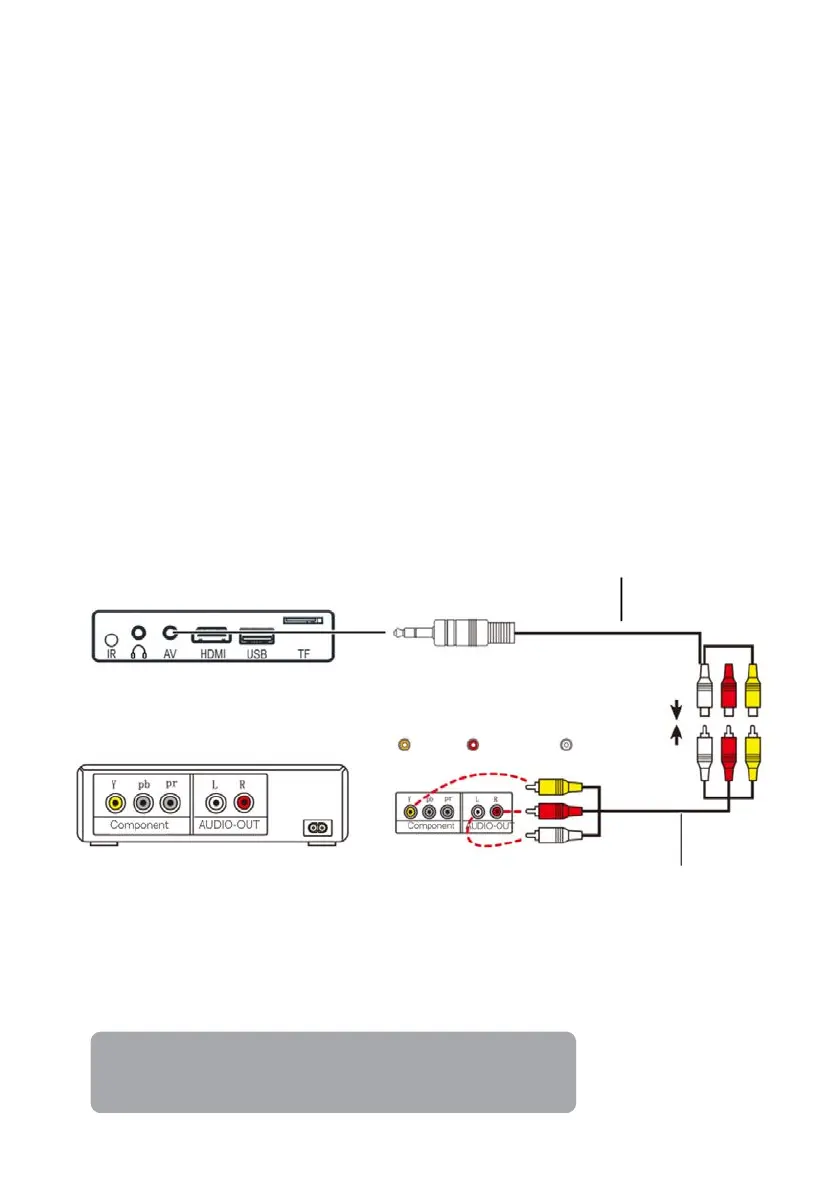
AV:
• Connect the projector to your AV device using the supplied 3-in-1 AV cable.
• Turn on both the projector and AV device.
• Select "AV" on the input select screen.
Amazon Fire TV Stick:
1. Plug the TV Stick into the HDMI port of the projector.
2. Choose “HDMI” on the input select screen.
Note:
Only 1080P TV Sticks are supported, not the 4KTV stick
Composite cable
(not include)


 To Next Page