a) b)
a) b)
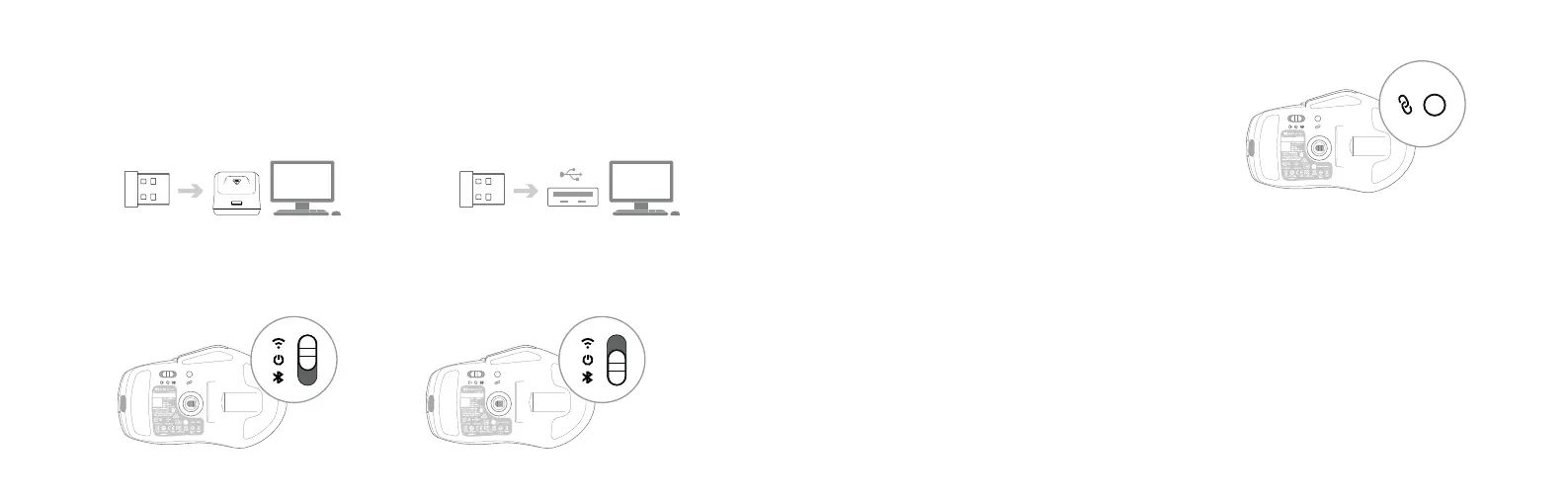
1. If you are setting up the docking station, plug the wireless dongleintothe USB slot on the docking stationand plug the docking station
into your PC using the PhantomFlex™ cable. Alternatively plug the wireless dongle directly into your PC.
2. Select 2.4GHz mode on the connection mode slider underneath the mouse to connect via dongle.
Alternatively, select Bluetooth
®
mode to connect via Bluetooth
®
.
4. Navigate to www.turtlebeach.com/swarm2
and download the latest driver.
5. Complete the installation to get access to all software
features and setup.
3. Hold down the pairing button for 3 seconds to enable pairing
mode. If you’re connecting via dongle, the mouse will be
paired automatically.
If you’re connecting via Bluetooth
®
, you’ll need to pair manually
via the Bluetooth
®
settings in your device.
QUICK START GUIDE


 To Next Page
 Loading...