1
Overview
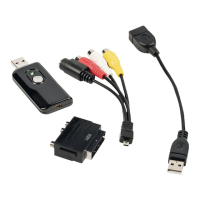
• The USB 2.0 Audio/Video grabber can capture high-quality video and audio fi les directly via
the USB 2.0 interface. The installation is very simple and external power is unnecessary. The
professional video editing software Ulead Video Studio SE DVD is enclosed with the package.
Video Studio is video-editing software that makes editing your movies as fun as showing them.
Key Features
• Professional video editing software Ulead Video Studio SE DVD
• USB 2.0 interface and no need for external power
• Capture Video & Audio through USB 2.0 interface
• Plug & play and easy to carry
• Support all formats, record in DVD+/-R/RW,DVD+/-VR and DVD-Video.
Specifi cation
• Supports NTSC, PAL
• Video input:1 x RCA composite, 1 x S-Video.
• Audio input: Stereo audio(RCA)
• Dimension (L)88mm X (W)28mm X (H)18mm
• USB bus power
• Supports high quality video resolution
NTSC: 720 x 480@30fps
PAL: 720 x 576@25fps
System Requirements
• USB: Compliant USB 2.0 free port
• Support Windows
®
2000,XP/Vista
• HD: 600MB of available hard drive space for program installation,
4 Gb+ hard disk space for video capture and editing
• Memory: 256 Mb of RAM
• Display: Windows
®
-compatible display with at least 1024 x 768
• Sound Card: compatible Windows
®
-sound card
Hardware Installation
Note: If you have any antivirus software enabled, please disable it during the installation of
the software.
Before you connect the USB 2.0 Audio/Video grabber to your computer for the fi rst time, please
insert the software CD-rom into your CD drive and select “install driver”. After you have installed the
driver you can connect the USB 2.0 Audio/Video grabber.


 To Next Page