2
ENGLISH
Radio/CD player
R
MMC
SD CARD
USB JACK
REP
RAN
PROGRAM
STOP
SD
PHONES
L
AP
S
ES
Y
B
A
P
U
U
ANT
NEXT
BACK
1
3
2
4
5
6 7 8 9
10
11
12
13
13
14
15 16
17
18
19
21
20
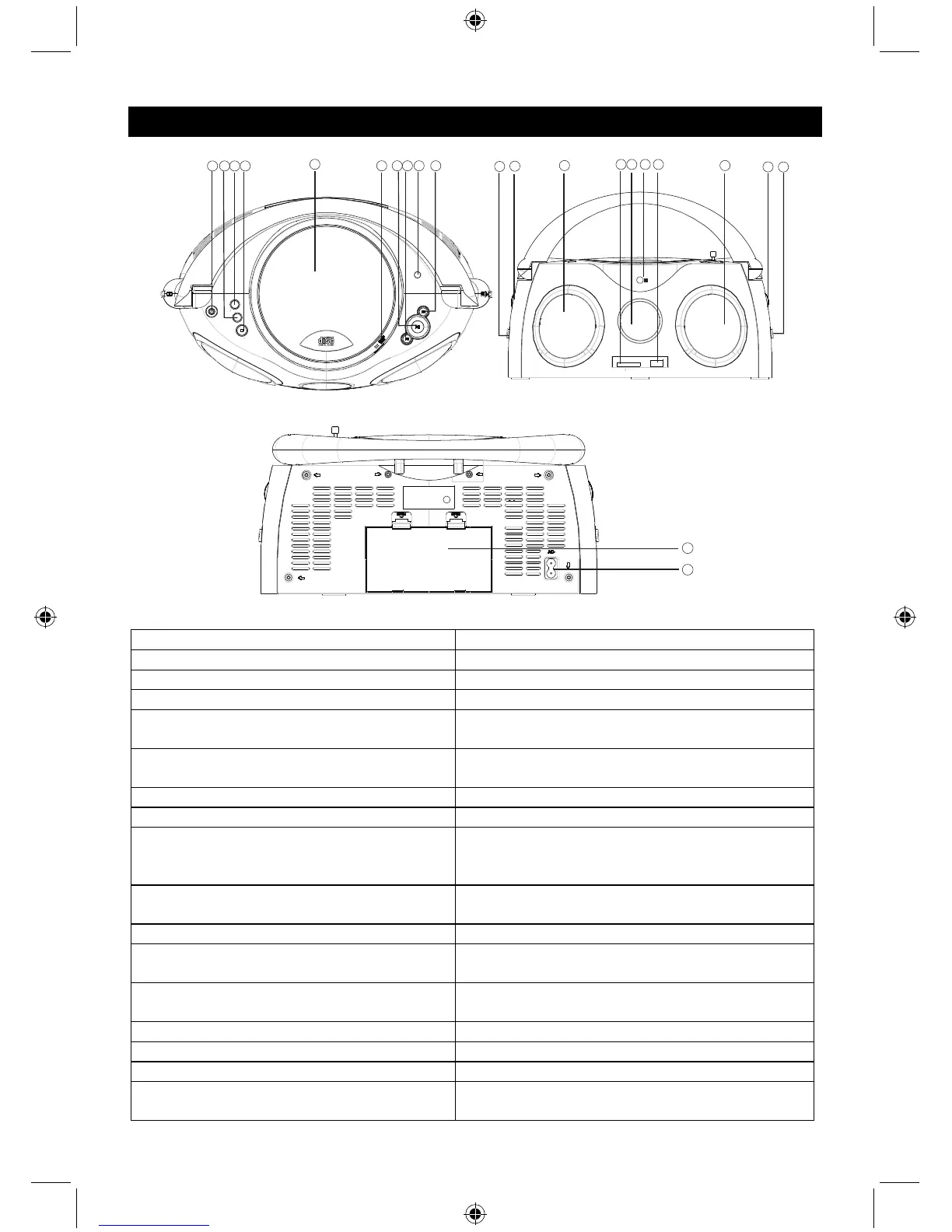
1. STEREO HEADPHONE JACK 3.5 mm stereo headphone jack
2. PROGRAM Program and review programmed track numbers
3. REPEAT/RANDOM BUTTON Repeat track/CD/MP3/USB/SD/MMC/program
RANDOM BUTTON Play CD/MP3 tracks in random order
4. STOP/SD BUTTON • Stop CD/MP3/USB/SD/MMC playback; erase a
CD program
Press and hold for more than 1.5 sec to change
USB1.1/MMC (SD) media
5. CD DOOR
6. CD DOOR OPEN BUTTON Press here to open/close the CD door
7. PLAY/PAUSE/USB BUTTON • Start or pause MP3/CD/USB/SD/MMC play
• Press and hold for more than 1.5 sec to change
CD/USB media
8. SEARCH BACK
BACK track selection
Press and hold for more than 1.5 sec to search
backwards
9. FM ANTENNA To improve FM reception
10. SEARCH NEXT
NEXT track selection
Press and hold for more than 1.5 sec to search
forward
11. FUNCTION SELECT Select source of sound as MP3/CD or RADIO,
also the power off switch
12. VOLUME Adjust volume level
13. LEFT & RIGHT SPEAKER
14. MMC/SD CARD JACK COMPATIBLE To listen to MP3 music files on your MMC/SD card
15. LCD DISPLAY • Show the AM/FM dial frequency
• Show the number of tracks



 To Next Page