ENGLISH
IMPORTANT SAFETY PRECAUTIONS
• Splashwaterresistant,donotimmersethedevicesinceit’snotfullywaterresistant.
• Removethebatteriesiftheunitisnotgoingtobeusedforalongtime.
BEWARE OF CONDENSATION
Whenthisproductismovedfromoneplacetoanothercondensationcanoccur.Inthatcasewait1or2hours
beforeusingit.
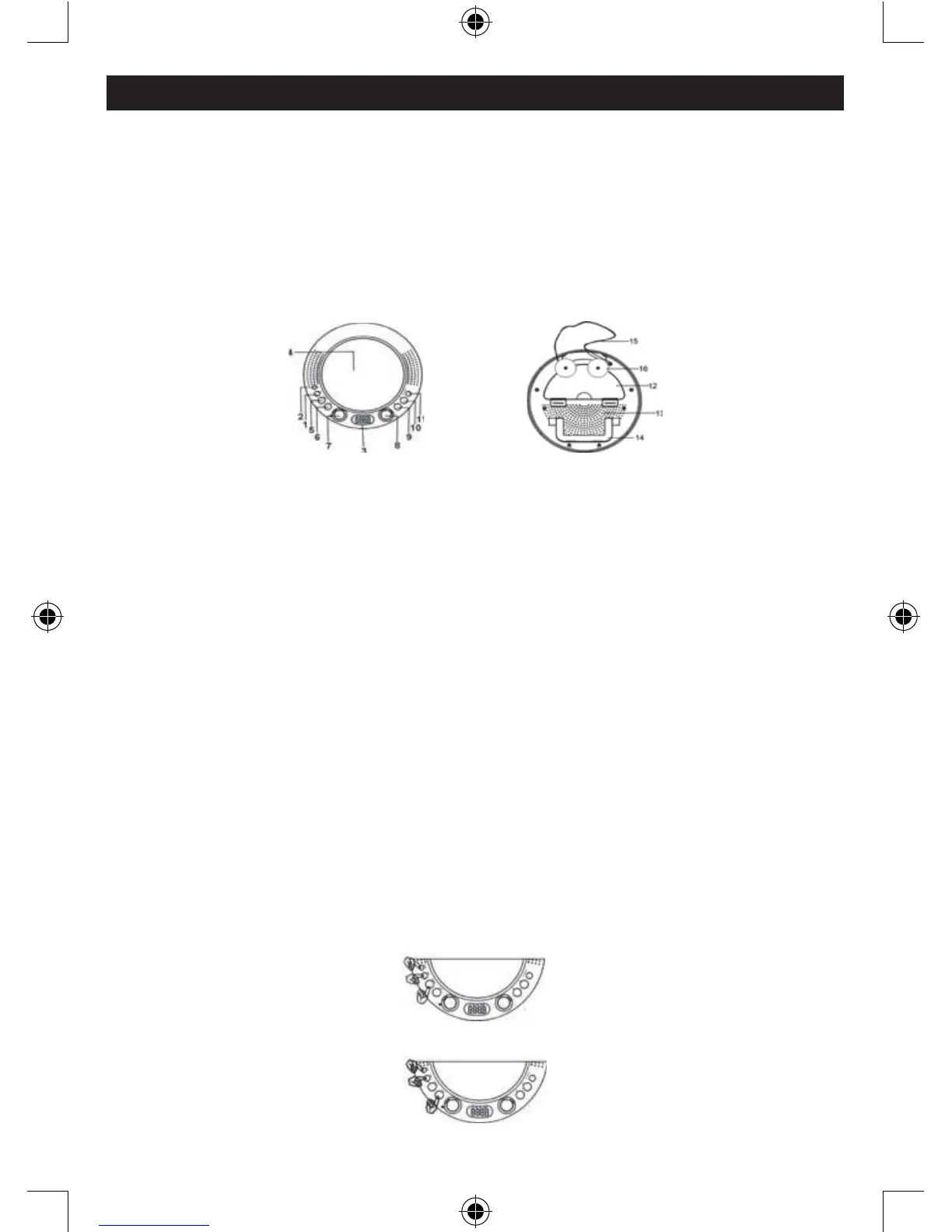
CONTROLS ON THE MAIN UNIT
1.MIN.button 9.AMbutton
2.HOURbutton 10.FMbutton
3.LCDscreen 11.AL.ON/OFFbutton
4.Mirror 12.Batterycompartment
5.TIMESETbutton 13.Built-inspeaker
6.ALARMSETbutton 14.Integratedstand
7.VOLUMEcontrolknob. 15.Hangingrope
8.TUNINGknob 16.Suctioncup
INSTALLING BATTERIES
Thisunitcanbepoweredby4xAAbatteries(notincluded).
1. Openthebatterycompartmentonthebackoftheunit
2. Insert4xAAbatteriesaccordingtotheindicatedpolarity
3. Closethebatterycompartment
USING THE STAND FOR DESKTOP USE
Toplacethisunitonadesktop,simplypulltheintegratedstandout.
SETTING THE CLOCK AND ALARM TIMES
1. Turntheradiooffbyrotatingthe[VOLUME]buttoncounterclockwise.
2. Adjustthehourandminutesbypressingthe[HOUR]and[MIN]buttonswhileholdingthe[TIMESET]
button.
3. Adjustthealarmtimebypressingthe[HOUR]and[MIN]buttonswhileholdingthe[ALS.SET]button.



 To Next Page