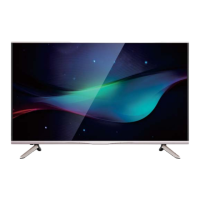
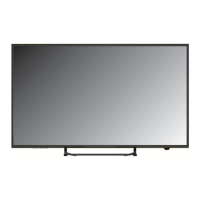
This document is a user manual for a Konka LED TV, covering models KUD43WT808AN, KUD50WT808AN, KUD55WT808AN, and KUD65WT808AN. It provides important safety instructions, maintenance guidelines, product specifications, setup instructions, and troubleshooting tips.
Function Description
The Konka LED TV is a smart television that adopts a TFT LED display screen with a 16:9 wide screen aspect ratio. It supports various input terminals for external equipment connection, including AV, USB, Earphone Output, RF, DVB-S2, HDMI, Network, and SPDIF. The TV can function as a TV/monitor combo when connected to a computer. It features auto tuning and fine tuning for channels, programmable sleep timer, wide range voltage input, and no-signal automatic power off. The TV operates on the webOS TV platform, offering a smart TV experience with access to online content and applications. It supports SIMPLINK (HDMI-CEC) for managing connected devices with a single remote control and allows for screen sharing from smart devices and PCs. The TV also includes features like Live Playback for temporarily saving programs to a USB HDD, Teletext, and HbbTV for interactive broadcast services.
Important Technical Specifications
- Display Sizes: 43" Diagonal (KUD43WT808AN), 50" Diagonal (KUD50WT808AN), 55" Diagonal (KUD55WT808AN), 65" Diagonal (KUD65WT808AN).
- LED Panel Resolution: 3840x2160.
- Speaker Output Power: ≥8WX2.
- Power Supply: 110-240V~, 50/60Hz.
- TV Receive System: Analog (PAL: DK IBG, SECAM: DK BG), Digital (DVB-T/T2/C/S, DVBS/S2).
- Frequency Range: Analog Antenna (48.25MHz~863.25MHz), Digital DVB-T/T2/C (174~862MHz), DVBS/S2 (950MHz-2150MHz).
- Video In: PAL/NTSC.
- Power Consumption: 100W (43"), 140W (50"), 150W (55"), 220W (65").
- Standby Consumption: <1W.
- Antenna Input: 75 ohms, unbalanced.
- Controller Power: DC 3V (Two AA size batteries).
- Dimensions (LxWxH):
- KUD43WT808AN: 972.9x253x621mm (with stand), 972.9x88.1x574.2mm (without stand).
- KUD50WT808AN: 1111.24x237x713.3mm (with stand), 1111.2x83x647.4mm (without stand).
- KUD55WT808AN: 1226.8x266x777mm (with stand), 1226.8x88x712.8mm (without stand).
- KUD65WT808AN: 1446x269x898.8mm (with stand), 1446x75.5x830.8mm (without stand).
- Weight (Net weight):
- KUD43WT808AN: 6.72kg (with stand), 6.59kg (without stand).
- KUD50WT808AN: 9.6Kg (with stand), 9.45Kg (without stand).
- KUD55WT808AN: 11.95Kg (with stand), 11.79Kg (without stand).
- KUD65WT808AN: 16.93kg (with stand), 16.8kg (without stand).
- Work Temperature: 0°C-40°C.
- HDMI Ports: All three HDMI ports are version 2.0 and support 4K X 2K @60Hz.
- Supported Video Codecs: H.264/AVC, MPEG-4, MPEG-2, VP8, VP9, HEVC, AV1.
- Supported Audio Codecs: AAC, AMR-NB, AMR-WB, Dolby Digital, Dolby Digital Plus, PCM, MPEG-1 Layer I, II, MPEG-1 Layer III (MP3), Dolby AC-4, DVD-LPCM.
Usage Features
- Remote Control: The TV comes with a remote control for advanced features. Basic features can be controlled via buttons on the lower-right panel of the TV. The remote control uses two 1.5V AA size batteries.
- Magic Remote Control: The Magic Remote needs to be paired with the TV by pointing it at the TV and pressing the Wheel (OK) button. It can be deregistered by pressing the BACK and HOME buttons simultaneously for five seconds.
- Home Dashboard: Allows selection and control of connected devices (mobile, external devices, Home IoT Devices).
- Network Connectivity: Supports wired (Ethernet) and wireless (Wi-Fi) network connections. DHCP is supported for automatic network connection. Manual setup is available for static IP configurations. WPS-PBC and WPS-PIN methods are supported for wireless connection.
- Picture Modes: Offers various picture modes such as Vivid, Eco/APS, Cinema, Sports/Football/Cricket, and Standard (for HDR signals). Users can fine-tune settings like Backlight, Contrast, Brightness, Sharpness, Colour, Tint, and Colour Temperature.
- Aspect Ratio Settings: Allows changing screen size to 16:9, Original, 4:3, Vertical Zoom, and 4-Way Zoom.
- Sound Out Settings: Configurable sound output options including Internal TV Speaker, Bluetooth, Optical, and HDMI ARC. Supports LG Sound Sync for compatible LG audio devices.
- Programmes: Features Auto Tuning for automatic channel setup, Manual Tuning, and Programme Manager for editing and managing channels.
- Language Settings: Allows selection of menu language, audio language for digital broadcasts, and keyboard languages.
- Location Settings: Configures the TV's location, address, broadcast country, service area postcode, and services country.
- Time Settings: Sets time, date, time zone, and sleep timer.
- TV Rating Locks: Enables parental control for TV programs, applications, and general safety settings.
- LG Account Management: Users can create and manage an LG account for personalized services.
- Content Store: Access to download and reinstall apps.
- Internet Browser: Supports HTML5 media.
- Mobile Connection Management: Allows controlling the TV via a smart device and managing connection history. Supports "TV On With Mobile" via Wi-Fi or Bluetooth.
- Screen Share: Enables mirroring of mobile device or PC screens to the TV.
- USB Media Playback: Supports playing music, photos, and videos from USB storage devices.
Maintenance Features
- Cleaning: Disconnect from AC outlet before cleaning. Use a soft, lint-free cloth for dust. A slightly damp cloth can be used if needed. Avoid detergents, bug repellents, solvents, thinners, or other volatile substances as they can damage the surface.
- MAINS PLUG: Wipe with a dry cloth regularly to prevent fire or electrical shock from moisture and dust.
- Battery Replacement: Replace remote control batteries when prompted on screen or when they run out. Do not mix old and new batteries. Remove batteries if not using the remote for a long period.
- Software Update: The TV supports software updates to check and obtain the latest version. Updates can be set to proceed automatically.
- Reset to Initial Settings: Allows restoring all TV settings to factory defaults. This is recommended before selling or transferring the TV to a third party.
- Quick Help/Troubleshooting: Provides self-diagnosis tools and instructions to resolve common issues related to power, remote control, screen display, network connection, LG account, content, internet browser, and PC connection.
- Ventilation: Ensure at least 10 cm space around the apparatus for sufficient ventilation. Do not cover ventilation openings.
- Heat Sources: Keep the TV away from heat sources like radiators, heat registers, stoves, or amplifiers.
- Sunlight/Reflection: Place the TV to avoid direct sunlight and reflections to prevent eye fatigue.
- Electromagnetic Radiation: Keep the TV away from equipment emitting electromagnetic radiation.
- Stability: Securely attach the TV to the floor/wall or place it on a stable cart, stand, table, or shelf to prevent falls and injury.
- LED Screen Care: Avoid pushing or scratching the front filter, or placing objects on top of the TV. Do not display still images or partially still images for more than 2 hours to prevent screen image retention ("screen burn"). Reduce brightness and contrast when displaying still images for extended periods.
- Power Cord: Route power cords to prevent walking on or pinching. Ensure the mains plug is easily accessible as the disconnect device. Always hold the plug, not the wire, when removing from the outlet. Never touch with wet hands.

 Need help?

 To Next Page
 General