Controlling the CAN busControlling the CAN bus
Table of contents
Overview
Common applications
Verifying CAN interface presence
Enabling a CAN link
Disabling a CAN link
Verifying communication
Sending and listening to messages between interfaces
More information
OverviewOverview
A Controller Area Network bus (CAN bus) is a robust vehicle bus standard designed to allow microcontrollers and devices to communicate with each other's
applications without a host computer, so the separate electronic control units (ECUs) inside a vehicle could communicate with only a single pair of wires.
The customer OS uses the Socket CAN interface and the can-utils package to support control of the CAN bus.
The following demo shows the output of a basic loopback test using the CAN bus connection.
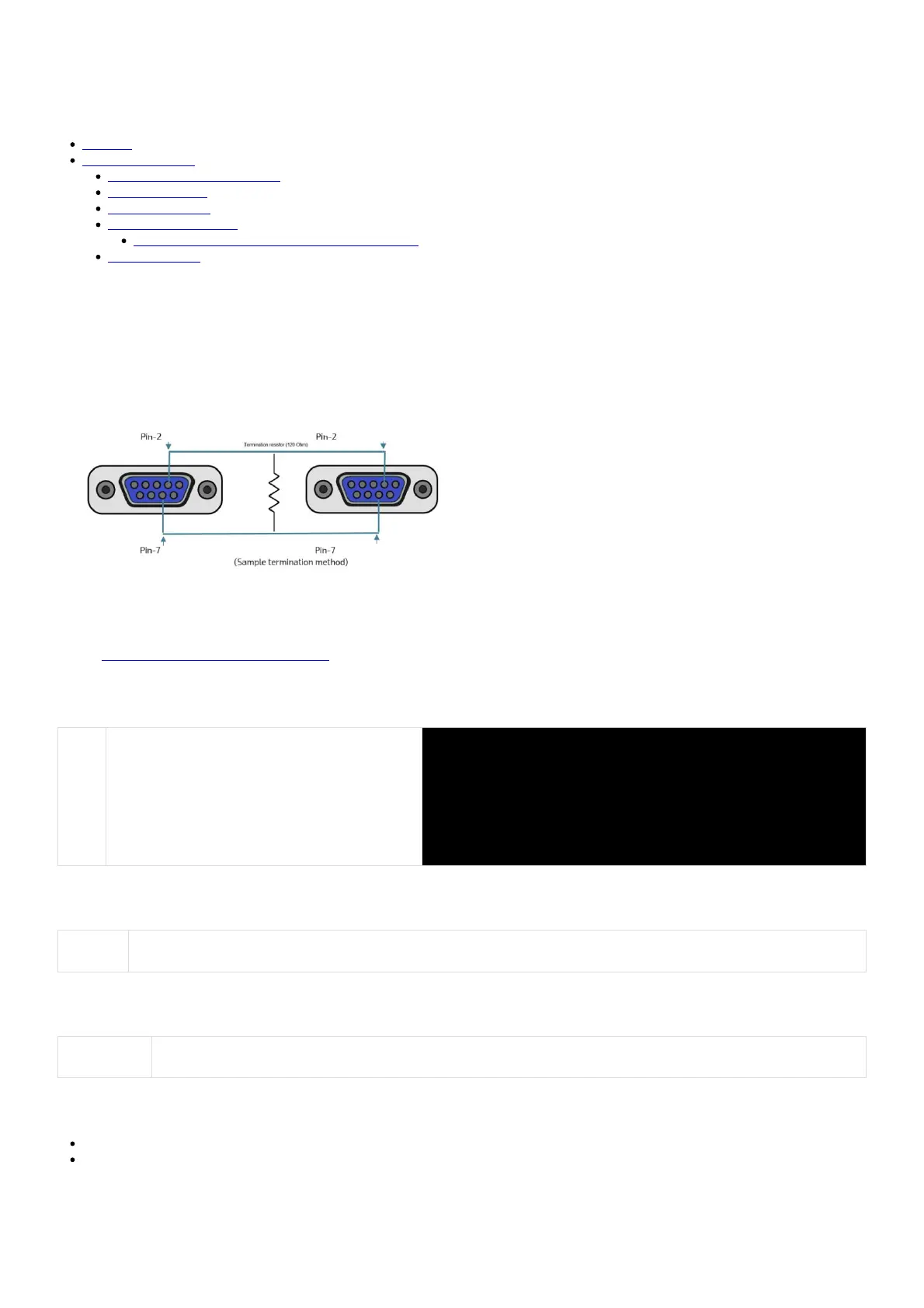
a) Using appropriate CAN bus termination, (physically) connect CAN0 and CAN1 together. Note that there is no end-of-line resistor installed inside the
platform. Any end-of-line resistor must be connected externally.
Common applicationsCommon applications
Refer to Accessing the operating system of a server for access instructions.
Verifying CAN interface presenceVerifying CAN interface presence
Step_1 Four CAN bus interfaces should be present within the
platform.
Use the following command to verify their presence.
LocalServer_OSPrompt:~# ip aip a
4: can0: <NOARP,ECHO> mtu 16 qdisc fq_codel state DOWN group default qlen 10
link/can
5: can1: <NOARP,ECHO> mtu 16 qdisc fq_codel state DOWN group default qlen 10
link/can
6: can2: <NOARP,ECHO> mtu 16 qdisc fq_codel state DOWN group default qlen 10
link/can
7: can3: <NOARP,ECHO> mtu 16 qdisc fq_codel state DOWN group default qlen 10
link/can
Enabling a CAN linkEnabling a CAN link
Step_1 Enable a CAN interface using the following command.
LocalServer_OSPrompt:~# ip link set [INTERFACE_NAME] up type can bitrate 1000000ip link set [INTERFACE_NAME] up type can bitrate 1000000
Disabling a CAN linkDisabling a CAN link
Step_1 Disable a CAN interface using the following command.
LocalServer_OSPrompt:~# ip link set [INTERFACE_NAME] downip link set [INTERFACE_NAME] down
Verifying communicationVerifying communication
The following section was documented using the following loopback configuration:
can0 ↔ can1
can2 ↔ can3
Sending and listening to messages between interfacesSending and listening to messages between interfaces
In this example, two Bash shells are used.
S1901_EvoTrac_User_Guide
July 14, 2023 www.kontron.com // 166


 To Next Page