RestoreFactorySettings
Insert the metal pin into the pinhole and hold for 10 seconds.When the LED flashes green once, it
indicatesthatyouhaverestoredthedevicetofactorysettings.
Specification
Powersupply:3Vbuttoncell
Batterytype:LithiumbatteryCR2450
Wirelessconnection:BluetoothLowEnergy
Operating
temperature:‐20℃ ~60℃
Color:White
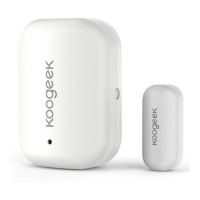
Magnetdimensions:46*33*17.1mm/1.8*1.3*0.67in(L×W×H)
Sensordimensions:26*12*9.2mm/1.1*0.4*0.3in(L×W×H)
Tips:
1. Mount the sensor on the door / window frame
and the magnet on the door / window. If the
sensor is used on double doors, mount the sensor on the least‐used door and magnet on the
most‐useddoor.
2. Avoidmountingsensorinareaswheretheywillbeexposedtomoisture.
3. Avoidmountingsensorinareaswith
alargequantityofmetalorelectricalwires.
4. Donotcleanwithliquid.
5. Theproducthasa1‐yearlimitedwarranty.
Legal
UseofWorkswithAppleHomeKitlogomeans…..
ControllingthisHomeKit‐enabledaccessory……
FCCWarning
This device complies with Part 15 of the FCC Rules. Operation
is subject to the following two
conditions:
(1)Thisdevicemaynotcauseharmfulinterference,and(2)thisdevicemustaccept anyint erference
received,includinginterferencethatmaycauseundesiredoperation.
NOTE1:Anychangesormodificationstothisunitnotexpresslyapprovedbythepartyresponsiblefor
compliancecouldvoid
theuser'sauthoritytooperatetheequipment.


 To Previous Page
 Loading...