Need help?
Do you have a question about the Kool-It KGM-75 and is the answer not in the manual?
Installation should only be performed by a dealer or qualified expert to avoid water leakage, refrigerant leakage, electrical shock, or fire.
Adhere to WARNINGS and CAUTIONS for safe operation. Do not tamper, splash water, use flammable substances, or use extension cords.
Remove packaging, clean interior, plug into a wall outlet, and operate for 1 hour before loading.
Avoid immediate re-starting after shutdown to prevent compressor overload and potential damage.
Defrosting is automatic; drain water evaporates automatically. Empty tray if excessive water accumulates.
Open and close doors quickly to prevent cold air escape and ensure the unit is well-ventilated.
Adjust shelves according to the dimensions of items placed in the cooler.
Adjust thermostat for optimal temperature (0-10°C) based on ambient conditions and load.
Do not obstruct airflow, ensure items do not protrude, place evenly, and use only for intended products.
Disconnect power before cleaning. Wipe with a damp cloth; avoid direct water splashing.
Minimize door openings and avoid adding new items to maintain temperature.
Remove items, disconnect power, clean, and leave doors open to dry completely.
Disconnect power cord before moving. Ensure feet do not damage the cord or hit obstacles.
Secure doors partially open and store away from children's play areas.
Check power supply, cord connection, and circuit breakers.
Verify temperature setting, airflow obstruction, item density, door usage, and condenser cleanliness.
Ensure unit is level and check for contact with walls or other objects.
Exterior condensation can occur in humid conditions; wipe with a dry cloth.
Gather nature of malfunction, product number, serial number, customer details, and purchase date.
 General
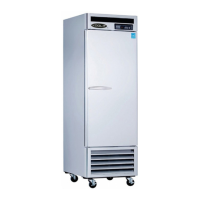
| Brand | Kool-It |
|---|---|
| Model | KGM-75 |
| Category | Refrigerator |
| Number of Doors | 1 |
| Reversible Door | No |
| Adjustable Thermostat | Yes |

 To Next Page