EasyManua.ls Logo

KOORUI 27E1QA - Page 8

KOORUI 27E1QA
22 pages
Print Icon
To Next Page IconTo Next Page
To Previous Page IconTo Previous Page
Loading...
VOORUI
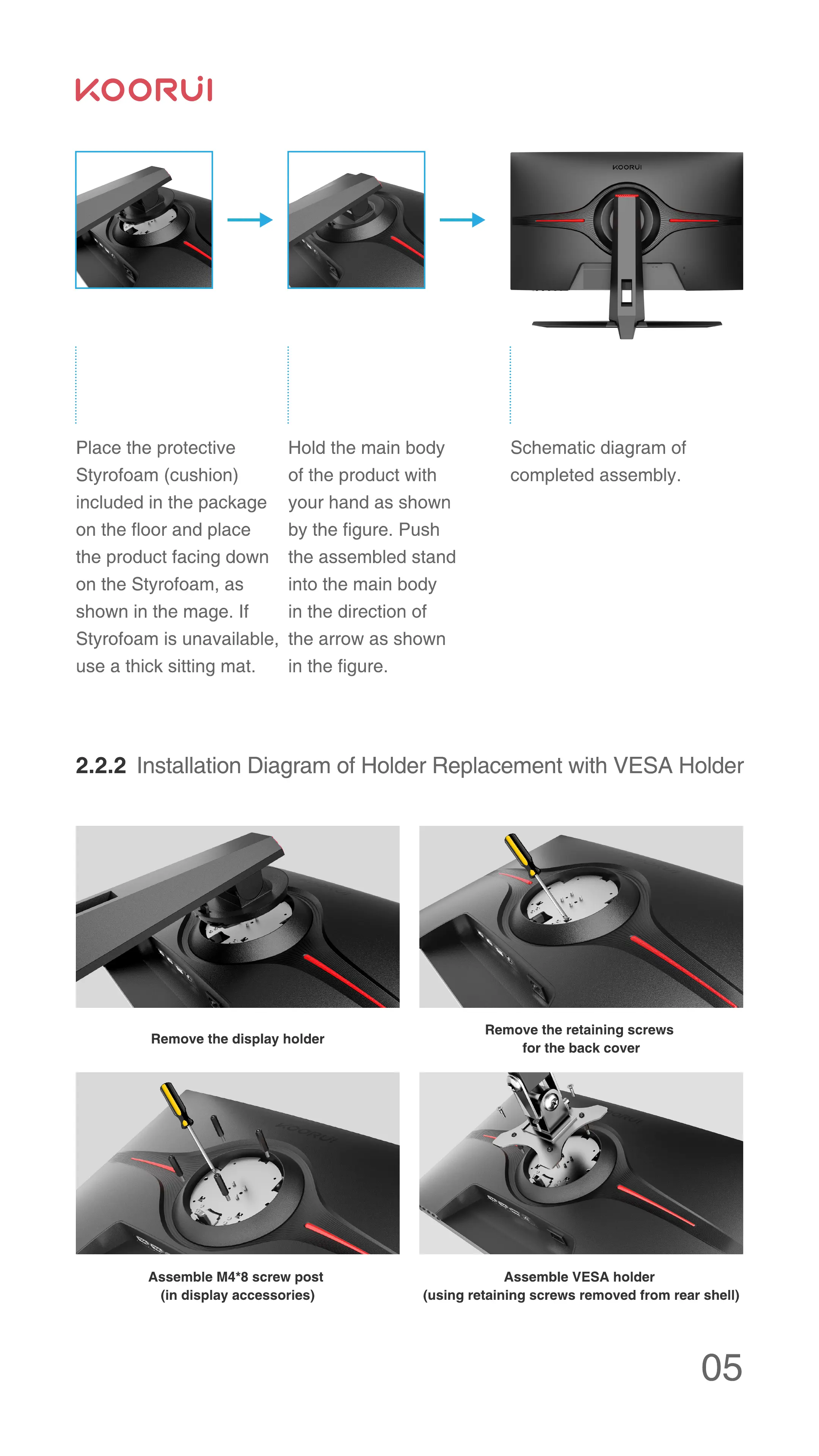
Place the protective
Styrofoam (cushion)
included in the package
on the floor and place
the product facing down
on the Styrofoam, as
shown in the mage. If
Styrofoam is unavailable,
use a thick sitting mat.
Hold the main body
of the product with
your hand as shown
by the figure. Push
the assembled stand
into the main body
in the direction of
the arrow as shown
in the figure.
Schematic diagram of
completed assembly.
2 2 2 Installation Diagram of Holder Replacement with VESA Holder
Remove the display holder
Assemble M4*8 screw post
(in display accessories)
Remove the retaining screws
for the back cover
Assemble VESA holder
(using retaining screws removed from rear shell)
05

Related product manuals