To pair your E1 with your Bluetooth enabled device, follow these steps:
1. Turn on the E1 so that it will become discoverable on your device.
2. Make sure the Bluetooth function in your handheld device and in the E1 is turned on.
3. Open the koowheel app in your device, and locate the Bluetooth icon in the top left corner.
4. Tap on the Bluetooth icon, and from the device list, select your E1.
5. You will be prompted to enter a password. Default password is “000000”
6. Your koowheel app should now be paired with your E1, and ready to use.
NOTE: When your app is not connected via Bluetooth, the Bluetooth logo in the app will be white.
When your app is connected via Bluetooth, the Bluetooth logo in the app will turn green.
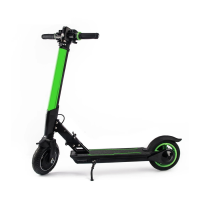
Pulsing Beam Light
Once your E1 Scooter is in motion, the pulsing beam light located on the handlebar stem will
automatically turn on. The throttle sensor on deck senses when you step of - once you step off,
the pulsing beam light will auto-matically shut off after 60 seconds.
Rear Wheel
Rear wheel LED lights will change from color (matching your E1 model) when in motion, to red
when braking.


 To Next Page