This document describes the KORAD KWR Series Programmable DC Power Supply, a wide-range power supply designed for various applications requiring precise voltage and current control.
Function Description
The KORAD KWR Series is a programmable DC power supply offering high voltage and current output within a wide operating range, limited primarily by its rated output power. It can operate in either Constant Current (CC) or Constant Voltage (CV) mode. The device features a 5-digit current and voltage display for high accuracy.
Key functions include:
- Voltage and Current Output: Provides regulated DC power with a maximum output current of 10A from the front terminals and up to 30A from the rear terminals.
- Over Voltage Protection (OVP): Allows users to set an OVP value to protect connected loads from excessive voltage. This function can be activated or deactivated.
- Over Current Protection (OCP): Enables setting an OCP value to prevent damage from overcurrent conditions. This function can also be activated or deactivated.
- Memory Function (M1-M5): Offers quick recall and storage of up to five different voltage and current settings.
- Dynamic Output Mode: Supports stand-alone dynamic output, allowing for programmed sequences of voltage and current steps.
- External Trigger Function: Allows the power output to be controlled by an external trigger signal.
- Remote Compensation Function: Utilizes rear SENSE terminals for voltage compensation, ensuring accurate voltage delivery at the load.
- Key Lock Function: Locks the front panel keys to prevent accidental changes to settings.
- Buzzer Setting: Enables or disables an audible buzzer for notifications.
- RS485 ID Setting: Configures the device's ID for RS485 communication.
- Voltage and Current Slope Setting: Allows users to define the rate at which voltage and current change during output transitions.
- Voltage and Current Priority Function: Sets whether voltage or current takes priority in control.
- Communication Interfaces: Equipped with LAN, USB, and RS232 interfaces for remote control and monitoring via a PC.
Important Technical Specifications
The KWR Series offers two models: KWR102 and KWR103, both with a 300W wide-range output.
KWR102:
- Power: 300W
- Voltage Output: 0-30V
- Current Output: 0-30A
KWR103:
- Power: 300W
- Voltage Output: 0-60V
- Current Output: 0-15A
Common Specifications (tested at 25℃±5℃, 5-minute warm-up):
- Load Regulation:
- Voltage: ≤0.01% + 3mV (KWR102), ≤0.01% + 2mV (KWR103)
- Current: ≤0.1% + 5mA (both models)
- Line Regulation:
- Voltage: ≤0.01% + 3mV (both models)
- Current: ≤0.1% + 3mA (both models)
- Setup Resolution:
- Voltage: 1mV
- Current: 1mA
- Read Back Resolution:
- Voltage: 1mV
- Current: 1mA
- Setup Accuracy (25°C±5°C):
- Voltage: ≤0.5% + 3mV (KWR102), ≤0.5% + 5mV (KWR103)
- Current: ≤0.5% + 5mA (KWR102), ≤0.5% + 3mA (KWR103)
- Voltage Rise Time:
- Rise Time: ≤50ms (KWR102), ≤65ms (KWR103)
- Fall Time: ≤50ms (both models)
- Ripple (20-20M):
- Voltage: ≤1mVrms + 0.03% of current output (both models)
- Current: ≤3mArms (both models)
- Temperature Coefficient:
- Voltage: ≤150ppm
- Current: ≤150ppm
- Read Back Temperature Coefficient:
- Voltage: ≤150ppm
- Current: ≤150ppm
- External Size: 91.5mm (W) x 175mm (H) x 305mm (D)
- Weight: 3.9Kg (both models)
Usage Features
Front Panel Controls:
- Key Lock Indicator: Shows if the keys are locked.
- Voltage/Current Display: 5-digit display for precise readings.
- Power Output Indicator: Indicates active power output.
- OVP/OCP/C.V/C.C Indicators: Show the status of protection and operating modes.
- Memory Keys (M1-M5): For storing and recalling settings.
- ADJUST Knob: Used for setting values and navigating menus.
- OVP/OCP Buttons: For setting and enabling/disabling protection functions.
- LOCK Button: For key lock and buzzer settings.
- ON/OFF Button: For output control and dynamic output settings.
- VSET/ISET Buttons: For setting voltage/current values, RS485 ID, and voltage/current priority.
- Output Terminals (+, -, GND): Front output terminals support up to 10A.
Rear Panel Connections:
- AC Input: Supports 115V/230V via a switch.
- SENSE TRIG Port: Includes SENSE for remote monitoring/compensation and TRIG for external trigger.
- Output Terminals (+, -): Rear output terminals support up to 30A.
- Communication Ports: USB, RS232, LAN, and RS485.
Operating Instructions:
- M1-M5 Quick Recall/Storage: Short press M1-M5 to recall stored settings. Long press an M key to store the current voltage and current values.
- OVP/OCP Setting: Short press OVP/OCP, adjust the value with the knob and VSET/ISET, then short press again to save. To enable/disable, short press OVP/OCP, then short press ON/OFF.
- External Trigger: Long press OVP until a decimal point appears on the voltage display to activate. Output can then be turned on by shorting the rear TRIG interfaces.
- Remote Compensation: Long press OCP until a decimal point appears on the current display to activate. The rear SENSE terminals can then be used.
- Key Lock: Long press LOCK to lock/unlock keys. The LOCK lamp indicates status.
- Buzzer Setting: Short press LOCK to toggle the buzzer on/off.
- RS485 ID Setting: Long press VSET, turn the knob to select ID, then long press VSET to save.
- Voltage/Current Slope Setting: Long press the ADJUST knob, turn to adjust the value (unit V/100uS), select voltage/current slope with VSET/ISET, then long press the knob to exit.
- Dynamic Output Function:
- Setting: Long press ON/OFF to activate. Use M1-M5 to set dynamic steps. Adjust values with the knob and VSET/ISET. Press M1 to set step 1, M2 for step 2, etc. (M1-M5 combinations for steps > 5). Long press ON/OFF to save and exit.
- Recall: Short press M5 and turn the knob to recall dynamic functions. Turn on ON/OFF for output.
- Voltage/Current Priority: Long press ISET, turn the knob to set 0 for voltage priority or 1 for current priority, then long press ISET to save.
- PC Communication: Refer to the communication protocol file for detailed commands. Baud rates include 9600, 19200, 38400, 57600, 115200 (factory default).
Maintenance Features
The manual does not explicitly detail maintenance features beyond the general specifications and operational instructions. However, the robust design and protection features (OVP, OCP) contribute to the longevity and safe operation of the device. The inclusion of communication interfaces (LAN, USB, RS232, RS485) suggests that firmware updates or diagnostic checks might be possible via PC, though specific procedures are not outlined in this excerpt. The "Note: Specifications are subject to change without notice" indicates that users should refer to the latest documentation for the most up-to-date information.

 Need help?
 General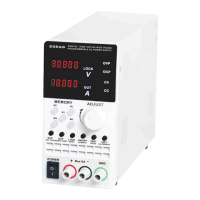

 To Next Page
