EasyManua.ls Logo

Korona 82002 - Control Panel Elements

Korona 82002
Print Icon
To Next Page IconTo Next Page
To Previous Page IconTo Previous Page
Loading...
Instruction Manual
ENGLISH
31
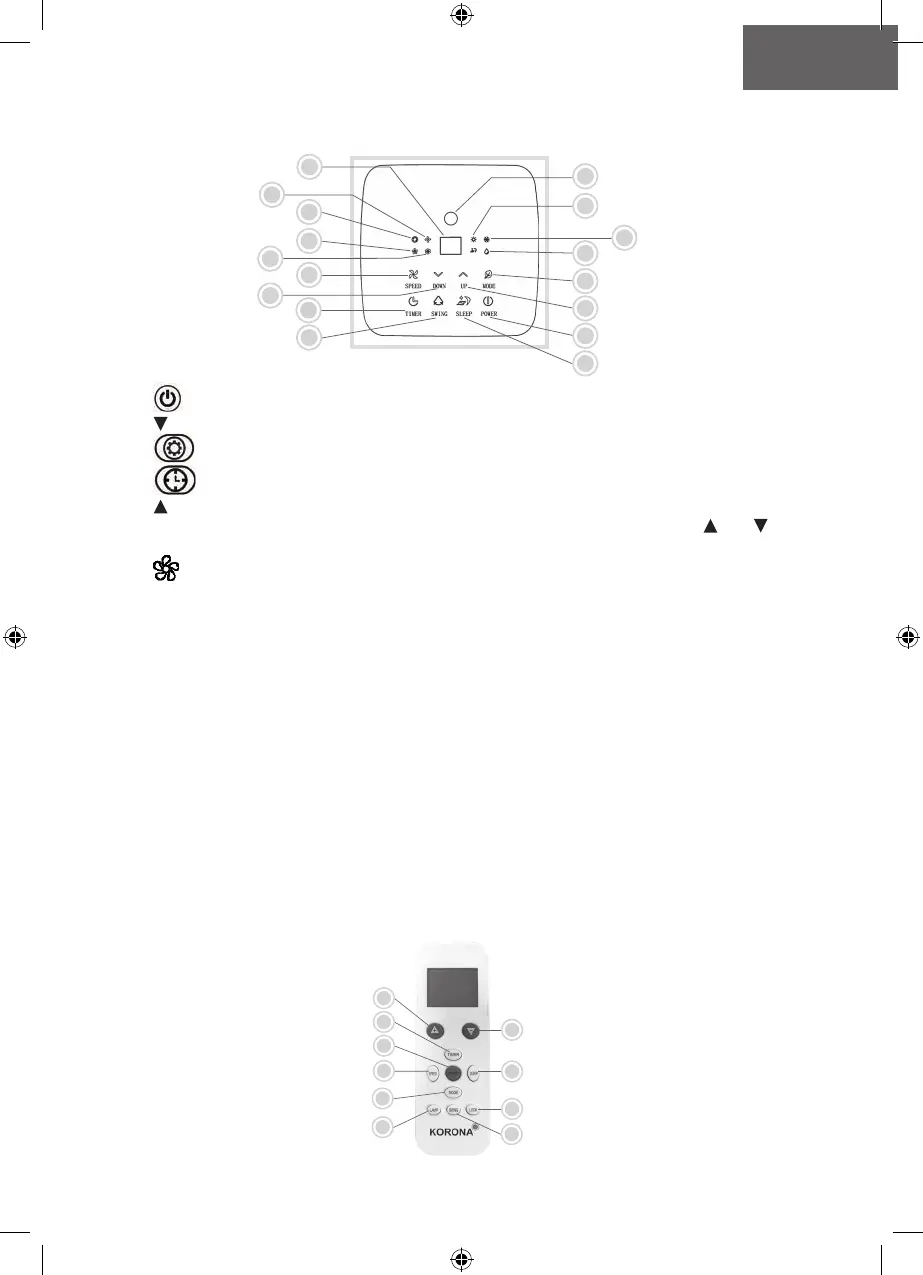
Control Panel
12
9
3
5
1
10
11
8
7
4
6
2
14
16
17
13
15
1.
Power (On/Off)
2. Temperature – DOWN
3.
Operation Mode
4.
Timer
5. Temperature + UP
To switch between °C (Celsius) and °F (Fahrenheit) press both the temperature and
keys.
6.
SPEED
7. Swing
8. Sleep
Indication lights operation modes
9. Dehumidification
10. Cooling
11. Heating
12. Signal receiver remote control
Indication light ventilation speeds
13. Medium
14. High
15. Auto fan mode
(will switch between low / medium /high automatically, depending on the ambient set
temperature)
16. Low
17. LED-display
REMOTE CONTROL
9
2
4
3
5
1
6
7
10
8

Table of Contents

Related product manuals