EasyManua.ls Logo

Koso BA010001 RX-2 - User Manual

Koso BA010001 RX-2
19 pages
Print Icon
To Next Page IconTo Next Page
Loading...
INTRODUCTION
1.The lcd meter is apply for DC 12V.
2.For installation, please follow the steps described in manual. Any
damage caused by wrong installation shall be imputed to the users.
3.Don't break or modify the wire terminal. To avoid the short circuit, please
don't pull the wire when installing.
4.Do not disassemble or change any parts excluding the manual
description.
5.The interior examination or maintenance should be executed by our
professionals.
MARK MEANING:
WARNING!
CAUTION!
You could get the installation details from the information behind the mark.
Some processes must be followed to avoid the affection caused by wrong installation.
Some processes must be followed to avoid damages to yourself or the public.
Some processes must be followed to avoid the damage to the vehicle.
Press the button
one time
Press the button
3 seconds
1-1
Content
Accessory
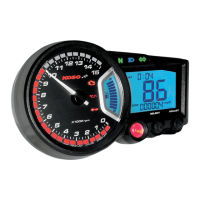
Thank you for purchasing KOSO RX2 GP style meter , before operating the
unit, please read the instruction thoroughly and retain it for the future
reference.
CDI & FI
Notice
Option accessory
1-2
2-1
Installation instructions
2-2
Wiring installation instructions
3-1
3-2
3-3
3-4
3-5
Basic function instruction
The button function instruction
The screen switch instruction
The main screen function switch instruction Select
Auto-checking screen
CDI & FI CDI & FI
3-6
3-7
3-8
4
Function, setting instruction
4-1
Speed unit setting
4-2
Cycle / piston setting
The main screen function switch instruction Adjust
The setting screen instruction
The power test screen instruction
4-3
The temperature unit setting
4-6
4-7
4-8
4-9
4-10
4-4
Speeding warning light setting
4-5
Over RPM warning light setting
Tire circumference and sensor point setting
The clock setting
The fuel gauge resistance and insufficient fuel warning
The target speed timer / target distance timer setting
setting
5-1
5-2
5-3
6
Trouble shooting
Guarantee & notice of products
7
Guaranty
8
The top speed test
Target distance timer test
Target speed timer test
We recommend that you finish the relative setting before operating to
assure the operation of meter.
Over heat warning setting

Questions and Answers

  • L
    Lisa WallaceJul 27, 2025
    How to fix Koso BA010001 RX-2 Multimeter if it doesn't work when the power is on?
    • P
      Paul FarrellJul 27, 2025
      If the Koso Multimeter is not working when powered on, start by ensuring the wiring is correctly connected. Also, verify that the wiring and fuse are intact. Check your battery voltage to ensure it's over DC12V. Confirm the speed and RPM sensors are correctly connected. Verify the spark plug is the 'R' type and replace it if it's not. Also, check that the positive wire (Red) connects to the battery, and main switch positive wiring (Brown) connects to the main switch.
  • J
    Jeffrey HarrisAug 5, 2025
    Why tachometer does not appear or appear incorrectly on Koso BA010001 RX-2 Multimeter?
    • S
      Shannon BridgesAug 5, 2025
      If the tachometer on your Koso Multimeter isn't displaying correctly, begin by ensuring all wiring is properly connected and that the wiring and fuse are not broken. Verify the battery voltage is above DC12V. Check the connections for the speed and RPM sensors. Ensure you're using an 'R' type spark plug, and if not, replace it. Also, check that the positive wire (Red) connects to the battery, and main switch positive wiring (Brown) connects to the main switch.
  • J
    Jessica SmithAug 15, 2025
    Why speed does not appear or appear incorrectly on Koso BA010001 RX-2 Multimeter?
    • J
      Julie WalkerAug 15, 2025
      If the speed isn't showing up or seems wrong on your Koso Multimeter, first, make sure all the wiring is connected properly and that the wiring and fuse aren't damaged. Next, check that your battery's voltage is more than DC12V. After that, see if the speed sensor is hooked up right. Also, check that the positive wire (Red) connects to the battery, and main switch positive wiring (Brown) connects to the main switch.

Summary

Auto-Checking and Basic Functions

3-2 Basic Function Instruction

Details the primary functions and displays of the meter.

Setting and Power Test Screens

3-8 Power Test Screen Instruction

How to access and use power test functions.

Function and Setting Instructions

Speed Unit and Cycle;Piston Settings

Warning Settings

Over Heat Warning Setting

Tire Circumference and Sensor Point Setting

4-7 Tire Circumference and Sensor Point Setting

How to set tire circumference and sensor points.

Clock and Fuel Gauge Settings

Target Timer Settings

4-10 The Target Speed Timer; Target Distance Timer Setting

How to configure target speed and distance timers.

Target Speed Timer Test

5-1 Power Target Speed Timer Test

How to perform a target speed timer test.

Target Distance Timer Test

5-2 Power Target Distance Timer Test

How to perform a target distance timer test.

Top Speed Test

5-3 Power The Top Speed Test

How to perform a top speed test.

Troubleshooting Common Issues

Meter Not Working

Checks for power supply and wiring issues.

Incorrect Information Display

Addresses issues with speed, tachometer, fuel, and temp displays.

Koso BA010001 RX-2 Specifications

General IconGeneral
DisplayLCD
VoltmeterYes
Current Range (AC)Not applicable
Current Range (DC)Not applicable
Resistance RangeNot applicable
Frequency RangeNot applicable
Capacitance RangeNot applicable
Temperature RangeNot applicable
Battery TypeNot applicable