EasyManua.ls Logo

Kowa SIX Version II - Operating the Kowa Six Camera; Open the Finder Hood; Set the Shutter Speed; Set the Aperture

Kowa SIX Version II
46 pages
Print Icon
To Next Page IconTo Next Page
To Previous Page IconTo Previous Page
Loading...
OPERATING
THE
KOWA-
SIX
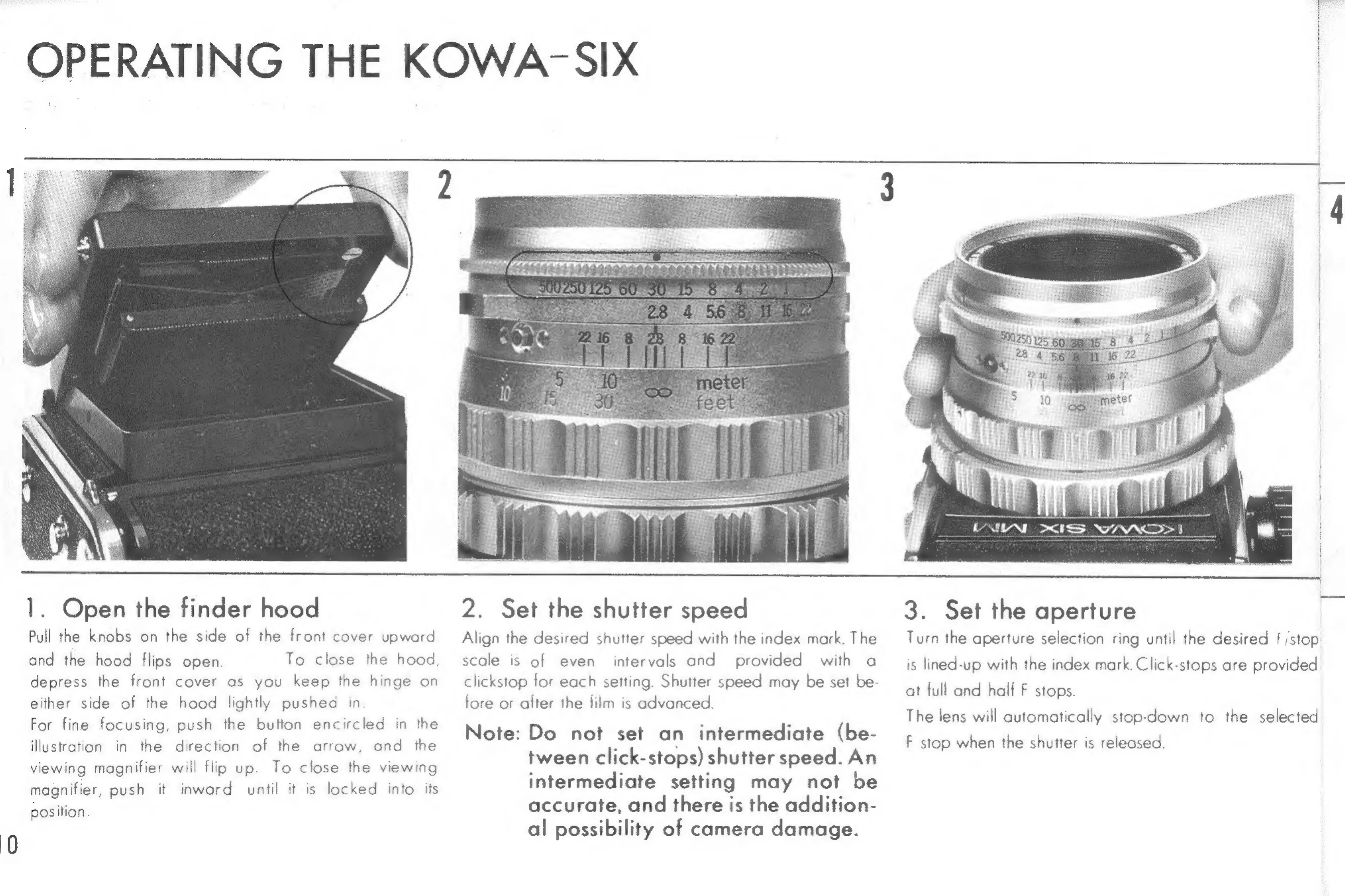
1.
Open
the
finder
hood
Pull
the
knobs
on
the
side
of
the
front
cover
upward
and
the
hood
flips
open
depress
the
front
cover
as
you
keep
the
hinge
on
either
side
of
the
hood
lightly
pushed
in
For
fine
focusing,
push
the
button
encircled
in
the
the
direction
of
the
arrow,
and
the
viewing
magnifier
will
flip
up.
To
close
the
viewing
magnifier,
push
it
inward
until
it
is
locked
into
its
position
illustration
in
To
close
the
hood,
2.
Set
the
shutter
speed
Align
the
desired
shutter
speed
with
the
index
mark.
The
scale
is
of
even
intervals
and
provided
with
a
clickstop
for
each
setting.
Shutter
speed
may
be
set
be-
fore
or
after
the
film
is
advanced.
Note:
Do
not
set
an
intermediate
(be-
tween
click-stops)
shutter
speed.
An
intermediate
setting
may
not
be
accurate,
and
there
is
the
addition-
al
possibility
of
camera
damage.
3.
Set
the
aperture
Turn
the
aperture
selection
ring
until
the
desired
f
stop
is
lined-up
with
the
index
mark.
Click-stops
are
provided
at
full
ond
half
F
stops.
The
lens
will
automatically
stop-down
to
the
selected
F
stop
when
the
shutter
is
releosed.

Related product manuals