EasyManua.ls Logo

Kowa SIX Version II - Position the Pressure Plate; Set the Frame Counter; Removing Exposed Film

Kowa SIX Version II
46 pages
Print Icon
To Next Page IconTo Next Page
To Previous Page IconTo Previous Page
Loading...
ж
If
you
do
not
plan
to
shoot
immediately,
it
is
advisable
to
lock
the
shutter-release
but-
ton
according
to
the
directions
on
Page
12.
This
will
prevent
you
from
wasting
a
frame
due
to
accidental
exposure.
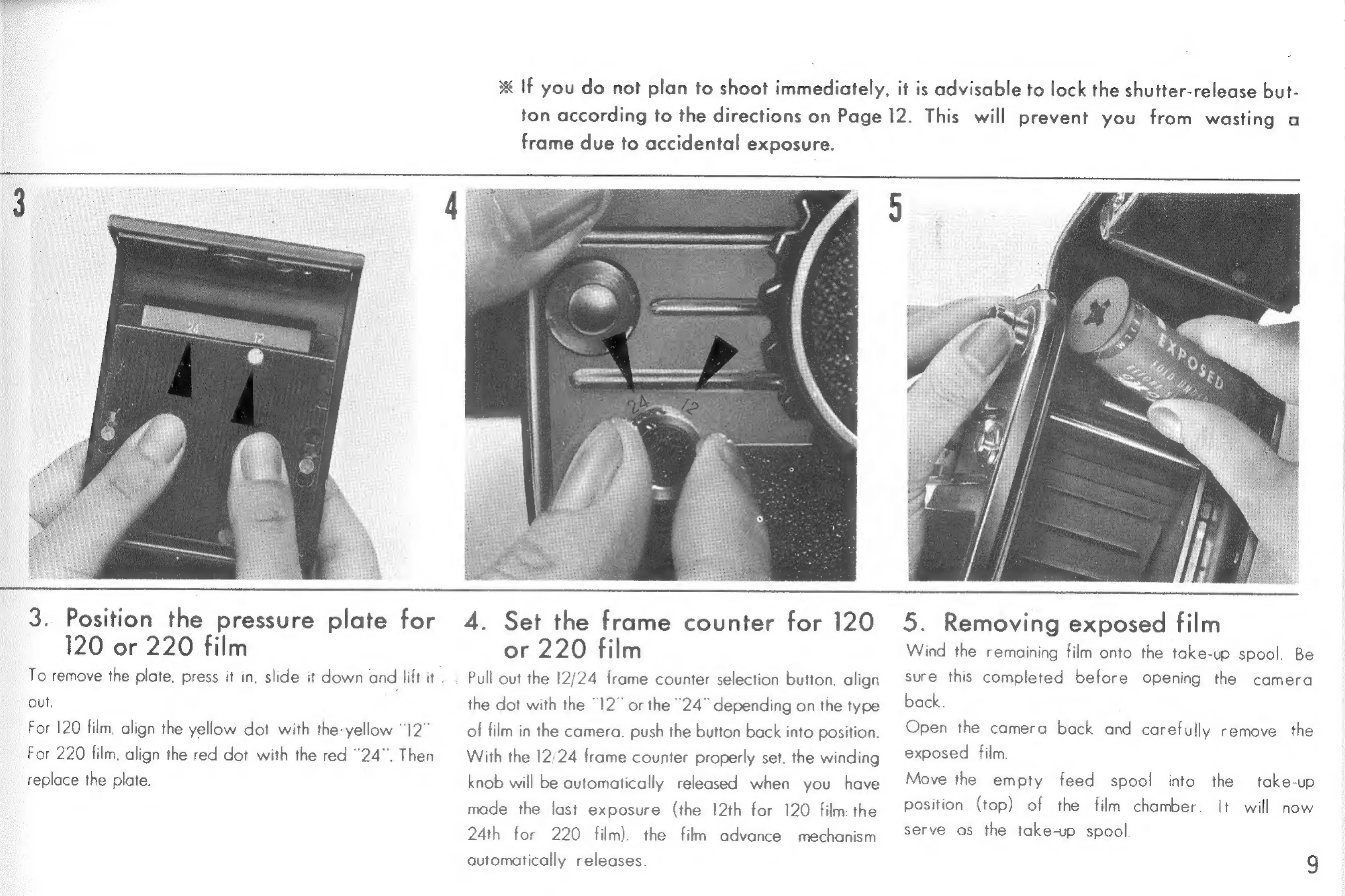
3.
Position
the
pressure
plate
for
120
or
220
film
To
remove
the
plate.
press
it
in,
slide
it
down
and
lift
it
Out.
For
120
film,
align
the
yellow
dot
with
the-yellow
“12”
For
220
film,
align
the
red
dot
with
the
red
"24".
Then
replace
the
plate.
4.
Set
the
frame
counter
for
120
or
220
film
Pull
out
the
12/24
frame
counter
selection
button.
align
the
dot
with
the
“12”
or
the
"24"
depending
on
the
type
of
film
in
the
camera.
push
the
button
back
into
position.
With
the
12/24
frame
counter
properly
set.
the
winding
knob
will
be
automatically
released
when
you
have
made
the
last
exposure
(the
12th
for
120
film:
the
24th
for
220
film)
automatically
releases.
the
film
advance
mechanism
5.
Removing
exposed
film
Wind
the
remaining
film
onto
the
take-up
spool.
Be
sure
this
completed
before
opening
the
camera
back.
Open
the
camera
back
and
carefully
remove
the
exposed
film.
take-up
position
(top)
of
the
film
chamber.
It
will
Move
the
empty
feed
spool
into
the
now
serve
as
the
take-up
spool
9

Related product manuals