4.3″
480 × 272 ( VGA)
About 280
135.0 W × 95.0 H × 40.0 D
95.0 W × 53.8 H
Less than 6W
126.0 W × 86.0 H
12
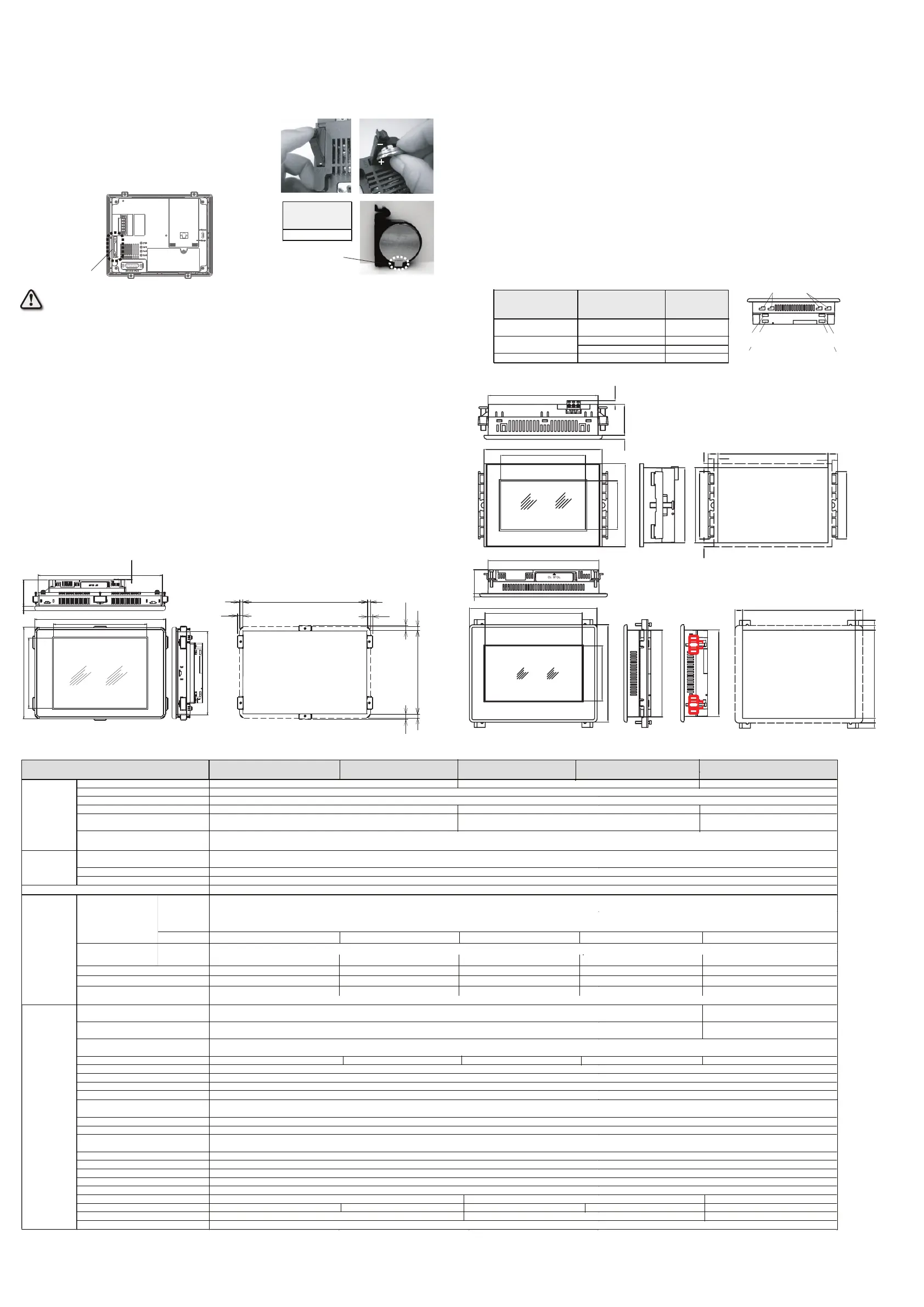
外形尺寸图与开孔尺寸
(Dimensions
・
Cutout Size
)
13
规格
(Specifications
)
9
产品安装注意事项
(Attention at mounting
)
10
交换电池
(Replacing the battery
)
背面
Rear view (7” panel)
Battery holder
电池架
① ②
③
1. Turn on the Touch Panel power .
2. Push down the battery holder's tab and pull out the holder (Picture ①).
3. Remove the old battery.
4. Insert the new battery (Picture ②). Please pay attention not to bend the
battery holder's retaining tab (Picture ③).
1. 请开启触摸屏的电源。
2. 下压并拉出电池架的卡盖(照片①)。
3. 取出旧电池。
4. 安装新电池(照片②)。此时请注意勿卷曲电池卡件(照片
③)。
When discarding the battery, if the battery contacts to other metal, it is prone of produce heat, burst or fire.
Therefore make sure you cover the terminal (+/-) by sticky tape etc. As for handling the used battery, make sure
you follow the regulation.
电池丢弃时若和其它金属物接触则可能会产生发热/破裂/起火情形。请务必将端子(+/-)粘覆胶带后再丢弃。
具体请按国家有关法律法规进行处理。
1. When you mount the Touch Panel on the control cabinet, please mount it on the flat surface and fix it correctly.
If you mount the Touch Panel on uneven surface you may damage the Touch Panel. Please be advised to
mount it on the center of square hole of the control cabinet. If the Touch Panel is mounted away from the center
of square hole, then its surface sheet might bend.
2. As for the enclosure thickness please refer to the table as below. Please select the hole position depending on
your control cabinet's material thickness.
3. As for the recommended tightening torque of mounting bracket, please refer to the table as below. Make sure all
screws of the mounting bracket are screwed and tightened evenly. If tightening torque is too strong then the
Touch Panel, control cabinet or mounting bracket might bend.
4. The holes on the top or side of the Touch Panel are necessary for ventilation. Therefore never block the holes.
The abnormal heat may cause defects on the Touch Panel.
5. Please make adequate space between the Touch Panel and the edge of the control cabinet or other products.
1. 当把触摸屏安装到控制柜上时,请务必妥善固定在平整的面板上。若安装在变形弯曲的面板上,则触摸屏会有破损可能。
另外,请把触摸屏安装在控制柜方形开孔的中心,否则触摸屏表面板可能会产生翘曲。
2. 允许的控制柜面板厚度请参照下表。可视控制柜板厚实际情况调整安装夹具安装孔位置。
3. 安装夹具推荐安装扭矩请参照下表。安装时请务必以均衡力量固定全部螺丝。如果安装扭矩过大,则可能会造成触摸屏
本体/ 控制柜面板/ 安装夹具的变形。
4. 触摸屏上部或侧部之空穴为内部排气之专用通道,请勿阻塞。异常发热有可能造成故障。
5. 触摸屏和控制柜边沿或柜中其他制品之间须留出适当空间。
电池废弃注意事项
(Discarding the battery
)
11
EA7E-TW7CL-C、EA7E-TW7CL-RC
Battery retaining tab
电池卡件
+
-
The super capacitor is not put on the Touch Panel. Therefore it is required to replace the battery by keeping the
Touch Panel power on. If the battery is replaced when the Touch Panel power is off, SRAM and clock data will be
deleted and there will be an error indicated.
本制品并未实装大容量电容,因此请务必在触摸屏电源开启时进行电池交换。若于电源关闭时交换电池则
SRAM
和
时钟
数据会丢失并产生错误码。
备用电池
Replacement battery
D2-BAT-1 (CR2354)
显示尺寸 Display actual size 10.2″
显示类型 Display type
TFT color LCD
显示色数 Color scale
65,536 colors
显示像素 Screen pixels
800 × 480 ( V G A )
实际显示区域尺寸
(mm)
222.0 W × 132.5 H
亮度调节
Brightness adjustment
背光规格 Backlight
是否允许用户自行更换
User replaceable
屏保功能 Auto-off function
画面上传/下载用端口
Screen data transfer
以太网口 Ethernet
※3
SD卡接口 SD Card-Slot
3.3V 限定 3.3V Only
USB口 USB
额定电源电压
Rated power voltage
电源电压容许变动范围
容许瞬间断电时间
Allowable momentary power failure period
消费功率 Power Consumption
Less than 15 W
Less than 13W Less than 11W
使用环境温度 Operating temperature
保存环境温度 Storage temperature
使用环境湿度 Operating humidity
保存环境湿度 Storage humidity
抗干扰
Noise immunity
耐电压 Withstand voltage
绝缘电阻 Insulation resistance
耐冲击 Shock
耐静电放电 ESD immunity
腐蚀性气体 Surrounding air
接地 Grounding
防护等级 IP rating
外形尺寸(mm) Dimensions
299.0 W × 209.0 H × 71.0 D
质量(g) Weight (g)
安装开孔尺寸 (mm) Panel cut size
285.0 W × 191.0 H
冷却方式 Cooling method
自然空冷 Natural air cooling
触摸屏规格 Touch panel
一般规格
General
Specifications
U SB( Type-A )1.1×1 ※4
(选购件 AC100/200V电源模块 型号:EA-AC)
24VDC (Optional 100/200VAC Power Adapter, EA-AC is available)
C20.4~28.8V
ms以内 Less than 5ms
最大147m/s
2
11ms(X、Y、Z方向各2次) 147m/s
2
peak, 11ms duration, 2 shocks per axis, on 3 mutually perpendicular axes
EC61000-4-2 标准 接触:4kV 空气:8kV IEC61000-4-2 compliant contact : 4kV air : 8kV
显示部分
Display
PLC连接用通讯口
PLC interface
USB(Type-B) 2.0×1
数据格式:: 7 / 8 bit 校验
:None/Odd/Even
停止位:1/2bit
传送速度 (bps):2400/4800/9600/19200/38400/57600/115200/187500
Data length:7/8 bit Parity:None/Odd/Even Stop bit:1/2 bit
Transmission speed (bps):
2400/4800/9600/19200/38400/57600/115200/187500
电阻膜方式、分辨率:1024 W × 1024 H Analog Resistive, Resolution : 1024 W × 1024 H
背光
Backlight
外部接口
External interface
~50℃
IP65(仅表面部分)相当 IP65(surface) equivalent
20~60℃
10~85%RH(无凝露 、non-condensing)
EC61131-2 标准 10-57Hz:0.075mm 57-150Hz:9.8m/s
2
(X、Y、Z方向各10次)
EC61131-2 compliant, 10-57Hz: 0.075mm amplitude, 57-150 Hz 9.8m/s
2
:
10 sweep cycles per axis on each of 3 mutually
perpendicular axes
10~85%RH(无凝露 、non-condensing)
干扰电压 AC1000Vp-p 波峰幅宽1
μ
s
持续时间1ns
Noise voltage : 1000VACp-p, Pulse width : 1
μ
s, Rise time : 1ns (with noise simulator)
AC1000V 1分钟(D C电源端子~FG端子间) 1000VAC for 1mimute (between DC and FG)
DC500V 10MΩ以上(DC电源端子~FG端子间) 500VDC, over 10MΩ (between DC and FG)
7.0″
标准串口:RS- 232C、RS-422/485(2/4线式) D-SUB-15P(双排孔型)×1 ※2
Asynchronous RS-232C, RS-422/485(2/4 wires) D-SUB-15P(female)×1 ※2
触摸屏本体系统设置画面调节 (可利用作图软件放置调节部品)
User configurable by the configuration screen of the Touch panel (Configuration object can be placed by the software)
LED发光管 (平均寿命:连续点灯20,000小时以上,亮度衰减到原始亮度的一半。
)※ 1
(Average lifetime: over 20,000 hours continuous use, the brightness decrease to 50% original brightness. )
※
1
通过作图软件设定 User configurable by the software
※1 25℃、 24H 连续点灯时。 ※2 RS-232C/422/485 同时只能使用其中1个。 ※3 10Base-T/100 Base-TX(RJ-45)自适应。 ※4 仅可连接部分USB移动磁盘、商用键盘、条码读入机。
※1 25℃, 24-hour continuous use . ※2 RS-232C, 422 or 485 only one of them can be used in sametime . ※3 10Base-T/100 Base-TX(RJ-45) . ※4 Only some commercial memory cards,keyboard and bar-cord reader are connectable.
.
EA7E-TW4CL-C
800 × 480 ( VGA)
3.3V 限定 3.3V Only
LED backlight
串口
Serial
Ethernet
无 N/A
无 N/A
有 YES
有 YES
有 YES
Less than 9 W
音频输出(无源)Audio Line Output
DC10.8~28.8V
安装紧固扭矩 (Enclosure Thickness and Screw Torque)
型号
Part Number
板厚
Enclosure Thickness
(
mm
)
紧固扭矩
Screw Torque
(
Nm
)
EA7E-TW10CL-C/CW、
EA7E-TW10CL-RC/RCW
EA7E-TW4CL-C/CW
About 1270
※3
※3
About 1280
About 550
About 560
A type bracket upper position
A type bracket lower position
(
适用板厚
Suitable enclosure thickness
:
1
~
6mm)
(
适用板厚
Suitable enclosure thickness
:
5
~
16mm)
A类夹具下侧安装孔
A类夹具上侧安装孔
EA7E-TW7CL-C/CW、
EA7E-TW7CL-RC/RCW
1~16 ※2
※2
0.25~0.35
0.25~0.35
Ethernet
DC12~24V
154.1 W × 85.9 H
179.0 W × 140.0 H
204.4 W × 156.0 H × 43.1 D
有 YES
有 YES
有 YES
有 YES
有 YES
有 YES
有 YES
有 YES
无 N/A
无 N/A
无 N/A
无 N/A
无 N/A
无 N/A
无 N/A
无 N/A
无 N/A
安装孔 HOLE
安装孔 HOLE
8.0
8.2
179
12.7 12.7
8.2 8.0
140
138.6
177.6
88
156
204.4
156
5
38.1
1.6~4 0.10~0.15
EA7E-TW10CL-C、EA7E-TW10CL-RC
(3.5)
61
10
209
134.7
190
284.1
299
224.3
135
96.7
125.5
4.3
35.44.6
55.5
95
85.5
4.5
77
77
4.5
11
11
4.5
126
+1
0
86
+1
0
无 N/A
(mm)
(mm)
12 12
12
12
285
+1
7 7
9
9
191
+1
安装孔 HOLE
0
0
W
W WQ
USB口 USB
+1
0
+1
0
EA7E-TW10CL-CW、EA7E-TW10CL-RCW
EA7E-TW7CL-CW、EA7E-TW7CL-RCW
EA7E-TW4CL-C
EA7E-TW10CL-C
EA7E-TW10CL-CW
EA7E-TW10CL-RC
EA7E-TW10CL-RCW
EA7E-TW7CL-C
EA7E-TW7CL-CW
EA7E-TW7CL-RC
EA7E-TW7CL-RCW
EA7E-TW4CL-CW
EA7E-TW4CL-CW
1~10
※1
B类(B type)1~5
A类(A type)
0.10~0.15
7寸屏有两类安装夹具,A类为金属夹具,B类为塑料夹具。(随机仅配一类夹具。)
※1
※1
For 7.0” product, there are two types of mounting bracket, A type is metallic, B type is plastic. (Only one type in the package.)
A类(A type)※1
B类(B type)※2
金属夹具 Metallic bracket
※1
※2
塑料夹具 Plastic bracket
138.6
B类夹具安装孔
B type bracket installation position
※3
※3



 To Previous Page
 Loading...