Need help?
Do you have a question about the Koyo KCV Series and is the answer not in the manual?
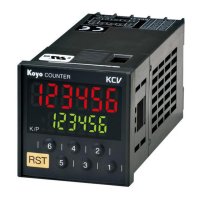
Features a large LED display with character heights of 12 mm and 10 mm in a compact DIN48x48 body.
Preset values are set and changed using individual setting keys that feel like digital switches.
Allows users to configure the number of digits displayed on the counter.
Utilizes EEPROM to retain values in memory, eliminating the need for battery maintenance.
Features removable terminals to simplify maintenance and a terminal cover for safe operation after wiring.
Key protection can be set for individual keys to prevent unauthorized tampering.
Provides a built-in 24VDC, 60mA power source for large-capacity sensors (AC P/S type only).
The AC type operates on a wide voltage range of 85VAC to 264VAC.
Details the structure and meaning of characters used in KCV model numbers.
Provides a summary of key electrical, environmental, and physical specifications for the KCV counters.
Details counting range, setting range, operational speed, and input/output characteristics.
Provides detailed specifications for input and output signals, including resistance, voltage, and response times.
Explains the Hold, One-shot, and Match output modes with operational diagrams.
Illustrates input timing for dual input and addition/subtraction modes with positive and negative logic.
Provides detailed wiring diagrams for various KCV model series (e.g., 4S/6S, 4T/6T).
Shows internal circuit diagrams for AC and DC power inputs and outputs.
Demonstrates wiring for proximity switches (NPN, PNP, 2-wire), rotary encoders, and switches/relays.
Illustrates how to connect output signals from the KCV counter to loads.
Details the layout and functions of displays, indicators, and keys on the KCV counter's front panel.
Provides step-by-step instructions for changing preset values, resetting counts, and protecting keys.
Setting the counting speed (30Hz/10kHz) using Dip switch 1.
Selecting the input mode (Addition/Subtraction or Dual input) using Dip switch 2.
Setting the operational mode (Addition or Subtraction) using Dip switch 3.
Configuring counting memory behavior upon power failure or reset using Dip switch 4.
Selecting the output mode (Hold or One-shot) using Dip switch 5.
Enabling or disabling key protection settings using Dip switch 6.
Selecting between Setup mode and Run mode using Dip switch 8.
Lists parameters like counting speed, input logic, and output duration adjustable in Setup mode.
Instructions on how to transition between Setup mode and Run mode using Dip switch 8.
Detailed steps for configuring counting speed, input logic, output mode, and prescaling.
Step-by-step guide on how to change preset values from 120 to 240.
Example of using the KCV for conveyor positioning with alarm output for stopping.
Formula and example calculation for determining the prescale factor based on pulley diameter.
Guides on setting counting speed, input logic, and output mode during setup.
Instructions for setting output duration, prescaling values, and decimal points.
Details on setting alarm output levels and configuring key protection options.
Describes common errors like Memory data error and Counter Overflow/Underflow, with corrective actions.
Details optional accessories like rubber packing and front covers for the KCV counter.
Guidelines on DC power, input logic, preset value changes, and environmental considerations.
Recommendations for wiring, including keeping wires away from noise and using proper crimped contacts.
Instructions for installing and removing the main KCV unit and its terminal block.
Provides overall dimensions, panel thickness requirements, and installation frame details.
Details the terminal block layout, screw size, wiring gauge, and permitted torque.
Shows recommended hole dimensions for horizontal and vertical installation of the unit.
 General
| Brand | Koyo |
|---|---|
| Model | KCV Series |
| Category | Cash Counter |
| Language | English |

 To Next Page