AUX IN
You can listen music from an external music player using this port.
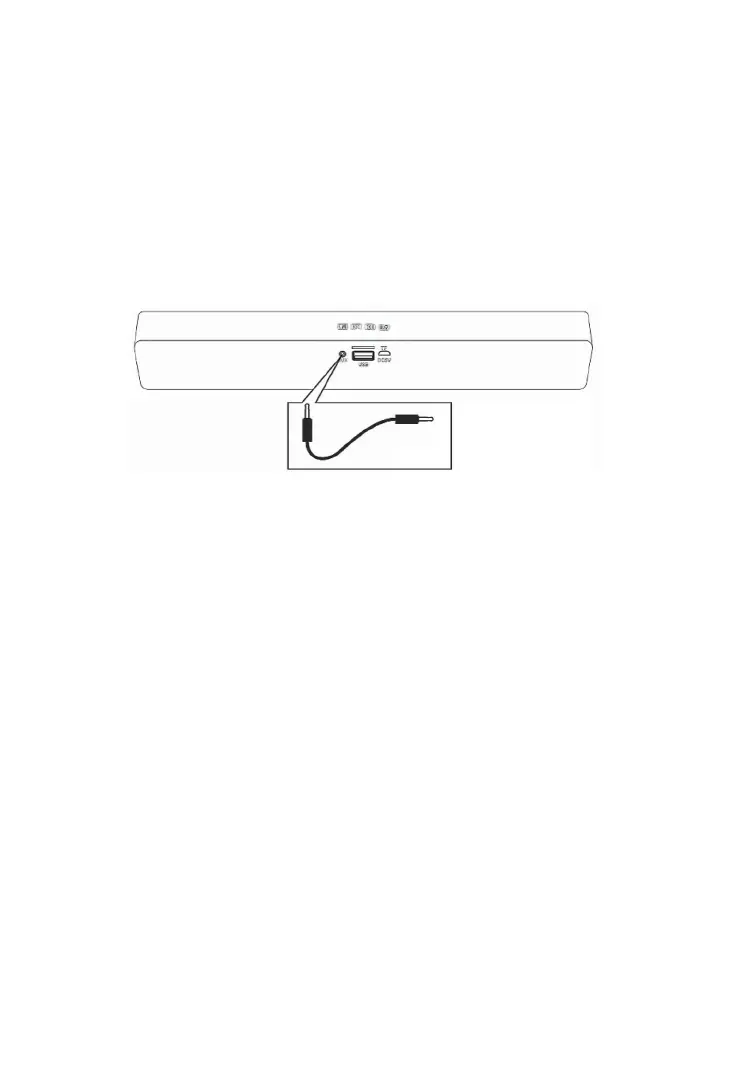
1. In pthe ower o mode, connect the 3.5mm stereo jack from the supplied audio con-
necon cable to the AUX Out/Line Out/Phone Jack of the external audio player.
2. Connect the other end to the AUX IN port on the rear of unit as the gure below.
3. Power on the unit.
4. Press the M) Buon repeatedly unl you hear ‘’Line in” from the speaker.
5. Play the music of the external music device (make sure the volume level of the device
is in high level).
RESET
If the unit is halt or doing an abnormal operaon, press the Reset Buon in the AUX IN
port using a small screw driver (not included) to shut it o. Press and hold the ⏻ Buon
approximate 0.5 seconds to turn it on again.
Guarantee
This product is guaranteed against defects in materials and workmanship for a period of
two years from the date of purchase. Under this guarantee the manufacturer undertakes
to repair or replace any parts to be defecve, providing the product is returned to one of
our authorised service centres. This guarantee is only valid if the appliance has been used
in accordance with the instrucons, and provided that it has not been modied, repaired
or interfered with by any unauthorised person, or damaged through misuse. This guar-
antee naturally does not cover wear and tear, nor breakables such as glass and ceramic
items, bulbs, etc. If the product does not work and it is the reason for returning it and it is
within the guarantee period, please also show the guarantee card and proof of purchase.


 To Next Page