1. A group channel should be started so that the transmitter will control all receivers. e group
channel is switched on when all channels are highlighted.
2. It is necessary to select the group channel on the transmitter and to set the automatic mode so
that the devices that are programmed on all channels will operate at the programmed time,
3. Replace the batteries when the receiver stops responding at the moment of pressing the keys.
4. When replacing the battery, it is necessary to pay attention to its correct polarity.
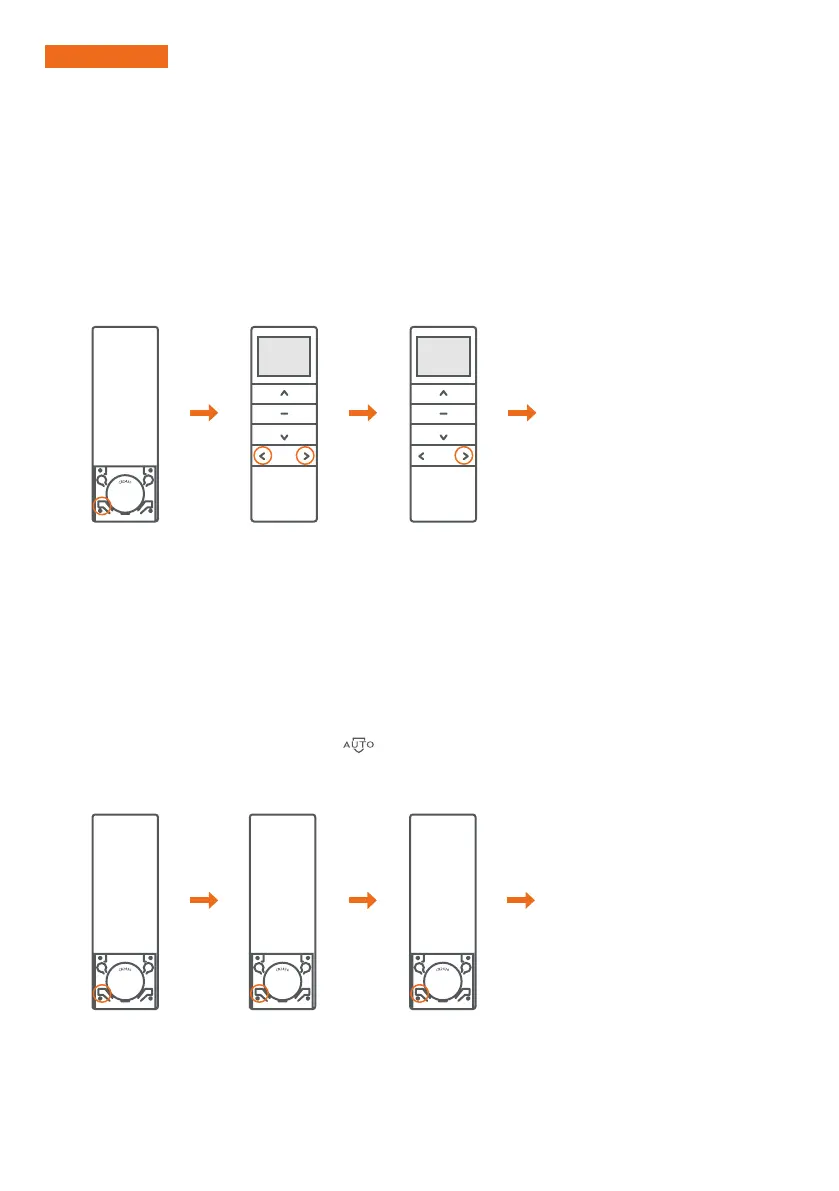
1. Each channel can be activated or deactivated in automatic operation mode. If the channel is inactive,
the transmitter will not control the receiver in this mode.
2. e channel is inactive if the digit corresponding to it flashes.
1. Manual operation mode (the MAN symbol is visible on the display): normal operation mode, without
time control function.
2. Automatic operation mode (the AUTO symbol is visible on the display): normal operating mode with
time control function.
3. Random operation mode (the symbol
): is visible on the display): time control function with
a randomly selected time from the range of ± 15 minutes from the set automatic time.
4. e operating mode changes for all channels.
IMPORTANT!
3. ACTIVATING CHANNELS IN THE AUTOMATIC MODE
4. CHANGING THE OPERATION MODE
We press the OPERATION
MODE button in order
to set the automatic
operation mode.
We press the OPERATION
MODE button to set the
manual operation mode.
We press the OPERATION
MODE button to set the
automatic operation mode.
We press the OPERATION
MODE button to set the
random operation mode.
We set the channel
with the P1- or P1 +
buttons
We press and hold
the P1 + button
for 3 seconds
e digit of the selected channel starts
flashing, which means that the channel
is inactive in automatic operation mode.
Re-performing the procedure will
activate the channel.
Pressing the button again
switches between successive
operation modes.


 To Next Page