1. e programming of the transmitter depends on the type of receiver. When programming, it is necessary
to be guided by the instruction manual of the device which is to be controlled by the transmitter.
2. A pause longer than 5 seconds between successive presses of the button will automatically cause
exit from the programming mode without any introduced changes.
3. Adding a transmitter using this method will cause erasing the memory of the receiver.
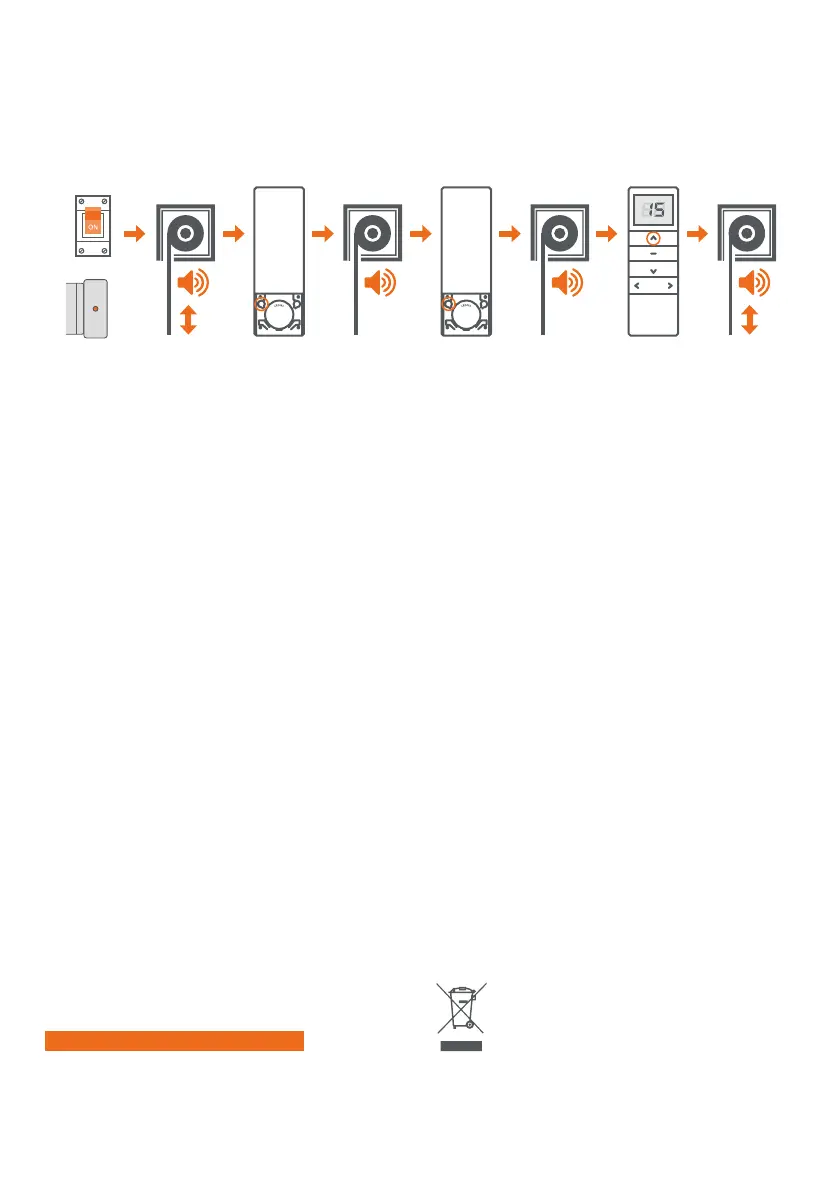
7. PROGRAMMING THE FIRST TRANSMITTER FOR THE ER TYPE DRIVES
e drive will
emit a sound.
e roller blind
will make short
up / down
movements.
Press the
programming
button (P2)
on the remote
control.
Press the
programming
button (P2)
on the remote
control.
e roller blind
will make short
up / down move-
ments and emit
several sound
signals.
e drive will
emit a sound.
e drive will
emit a sound.
We press the UP
button once.
We turn on the po-
wer supply or press
the programming
button on
the drive head.
OR
ENVIRONMENTAL PROTECTION
is device has been marked in accordance with the WEEE Directive (2002/96
/ EC) regarding waste electrical and electronic equipment. By ensuring proper
scrapping you contribute to reducing the risk of occurrence of a negative
impact of the product on the environment and human health, which could exist
in the event of improper disposal of the device.
e symbol placed on the product or the documents attached to it means that
this product is not classified as a household waste. e device must be given
to an appropriate waste disposal point for recycling. For additional information
regarding recycling of this product please contact your local authority repre-
sentative, a waste disposal service provider or a store where the product
was purchased.
1. Uni- and bi-directional function
e Multi remote control can be switched between uni- and bi-directional communication. Setting this
procedure requires removing the battery to make it more difficult to start up.
e procedure is as follows: take out the battery first, then press the P2 button and insert the battery
while keep pressing the P2 button; the remote will switch to the unidirectional mode. Repeat the same
step to change to the bidirectional mode.
is function is useless for SIL STEO drivers; this is just a hint of the hidden transmitter option.
2. User function
When the end user keeps pressing the Stop button for more than 15 seconds, the remote control enters
the User mode and the letter L (Lock) appears on the screen. e function of pressing two setting
buttons (stop + up, stop + down and up + down) is disabled then and the settings cannot be changed.
When you press the Stop button again for another 15 seconds, the display shows the letter U (Unlock)
and you exit the User mode. e setting buttons becomes active.
e primary purpose of creating a User mode is to prevent the accidental pressing of the Up + Stop or
Up + Down buttons and changing working directions.
8. SECOND GENERATION STARCUS REMOTE CONTROL


 To Next Page
 Loading...