EasyManua.ls Logo

Krom Schroder DMG S2601 - User Manual

Krom Schroder DMG S2601
4 pages
Print Icon
To Next Page IconTo Next Page
Loading...

ADD FURNACE CO.,LTD.
44 ซอยบรมราชชนนี 

โทร: 02-888-3472 โท: ออกแบ:08-08-170-170 แฟกซ์: 02-888-3258
https://www.add-furnace.com E-mail: sales@add-furnace.com
13.1.1.5 Edition 07.10
D GB F
www.docuthek.com
Operating instructions
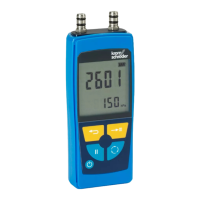
Electronic pressure gauge
DMG S2601, DMG S2610
Translation from the German
© 2008 – 2010 Elster GmbH
Electronic pressure gauge ..............................1
DMG S2601, DMG S2610 .................................1
Contents ........................................................ 1
Safety .............................................................1
Checking the usage ........................................2
Type code ......................................................... ..2
Part designations ................................................2
Type label ...........................................................2
Commissioning ..................................................2
Segment displays ................................................ 2
Connecting the measuring hoses ........................ 2
Selecting the operating mode ..............................2
ZERO (zero point calibration) operating mode .....3
UNIT (unit selection) operating mode ..................3
AUTO (measured value resolution) operating
mode ................................................................3
Min./Max. measured value ..................................3
Hold function .......................................................3
Display lighting ....................................................3
Switching off .........................................................3
Maintenance ....................................................3
Changing the batteries...................................... 3
Accessories .....................................................4
Assistance in the event of malfunction............4
Technical data ....................... .........................4
Declaration of conformity ..............................4
Please read and keep in a safe place
Please read through these instructions
carefully before installing or operating. Follow-ing the
installation, pass the instructions on to the operator.
These instructions can also be found at
www.docuthek.com.
Explanation of symbols
, 1 , 2 , 3 ...= Action
= Instruction
Liability
We will not be held liable for damages resulting from
non-observance of the instructions and non-compliant
use.
Safety instructions
Information that is relevant for safety is indicated in the
instructions as follows:
DANGER
Indicates potentially fatal situations.
WARNING
Indicates possible danger to life and limb.
! CAUTION
Indicates possible material damage.
All interventions may only be carried out by qualified
gas technicians. Electrical interventions may only be
carried out by qualified electricians.
Conversion, spare parts
All technical changes are prohibited. Only use OEM
spare parts.
Transport
On receipt of the product, check that the delivery is
complete (see Part designations). Report any trans-port
damage immediately.
Storage
Store the product in a clean, dry environment, protected
from shocks. Ambient temperature: see Technical data.
Disposal
Components, particularly batteries, are to be dis-posed
of separately.
On request, old units may be returned carriage paid to
Elster GmbH in accordance with the relevant waste
legislation requirements (for Germany: KrW-/AbfG [Act
for Promoting Closed Substance Cycle Waste
Management and Ensuring Environmentally Compat-
ible Waste Disposal]).
Contents
Safety
Question and Answer IconNeed help?

Do you have a question about the Krom Schroder DMG S2601 and is the answer not in the manual?

Summary

Safety

Explanation of symbols

Explains symbols used in the instructions, like Action and Instruction.

Safety instructions

Information that is relevant for safety is indicated in the instructions.

Conversion, spare parts

Technical changes are prohibited; only use OEM spare parts.

Transport

Check delivery for transport damage immediately upon receipt.

Storage

Store the product in a clean, dry environment, protected from shocks.

Disposal

Dispose of components and batteries separately according to regulations.

Checking the usage

Cautionary notes for usage

Observe notes to prevent damage: avoid explosive areas, note temperatures, protect from shocks.

Commissioning

Segment displays

Describes the initial display segments shown when switching on the DMG.

Type code

Lists the device codes and their corresponding measuring ranges.

Connecting the measuring hoses

Instructions for connecting hoses to pressure ports P1+/P2-.

Selecting the operating mode

How to change between different operating modes using the program selection button.

Operating Modes

ZERO (zero point calibration) operating mode

Allows setting the zero point at any time and as often as required.

UNIT (unit selection) operating mode

Enables selection of units according to the measuring mode.

AUTO (measured value resolution) operating mode

Automatically adjusts display resolution based on measured value.

Min.;Max. measured value

Displays and allows deletion of minimum and maximum measured values.

Hold function

Holds the current measured value by pressing the pause button.

Display lighting

Allows switching the display lighting on and off.

Switching off

Device is switched off by pressing the On/Off button for approx. 2 seconds.

Maintenance

Recommended checks and calibration

Instrument should be checked and recalibrated regularly.

Changing the batteries

Instructions for replacing batteries, ensuring correct polarity and timing.

Accessories and Support

Accessories

Lists available accessories, including connection sets.

Assistance in the event of malfunction

Troubleshooting guide for common faults like device not switching on or no pressure display.

Technical data and Declaration

Technical data

Provides specifications including dimensions, weight, ranges, and temperatures.

Declaration of conformity

Declares compliance with relevant EU Directives and Standards.

Summary

Safety

Explanation of symbols

Explains symbols used in the instructions, like Action and Instruction.

Safety instructions

Information that is relevant for safety is indicated in the instructions.

Conversion, spare parts

Technical changes are prohibited; only use OEM spare parts.

Transport

Check delivery for transport damage immediately upon receipt.

Storage

Store the product in a clean, dry environment, protected from shocks.

Disposal

Dispose of components and batteries separately according to regulations.

Checking the usage

Cautionary notes for usage

Observe notes to prevent damage: avoid explosive areas, note temperatures, protect from shocks.

Commissioning

Segment displays

Describes the initial display segments shown when switching on the DMG.

Type code

Lists the device codes and their corresponding measuring ranges.

Connecting the measuring hoses

Instructions for connecting hoses to pressure ports P1+/P2-.

Selecting the operating mode

How to change between different operating modes using the program selection button.

Operating Modes

ZERO (zero point calibration) operating mode

Allows setting the zero point at any time and as often as required.

UNIT (unit selection) operating mode

Enables selection of units according to the measuring mode.

AUTO (measured value resolution) operating mode

Automatically adjusts display resolution based on measured value.

Min.;Max. measured value

Displays and allows deletion of minimum and maximum measured values.

Hold function

Holds the current measured value by pressing the pause button.

Display lighting

Allows switching the display lighting on and off.

Switching off

Device is switched off by pressing the On/Off button for approx. 2 seconds.

Maintenance

Recommended checks and calibration

Instrument should be checked and recalibrated regularly.

Changing the batteries

Instructions for replacing batteries, ensuring correct polarity and timing.

Accessories and Support

Accessories

Lists available accessories, including connection sets.

Assistance in the event of malfunction

Troubleshooting guide for common faults like device not switching on or no pressure display.

Technical data and Declaration

Technical data

Provides specifications including dimensions, weight, ranges, and temperatures.

Declaration of conformity

Declares compliance with relevant EU Directives and Standards.

Krom Schroder DMG S2601 Specifications

General IconGeneral
BrandKrom Schroder
ModelDMG S2601
CategoryMeasuring Instruments
LanguageEnglish