EasyManua.ls Logo

KRON MEDIDORES Mult-K User Manual

KRON MEDIDORES Mult-K
4 pages
To Next Page IconTo Next Page
Page #1 background imageLoading...
Page #1 background image
MULT-K
Mult-K
Quick Installation Guide Mult-K Revision 3.2 June, 2020
Quick Installation Guide
Knowing the Product
Installing the Product
Accomodate the meter on the panel cutout and fasten it using the side locks . Panel’s cutout dimensions must be 92x92mm.
Power Supply Connection
Power Supply signal must be applied to the terminal block. Cabling must be connected in accordance to the power supply option
present in the meter.
ATTENTION
Pay extreme attention to the type of auxiliary
power supply of your meter.
Incorrect cabling connection or applying a voltage
signal above the specified limits can damage it
severely.
Mult-K
Side locks
Power Supply
Input
Voltage Input
Navigation keys
Current Input
RS-485 Output
Selectable AC Voltage (220 or 120 Vac)
Working Range: 80 to 120%
220Vac
120Vac
Universal Power Supply
DC Power Supply
Working Range:
85 to 265 Vac / 100 to 375Vdc
Working Range:
24, 48 Vdc: 80 to 120%
12Vdc: 90 to 120%
(Without Polarity)
11 (Ph)
13 (Ph/N)
12 (Ph)
13 (N)
11 (+)
13 (-)
11
13
Question and Answer IconNeed help?

Do you have a question about the KRON MEDIDORES Mult-K and is the answer not in the manual?

KRON MEDIDORES Mult-K Specifications

General IconGeneral
Data HoldYes
DisplayLCD
Measurement FunctionsVoltage, Current, Resistance, Capacitance, Frequency, Temperature
Current RangeAC: 0.1A to 10A, DC: 0.1A to 10A
Temperature RangeNot specified in available documentation
Battery9V

Summary

Knowing the Product

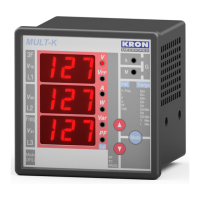
LED Display

Displays measurements and configurations.

Parameter Display Rows

Shows three rows for parameter checking and configurations.

Current Parameter Indicator

Indicates the parameter currently shown on the display.

Navigation Keys

Keys used for navigating menus and settings.

Indicative LEDs

Visual indicators for device status or parameters.

Side Locks

Fastening mechanism for panel mounting.

Power Supply Input Terminal

Terminal for connecting the device's power supply.

Voltage Input Terminal

Terminal for connecting voltage measurement inputs.

Current Input Terminal

Terminal for connecting current measurement inputs.

RS-485 Output

Communication port for RS-485 data transmission.

Installing the Product

Power Supply Connection

Voltage Input Connections

Current Input Connections

Accessing Operation Modes

Instantaneous Measurements

View real-time V, A, W, VAr, VA, PF, and Hz values.

Energy Measurements

Check cumulative energy values like kWh, kVArh, kW, and kVA.

Configuring the Product

PT Configuration

Define Potential Transformer ratio for voltage measurement.

CT Configuration

Define Current Transformer ratio for current measurement.

CD Configuration

Define connection diagram for circuit measurement.

Connection Diagrams