EasyManua.ls Logo

Kryptonite KryptoFlex 815 Combo Cable User Manual

Kryptonite KryptoFlex 815 Combo Cable
2 pages
To Next Page IconTo Next Page
Page #1 background imageLoading...
Page #1 background image
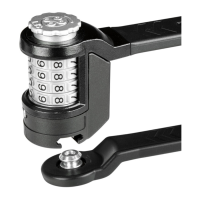
Guide Points
Reset Collar
Lock Post
To set your own combination:
Your new lock is pre-set to open at
0-0-0-5.
1. Open the lock by aligning the pre-set
combination number to the Guide
Points and pull out the Lock Post.
(Figure 1)
2. Turn the Reset Collar clockwise until
it comes to a stop. (Figure 2)
3. Turn the number dials to your own
personal combination, such as a
phone number, birthday, etc.
4. After setting your personal combina-
tion, turn the Reset Collar counter-
clockwise until it comes to a stop at
its original position. (Figure 3)
5. Write down your combination and
keep in a safe place. Your lock is now
ready to use.
The reset operation is now complete.
Repeat steps 1-5 anytime you wish to
change your personal combination.
9994
1116
Diagram 1
7772
8883
9991
Diagram 2
321
4321
5432
Diagram 3
1
2
3
1
2
3
KryptoFlex
®
815
Combo Cable
Kryptonite
437 Turnpike Street
Canton, MA 02021
(781) 828-6655
www.kryptonitelock.com
INS-KFCombo815_REV0515
Question and Answer IconNeed help?

Do you have a question about the Kryptonite KryptoFlex 815 Combo Cable and is the answer not in the manual?

Kryptonite KryptoFlex 815 Combo Cable Specifications

General IconGeneral
Diameter10 mm
MaterialSteel
TypeCable Lock
Cable Diameter10 mm
Cable Thickness10 mm
Lock TypeCombo

Summary

Set Your KryptoFlex 815 Combination

Open Lock with Pre-set Code

Align pre-set numbers to guide points, then pull out the lock post.

Turn Reset Collar Clockwise

Rotate the reset collar in a clockwise direction until it stops.

Set New Combination Dials

Adjust the number dials to your desired personal combination.

Return Reset Collar to Original Position

Turn the reset collar counter-clockwise to its starting position.

Record and Secure Your Combination

Write down your new combination and store it safely.

Related product manuals