EasyManua.ls Logo

KSIX Olympo - User Manual

KSIX Olympo
57 pages
Print Icon
To Next Page IconTo Next Page
Loading...
ENGLISH
Olympo - BXSW20N
Smartwatch User manual
1. Characteristics
1.1 Technical specifications
Display: 1,96” AMOLED multi-touch 410 x 502
Battery: Lithium polymer 260 mAh
Voltage frequency: 5V-0,5A / 50-60 Hz
Connectivity: Bluetooth 5.3 + BLE 3.0
Compatibility: Android 5.1 / iOS 12.0 and later versions
App: Smart-Time Pro
Housing material: Zinc alloy
Display material: Reinforced Panda Glass
Straps material: 1 silicon strap and 1 stainless-steel strap
(both with a stainless-steel buckle)
Protection rating: IP67 (submersible 1 meter for 30 minutes)
Watch dimensions: 51 x 38 x 12,3 mm
Strap width: 22 mm
Wrist closure diameter: 15 to 23 cm
Weight: 40 g
Autonomy: Up to 5 days in normal use, Up to 2 days in
intensive use
Charging time: 3 hours
Languages: English, Spanish, French, German, Italian,
Portuguese, Dutch, Polish, Hungarian, Greek, Czech, Slovak,
Danish, Norwegian, Swedish, Finnish, Turkish, Japanese,
Chinese, Serbian, Hindi, Vietnamese, Arabic, Indonesian,
Romanian, Bulgarian, etc.
Built-in microphone and speaker
Health functions: Sport monitor, activity tracker, heart rate
meter, blood pressure, blood oxygen saturation meter, sleep
monitor, stress meter, menstrual cycle, breathing exercises,
sedentary reminder
Functions: Make and receive calls, notifications, voice
assistants, music control, games, remote camera control,
anti-lost function, flashlight, etc.
Other functions: Alarm, calculator, stopwatch, timer,
weather, calendar, etc.
1.2 In the box
1 x Smartwatch  
1 x USB-A cable with wireless charging base (60 cm)
2 x Straps (1 silicon and 1 stainless-steel)
1 x Adjustment tool
1 x Manual
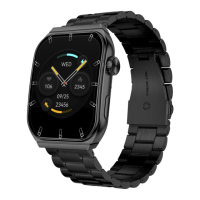
1.3 Diagram
1. Screen
2. Microphone
3. Strap attachment
4. Dial button
5. Speaker
6. Magnetic charging port
7. Inferior button
Question and Answer IconNeed help?

Do you have a question about the KSIX Olympo and is the answer not in the manual?

Overview

The KSIX Olympo BXSW20N Smartwatch is a versatile wearable device designed for daily use, offering a blend of health monitoring, communication, and smart features. It comes with two interchangeable straps (one silicon and one stainless-steel) to suit different styles and occasions.

Function Description:

The Olympo Smartwatch serves as a comprehensive personal assistant, integrating health tracking, communication, and various smart functionalities. It allows users to make and receive calls directly from the watch, manage notifications from various apps (WhatsApp, Gmail, Instagram, Twitter, LinkedIn, etc.), and control music playback on their paired smartphone. Voice assistants are supported for hands-free operation. For health and fitness, it includes a sport monitor, activity tracker (steps, calories, distance), heart rate meter, blood pressure meter, blood oxygen saturation meter, sleep monitor, stress meter, menstrual cycle tracker, breathing exercises, and sedentary reminders. Additional features include an alarm, calculator, stopwatch, timer, weather updates, calendar, remote camera control, anti-lost function, and a flashlight.

Important Technical Specifications:

  • Display: 1.96" AMOLED multi-touch screen with a resolution of 410 x 502 pixels.
  • Battery: 260 mAh Lithium polymer.
  • Charging: 5V-0.5A / 50-60 Hz. Full charge takes approximately 3 hours.
  • Connectivity: Bluetooth 5.3 + BLE 3.0.
  • Compatibility: Android 5.1 / iOS 12.0 and later versions.
  • App: Smart-Time Pro.
  • Housing Material: Zinc alloy.
  • Display Material: Reinforced Panda Glass.
  • Straps: 1 silicon strap and 1 stainless-steel strap, both with a stainless-steel buckle.
  • Protection Rating: IP67 (submersible 1 meter for 30 minutes).
  • Dimensions: 51 x 38 x 12.3 mm.
  • Strap Width: 22 mm.
  • Wrist Closure Diameter: 15 to 23 cm.
  • Weight: 40 g.
  • Autonomy: Up to 5 days in normal use, up to 2 days in intensive use.
  • Built-in: Microphone and speaker.
  • Languages: English, Spanish, French, German, Italian, Portuguese, Dutch, Polish, Hungarian, Greek, Czech, Slovak, Danish, Norwegian, Swedish, Finnish, Turkish, Japanese, Chinese, Serbian, Hindi, Vietnamese, Arabic, Indonesian, Romanian, Bulgarian, etc.

Usage Features:

Initial Setup:

  1. Download the App: The compatible app, Smart-Time Pro, can be downloaded from Google Play or the App Store, either by searching for it or by scanning a QR code found in the smartwatch's main menu.
  2. Register in the App: Access the app, accept its terms of use, select your region, and then sign up using a Google account. Fill in all requested personal information and accept all app permissions for optimal performance.
  3. Pairing Devices: Enable Bluetooth on your smartphone. In the Smart-Time Pro app, go to the device section ("Add device") and tap on "OLYMPO." Accept the pairing message that appears on the smartwatch. Ensure all permissions are accepted during the initial setup.

Smartwatch Navigation:

The Olympo smartwatch is designed for intuitive use:

  • Screen Swipe:
    • Swipe left to access the quick access menu, displaying health and sport functions. Users can customize this menu by swiping right until a "+" icon appears, then selecting desired features.
    • Swipe right to access the auxiliary menu, showing weather, alarm, date, and recently accessed functions.
    • Swipe up to access the settings menu, which includes practical functions (alarm, calculator, calendar) and key smartwatch settings (brightness, do not disturb mode, binding state).
    • Swipe down to view app notifications, missed calls, text messages, and other alerts.
  • Dial Button: Press to access the main menu, where all functions are available by tapping their icons. Spinning the dial button changes the watch's theme. A 2-second press accesses "Power off" and "SOS" options.
  • Inferior Button: Press to access the sport monitoring function. A 2-second press displays all background functions in standby, allowing users to access or discard them to free up RAM.

Key Functions:

  • Changing Watch Face: Three methods: spinning the dial button, long-tapping the main screen and swiping, or selecting from the "Watch Face Gallery" in the Smart-Time Pro app. Users can also design custom watch faces with their own pictures or videos.
  • Calls:
    • Receiving/Answering/Rejecting: Ensure call notifications are enabled. Calls appear in real-time with sound/vibration. Green icon accepts, red icon rejects. The built-in microphone and speaker allow hands-free conversation.
    • Making Calls: Call contacts synchronized from the smartphone via the "frequent contact" option in the app. Use the dialpad to enter numbers. View call records (made, received, lost) and redial from there.
  • Notifications: Displays notifications from various apps. Swipe down on the main screen to access.
  • Voice Assistants: Compatible with voice assistants once synchronized and all accesses are enabled in the app. Access from the main menu by tapping the blue/purple icon.
  • Music Control: Control music playback (play/pause, skip tracks, adjust volume) from the smartwatch's main menu (musical note icon). All audio files from the paired smartphone will play on the smartwatch. To prevent this, disable "media audio" in the smartphone's Bluetooth settings for the Olympo device.
  • Remote Camera Control: Take pictures remotely from the smartphone. Access the camera icon in the smartwatch's main menu; the smartphone will display its camera if unlocked and paired.
  • Anti-lost Function: Tap the green radar icon in the smartwatch's main menu, then tap again to make the paired phone ring.
  • Other Functions: Alarm, calculator, stopwatch, timer, weather, calendar.

Health Features:

  • Sports: Monitor various sports (running, cycling, basketball, football, hiking, free training). Real-time data (heart rate, steps, calories, time) is displayed. Can be accessed via quick access menu or Smart-Time Pro app.
  • Activity Tracker: Automatically records steps, burned calories, and distance. View via the main menu (blue, green, pink circles icon) or quick access menu. Data also appears in the Smart-Time Pro health section.
  • Heart Rate Meter: Automatic heart rate monitoring, enabled via the Smart-Time Pro app. Measure instantly by tapping the red heart icon in the main menu. Data displayed in Smart-Time Pro health section.
  • Blood Pressure Meter: Measure instantly by tapping the orange stethoscope icon in the main menu. Press "play" and remain still. Data displayed in Smart-Time Pro health section.
  • Blood Oxygen Saturation Meter: Measure instantly by tapping the white icon (blue and red semicircles) in the main menu. Remain still for a few seconds. Data displayed in Smart-Time Pro health section.
  • Sleep Monitor: Tracks sleep time and quality. More detailed data (deep, light, awake sleep, weekly/monthly records) available in the Smart-Time Pro app. Access via main menu (blue bed icon) or quick access menu.
  • Menstrual Cycle: Set reminders and track cycle length, menstrual length, and reminders via the "Period Tracker" option in the Smart-Time Pro app. Calendar with data displayed in the app.
  • Sedentary Reminder: Configure reminders to maintain an active lifestyle via the Smart-Time Pro app (time span, frequency). Reminders appear on the smartwatch.

Maintenance Features:

  • Charging: Use the included 60 cm USB-A cable with a magnetic charging base. Connect the USB-A to a charger, computer, or power bank, and ensure the magnetic base properly attaches to the watch's back.
  • Strap Attachment/Removal:
    • Sport Strap: To remove, slide the metal piece out of its hole. To attach, insert the metal piece into one end, slide it through the other, and ensure it clicks into the case hole.
    • Formal Strap: Similar to the sport strap for attachment and removal.
    • Shortening/Elongating Formal Strap: Remove the strap from the watch. Rotate the alignment tool counterclockwise to make space. Align the desired strap piece's hole with the tool's pin, rotate clockwise until the pin is inserted and the metal pin comes out. To elongate, reverse the process, using the round end of the tool as a hammer to fully slide the metal piece.
  • Troubleshooting:
    • If the app cannot find the device, power off and restart the smartwatch.
    • If the device connects and disconnects quickly, check for obstructions between the device and phone. Metal jewelry may interfere with connection stability.
    • If call management functions do not work, check Bluetooth settings on the smartphone to ensure proper pairing. If not, unpair and re-pair via the Smart-Time Pro app.
    • If the device does not charge, check for a dirty or rusted charging port.

Exemption Clause:

The Olympo smartwatch's heart rate and blood pressure data should not be used for medical or diagnostic decisions. Only qualified medical personnel can diagnose and treat cardiovascular diseases. Data may be inaccurate due to signal interference, improper placement, weather, or physiological changes. Do not modify medication or medical treatment based on smartwatch data; follow authorized medical personnel's instructions. The manufacturer is not responsible for data inaccuracy or consequences of its use.
KSIX Olympo Specifications

General IconGeneral
BrandKSIX
ModelOlympo
CategoryWatch
LanguageEnglish

Related product manuals