EasyManua.ls Logo

KSV Sigma 70 - System Diagnostics; Calibration

Default Icon
108 pages
Print Icon
To Next Page IconTo Next Page
To Previous Page IconTo Previous Page
Loading...
System
Diagnostics
/
Calibration
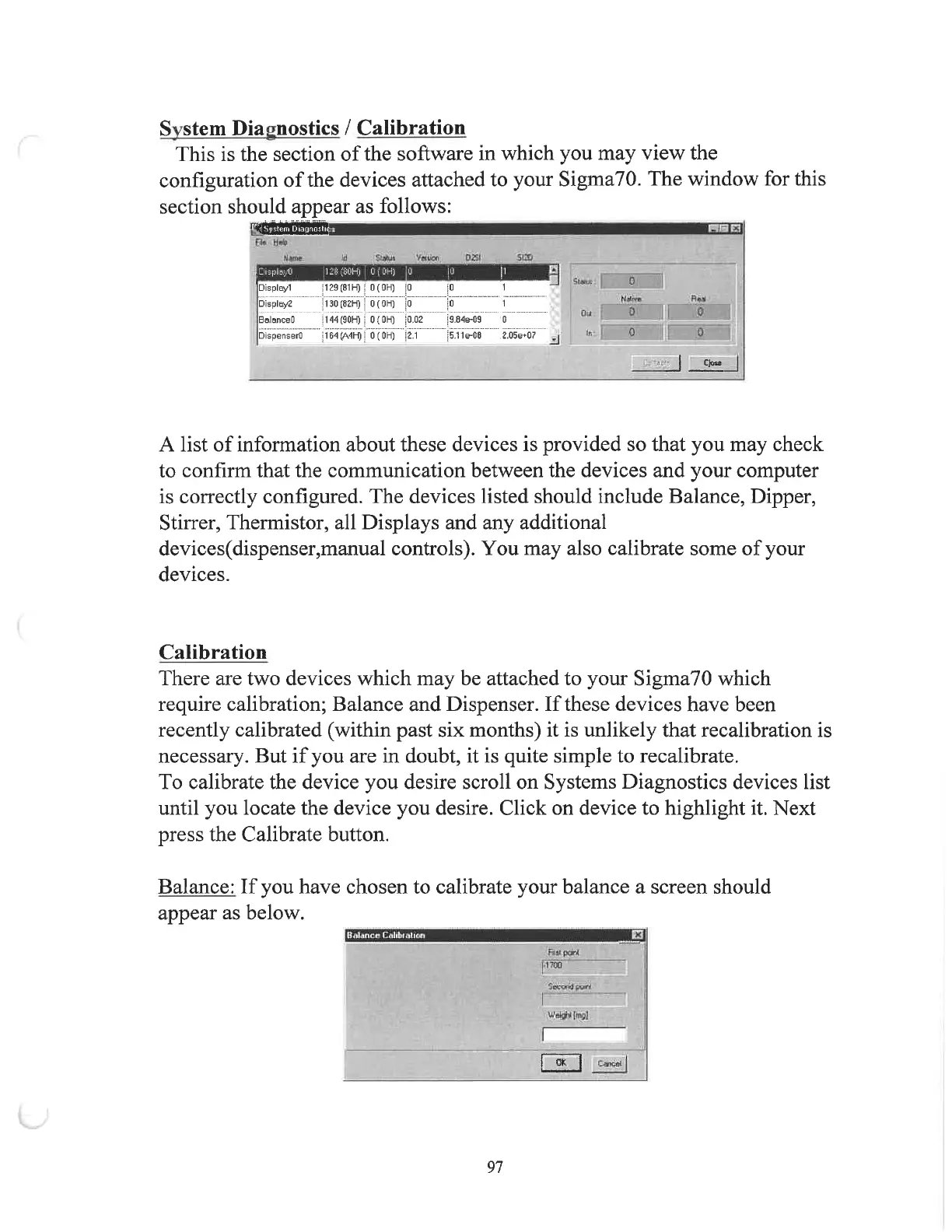
This
is
the
section
of
the
software
in
which
you
may
view
the
configuration
of
the
devices
attached
to
your
Sigma
70
.
The
window
for
this
section
should
appear
as
follows
:
L r i x i
Jijistem
Diagnoslic
i
SCD
0251
Id
S
>
*
ui
VMUOD
Uttnt
1128
(
80
H
)
0
(
OH
)
,
0
.
DisplayO
0
Sl
«
RA
1
Display
!
Display
2
BalanceO
DispenserO
1129
(
81
H
)
{
0
(
0
H
)
|
0
[
l
30
(
82
H
)
f
0
(
0
H
)
[
0
\
i
'
AA
(
90
H
)
fo
(
OH
)
j
0
02
jlMOMhO
i
"
0
(
0
H
)
|
2
.
i
1
0
0
O i
9.84
e
-
09
0
0
0
Ir
.
5.11
e
-
08
2
.
Q
5
e
+
07
Cjoss
A
list
of
information
about
these
devices
is
provided
so
that
you
may
check
to
confirm
that
the
communication
between
the
devices
and
your
computer
is
correctly
configured
.
The
devices
listed
should
include
Balance
,
Dipper
,
Stirrer
,
Thermistor
,
all
Displays
and
any
additional
devices
(
dispenser
,
manual
controls
)
.
You
may
also
calibrate
some
of
your
devices
.
Calibration
There
are
two
devices
which
may
be
attached
to
your
Sigma
70
which
require
calibration
;
Balance
and
Dispenser
.
If
these
devices
have
been
recently
calibrated
(
within
past
six
months
)
it
is
unlikely
that
recalibration
is
necessary
.
But
if
you
are
in
doubt
,
it
is
quite
simple
to
recalibrate
.
To
calibrate
the
device
you
desire
scroll
on
Systems
Diagnostics
devices
list
until
you
locate
the
device
you
desire
.
Click
on
device
to
highlight
it
.
Next
press
the
Calibrate
button
.
Balance
:
If
you
have
chosen
to
calibrate
your
balance
a
screen
should
appear
as
below
.
3
Bul
/
inrr
Crtlibi
.
ihoo
FMI
por
4
11700
WeJ
^
Imgl
QK
|
|
97