Need help?
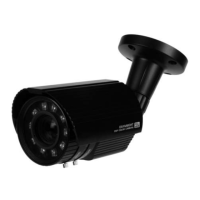
Do you have a question about the KT&C KEZ-c2BR28V12XIR and is the answer not in the manual?
Details FCC compliance requirements, conditions, and potential interference issues.
Explains CE marking and compliance with EU directives.
Defines warnings for serious injury/death and cautions for equipment damage.
Details electrical safety, input voltage, power supply, mounting, and emergency procedures.
Discusses lens protection, avoiding bright light, laser energy, environmental limits, and repair.
Illustrates camera components and shows the location of the dip switch and menu button.
Ensures the camera is in good condition and related equipment is powered off before installation.
Instructions for attaching the drill template, securing the camera, and connecting cables.
Details on how to loosen screws and adjust pan, tilt, and rotation for camera positioning.
Visual guide to the 3-axis adjustment points on the camera bracket.
Explains the function of the dip switch for controlling WDR and CVBS output.
Describes how to adjust the varifocal lens for optimal focus using test monitor or OSD.
Explains how to access the OSD menu using the joystick or "Up the Cable" function.
Covers PTZ menu, configuration screen, protocol settings, and Up-the-Cable control notes.
Details Video Out, Language, Setup, Exposure, BLC, WDR, WB, Day/Night, and NR settings.
Covers Special functions like Camera Title, Motion Detection, Privacy Mask, and Adjustments like Sharpness, Reset, and Exit.
 General
| Brand | KT&C |
|---|---|
| Model | KEZ-c2BR28V12XIR |
| Category | Security Camera |
| Language | English |

 To Next Page