Product Introduction
It is o kind of high-performance intelligent multiple frequency scanning display, which adopts active
matrix thin film transistor LED-bocl<lit LCD. The display is controlled through the microcomputer MCU
digital technology. It is compact and lightweight, which is suitable for narrow working spaces.
Before installation, please check whether the following articles are complete in the pocking box:
- LCDx1
Bosexl
Power Cordxl
- Power Adopterxl
- Warranty Cordxl
- Signal Coblexl
- User Guidexl
If any of above product is missing, please contact with product distributor immediately.
Notice: Specific accessories in order to prevail in kind. Please keep pocking materials for future movement.
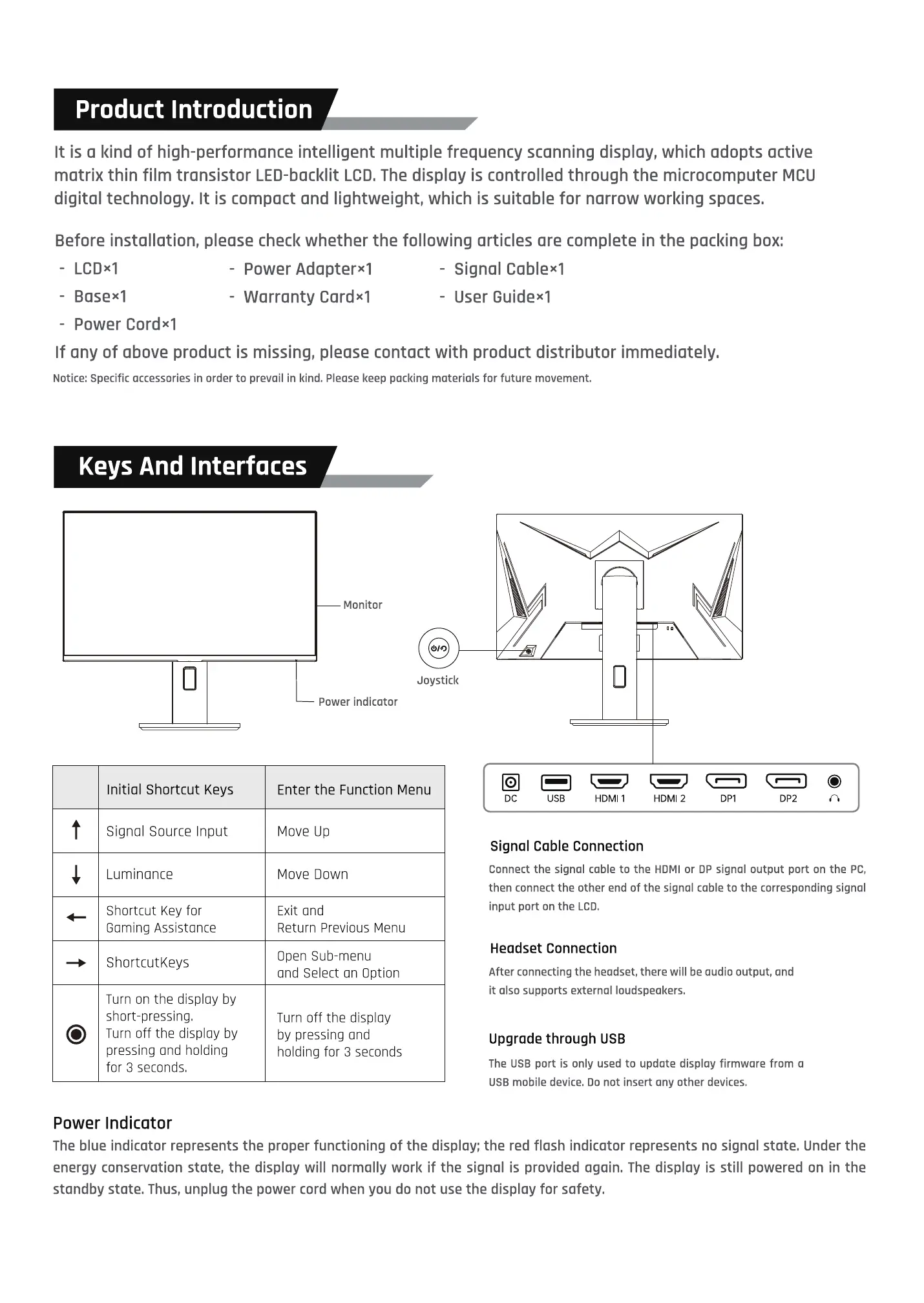
Keys And Interfaces
Monitor
Joystick
Initial Shortcut Keys
Signal Source Input
Luminance
Shortcut Key for
Gaming Assistance
ShortcutKeys
Turn on the display by
short-pressing.
Turn off the display by
pressing ond holding
for 3 seconds,
Power Indicator
Power indicator
Enter the Function Menu
Move Up
Move Down
Exit and
Return Previous Menu
Open Sub-menu
and Select on Option
Turn off the display
by pressing and
holding for 3 seconds
DC USB HDMI 1 HDMI 2 DPI DP2
Signal Coble Connection
Connect the signal coble to the HDMI or DP signal output port on the PC,
then connect the other end of the signal cable to the corresponding signal
input port on the LCD.
Headset Connection
After connecting the headset, there will be audio output, and
it also supports external loudspeakers.
Upgrade through USB
The USB port is only used to update display firmware from a
USB mobile device. Do not insert any other devices.
The blue indicator represents the proper functioning of the display; the red flash indicator represents no signal state. Under the
energy conservation state, the display will normally work if the signal is provided again. The display is still powered on in the
standby state. Thus, unplug the power cord when you do not use the display for safety.


 To Next Page
 Loading...