1.2 Packing List
Before installation, please check whether the following articles are complete in the packing box:
- LCDx1
- DP Signal Cablexl
- power cordxl
- power Adapterxl
- Warranty Cordxl
- screwdriverxl
- QSGx1
- Bose and mounting screws (Max16 * 2)
If any of above product is missing, please contact with product distributor immediately.
Notice: Specific accessories in order to prevail in kind. Please keep packing materials for future movement.
2.1nstallation and Connection
2.1 Display Installation
Installation Guide
-The display should be installed near an AC power socket that can be easily pluggable.
-It is recommended to use suitable wall mount brackets or a base for safety purpose.
-TO prevent injury, the display should be placed on a smooth horizontal plane, or fixed on a firm wall.
-If you need to install it on o wall, it should be done by professional technicians. The improper
display installation may cause instability.
-DO not place the display where it may be suffered from mechanical vibration.
-Do not place the display where insects may enter.
-Do not place the display directly facing an air conditioner, or the internal panel may condense,
leading to faults.
-Do not place the display where there is o strong electromagnetic field, or it will be interfered with
and damaged by the electromagnetic waves.
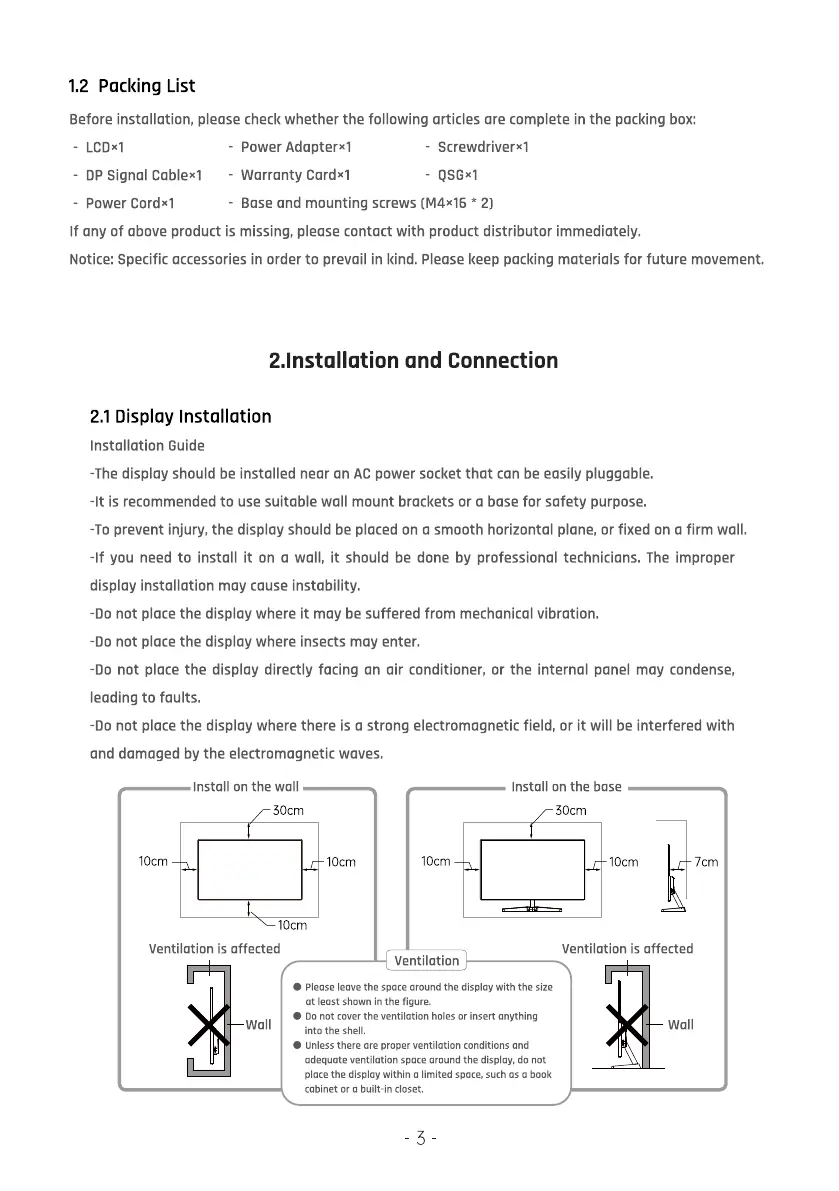
10cm
Install on the wall
socm
1Ocm
1Ocm
IOcm
Ventilation
Install on the base
30cm
Ocm
Ventilation is affected
7cm
Ventilation is affected
please leave the space around the display with the size
at least shown in the figure.
00 not Cover the ventilation holes or insert anything
wall
into the shell.
Unless there ore proper ventilation conditions and
adequate ventilation space around the display, do not
place the display within a limited space, such as o book
cabinet or a built-in closet.
5
wall


 To Next Page
 Loading...