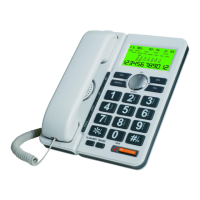
Operating Instructions
1. Tone/Pulse dialing select:
1.1 This phone’s default setting is touch dialing service.
1.2 You could press and hold */. key for a few seconds to select
“Pulse” rotary dialing service., LCD display “PULSE”
2. How to receive calls
2.1 When there is an incoming call, there is a ringer tone.
2.2 To answer the call, either pick up the handset or press the
key to start the converstaion.
3. How to make phone calls
3.1 Pick up the handset or press , listen to a dial tone.
3.2 Enter the desired numbers
3.3 To end the converstion, return the handset to the cradle or
press key.
4. Set date and time
4.1 Press and hold SET over 3 seconds , LCD shows “ set 1 date”
4.2 Press SET again, the “year” on the LCD begins to flash.
4.3 Press UP or DOWN to set the “year”
4.4 Press SET again, the “month” on the LCD begins to flash.
4.5 Press the UP or DOWN to set the “month”
4.6 Repeat the same steps to set the “hour” and “minute”
5. Area code setting
5.1 Press and hold SET key over seconds, then press UP .
5.2 LCD shows “set 2 code”
5.3 Press the SET key again, the LCD show “code- - - -”
5.4 Press the UP or DOWN to set first digit of area code.
5.5 Press SET to confirm, then press the UP or DOWN to set the
other digits of area code.
5.6 Press SET to confirm and exit. Area code setting service
should be in compliance with local telecom service.
12


 To Next Page
 Loading...