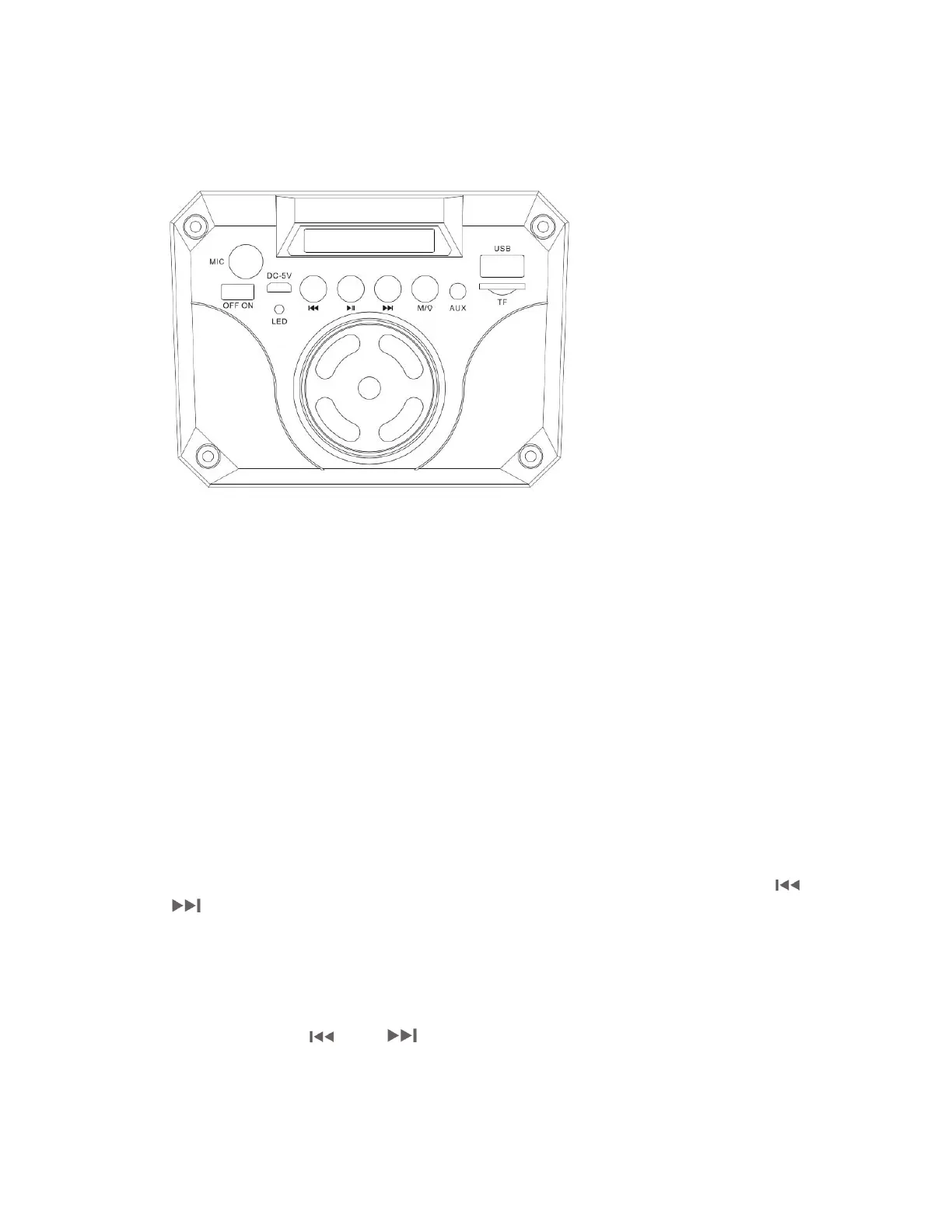
Description of parts
1. LED display
2. Microphone jack
3. Power ON/OFF
4. Charging port
5. Previous track
6. Play/Pause
7. Next track
8. M button
9. AUX-IN jack
10. USB slot
11. Micro SD(TF) card slot
12. Vol--/ Vol+
Wireless
Turn on the speaker and it will come into the wireless mode directly. After pairing
the device, it can play the music. Short press“ll”
button to Play/Pause, press " "
or "
" button to previous track or next track. Revolve the knob to turn down and
turn up the Volume.
AUX-IN
AUX-IN, Insert the audio cable into AUX slot, and press M button to switch to Aux-in
mode. Long press "
"or" "buttontoincreaseordecreasetheVolume.
Under AUX-IN status, it cannot shift previous track or next track by the speaker unit,
only can control it by the device itself.


 To Next Page