
 Need help?
Do you have a question about the KTS KTS-1042 and is the answer not in the manual?
Lists all items included in the speaker package, such as wireless speaker, manuals, cables, and microphone.
Details the device's technical capabilities including operation range, battery, output power, frequency response, and input types.
Identifies and labels the physical components and ports on the speaker unit for user reference.
Explains how to connect and play music via wireless mode, including play/pause and volume control.
Details the process for connecting and playing audio via the AUX-IN port, including mode switching.
Instructions for playing music from USB flash drives or Micro-TF cards, including playback controls.
Guide to searching, scanning, and controlling FM channels, including volume adjustment.
Information on connecting a microphone for karaoke use via the MIC port.
Steps for charging the speaker's built-in battery and indicator light status.
Explains the unit on/off function and how to cycle through different input modes (USB, TF, AUX, FM, Wireless).
Details how to control track/channel selection, play/pause, mute, and volume using the remote.
Instructions for changing the equalizer settings and turning the LED light on or off.
Provides compliance information, usage conditions, and guidelines for preventing harmful interference.
This document provides the user manual for the KTS-1042 speaker, detailing its functions, specifications, and usage instructions.
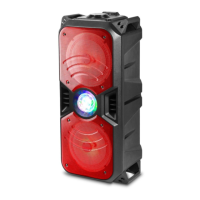
The KTS-1042 is a versatile wireless speaker designed for audio playback from various sources. It supports wireless connectivity for streaming music, as well as playback from USB flash drives and Micro SD (TF) cards. Additionally, it features an AUX-IN port for connecting external audio devices via a 3.5MM audio cable and includes an FM radio function for listening to broadcast stations. The speaker is equipped with a microphone jack, allowing for karaoke use with a wired microphone. It also comes with a remote control for convenient operation.
The KTS-1042 speaker offers multiple modes of operation and control options:
Upon turning on, the speaker defaults to wireless mode. After pairing with a device, music can be played. Short press the "►II" button to play/pause. Use the "◄◄" or "►►I" buttons to navigate previous or next tracks. The volume knob controls the output volume.
Insert the audio cable into the AUX slot and press the "M" button to switch to AUX-IN mode. Long press the "◄◄" or "►►I" buttons to increase or decrease the volume. In AUX-IN mode, track navigation is controlled by the connected device, not the speaker unit.
Insert a U flash memory or Micro-TF card into the respective slot. The speaker will automatically read and play MP3 format music. Use the "►II" button for play/pause and "◄◄" or "►►I" buttons for previous/next track. The volume knob adjusts the volume.
Press the "M" button to automatically search for FM channels. This process scans and pre-records all available stations to memory and may take several minutes. Once complete, short press "◄◄" or "►►I" buttons to move forward or backward through channels. Long press "◄◄" or "►►I" buttons to increase or decrease the volume.
Insert the wired microphone cable into the MIC port to use the karaoke feature.
The included remote control provides convenient access to various functions:
To charge the speaker, plug the USB cable into the speaker's charging port and connect it to a power source. A red LED on the panel will illuminate to indicate that the device is charging.
The device complies with Part 15 of the FCC Rules, ensuring it does not cause harmful interference and accepts any interference received. Users are advised to reorient or relocate the receiving antenna, increase separation between equipment and receiver, connect equipment to a different circuit, or consult a dealer/technician if interference occurs. Unauthorized modifications to the device are not permitted and may void the user's authority to operate the equipment.

 To Next Page
 General