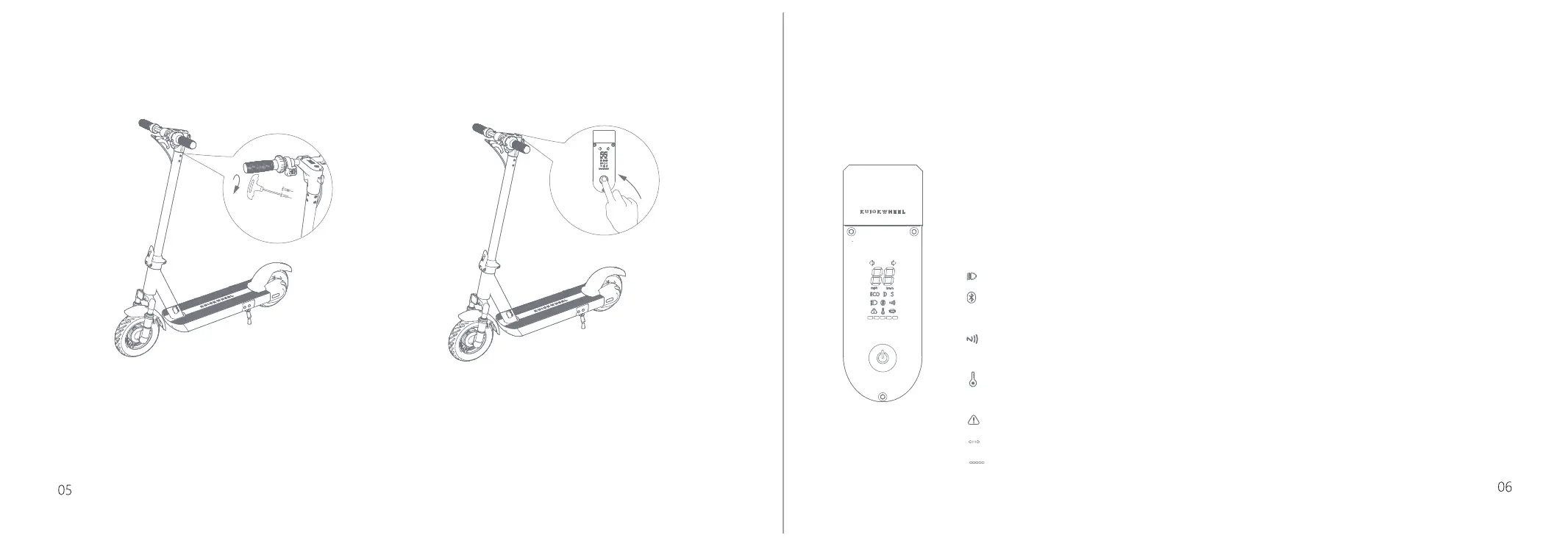
3 4
3.Use the hexagon wrench in the box to
tighten the screws on both sides and the
back of the handlebars.
4.After the installation is complete,
detect by switching on and off.
3
DASHBOARD OPERATION
1:Power Switch: S1-C(without NFC): Long press to power on; S1-C Pro(with NFC): short press to power on, then the scooter
information will be displayed on the dashboard. Drive after unlocking the scooter by using NFC card, otherwise you cannot drive
the scooter. Long press to power off.
2:Mode Selection: 3 driving modes are available, which respectively are ECO mode (enegry-saving), D mode (Standard), and S
mode (Sports). Single click to switch the mode.
3:Speedometer: Indicates the current speed. Also displays error codes when faults are detected.
4: LED Lighting: Double-click to turn on.
5: Bluetooth: A solid Bluetooth icon indicates that the vehicle is connected to a mobile device. You can view the vehicle status
after connecting to the APP via Bluetooth.
6: NFC (optional function): When the NFC card is close to the display panel, the NFC logo on the panel will light up, and the
buzzer will beep to indicate successful unlocking.
7: Over-temperature Display: If the internal temperature of the controller and motor is too high during the operation of the
vehicle, the panel will promptly display an over-temperature alarm.
8: Failure Alarm: When the controller fails, the alarm symbol will light up to warn.
9: Left and right turn signals: the left turn signal lights up when turning left, and so is the right side.*All S1-C Pro models
10: Power display: when the power is more than 85%, the display is full, and it will gradually go out as the power drops.
Tips: When installing the screws, please install all
the 6 screws on 1/2 of the pole, and then tighten them
separately to prevent the front part from warping.


 To Next Page