28 29
KDW4752
EN
dishwasher
Switching on
1. Open the tap, if it is closed.
2. Close the door.
3. Make sure the spray arms are not obstructed.
4. Switch the dishwasher on using the “ Start/Pause “ button.
Cancel/Change the program
Note: a cycle that is underway can only be modied if it has only
been running for a short time. Otherwise, the detergent may have
already been released, and the appliance may have already drained
the wash water. Should this be the case, the detergent dispenser
must be relled (refer to section “Fill in the Detergent”).
Open the door and press the power button for more than 3 seconds
to turn off the machine and cancel the program. When you restart the
machine, you can change the program to the desired cycle setting
(refer to section “Starting a washing programme”).
NOTE: if you open the door during a washing programme, the
machine pauses, a warning alarm will ring and the display will show
E1. When you close the door, the dishwasher will resume working.
Forget to add a dish
Dishes can be added any time before the detergent container opens.
1. Slightly open the door to stop the washing programme.
2. After the spray arms stop working, open the door completely.
3. Add the dishes.
4. Close the door. The dishwasher will resume work after 10 seconds.
WARNING!
It is dangerous to open the door when washing, as hot water may
scald you.
Switch Off the Dishwasher
The digital display shows “--”, only in this case the programme has
ended.
1. Switch off the dishwasher by pressing the ON/OFF button.
2. Turn off the water tap!
2.3. Maintenance
Filtering System
The lter is used to avoid large residues
and other sundries from getting inside the
pump, as they can obstruct the lter.
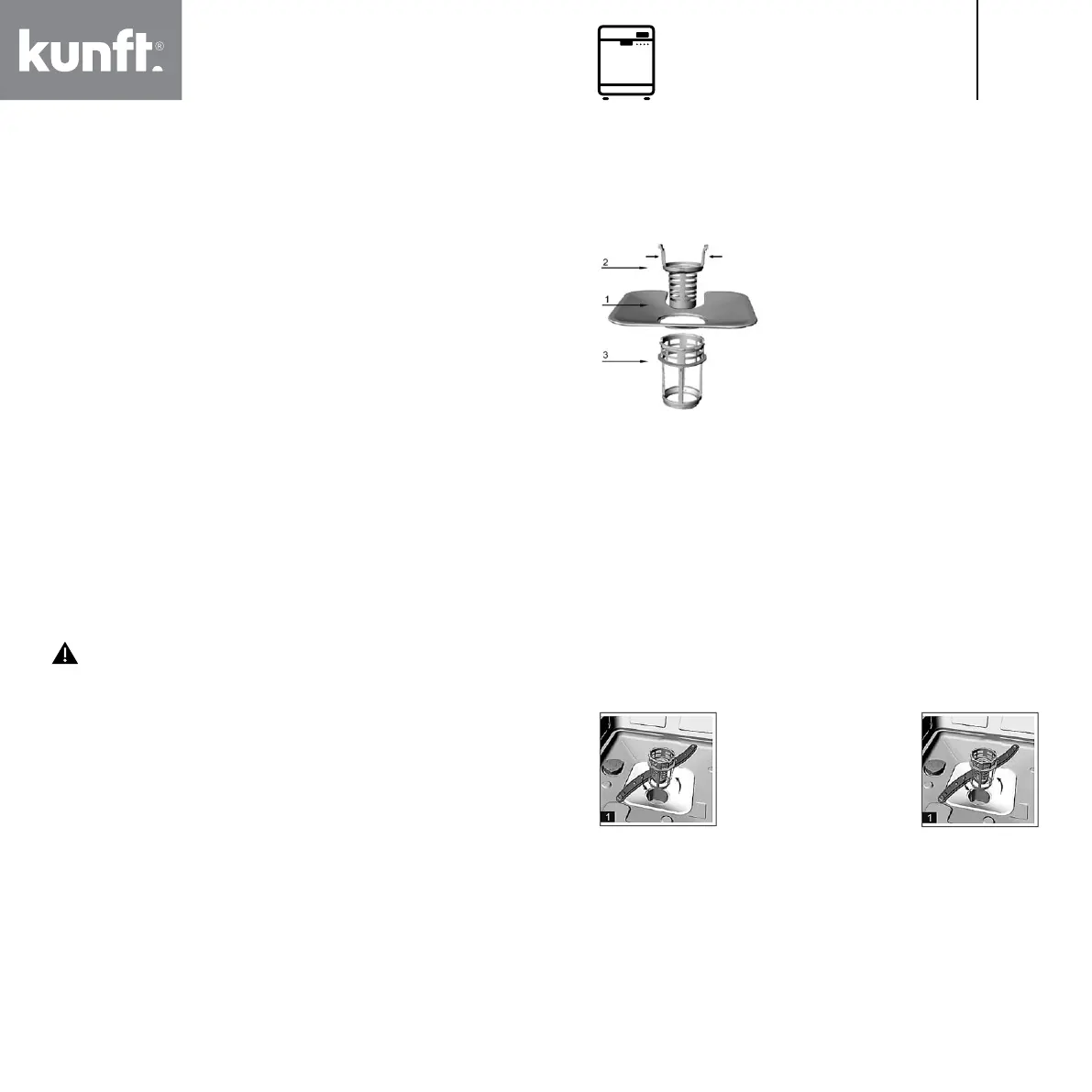
The lter system consists of a coarse
lter, a at (main lter) and a micro lter
(ne lter).
1. Flat lter
Food and debris will be trapped by a
special jet on the lower spray arm.
2. Coarse lter
Larger debris, such as bone and glass that could clog the drain, will
be trapped in the coarse lter.
To remove an item caught in this lter, gently squeeze the taps on
the top of this lter and lift it out.
3. Micro lter
This lter holds soil and food residue in the sump area and
prevents it from being redeposited on the dishes during a washing
programme.
- Inspect the lters for obstructions after each use of the
dishwasher.
- By unscrewing the coarse lter, you can remove the lter system.
Remove any food remnants and clean the lters under running
water.
Step 1. Rotate the coarse
lter counter-clockwise
and lift it up.
Step 2: Lift the at lter.
NOTE: If operate from step 1 to step 2, the lter system will be
removed; while operate from step 2 to step 1, the lter system will
be installed.
Filter assembly
For best performance and results, the lter assembly must be
cleaned. The lter efciently removes food particles from the wash
water, allowing it to be recirculated during the cycle. For this reason,
it is a good idea to remove the larger food particles trapped in the


 To Next Page
 Loading...