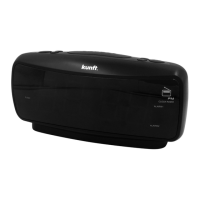
The Kunft KTCR3848 is a clock radio designed for household use, offering FM radio functionality, dual alarm settings, and a sleep timer.
Function Description
The primary function of this device is a clock radio with an FM tuner. It allows users to set two independent alarms, which can be configured to wake up to either the radio or a buzzer sound. The clock radio also features a sleep timer, allowing users to fall asleep to the radio, which will automatically turn off after a set period.
Important Technical Specifications
- Power Source: The unit operates on AC power (230 V~ 50 Hz).
- DC Backup: It includes a DC backup system, requiring 3 V batteries (2 x AAA/LR03) to maintain time and alarm settings during a power outage. It's important not to mix old and new batteries, or different types of batteries (alkaline, carbon-zinc, ni-cad, ni-mh).
- FM Radio: The device has an FM radio tuner with a memory function to store up to 10 preset radio stations.
- Alarm Functions: Dual alarm function (Alarm 1 and Alarm 2) with options for radio or buzzer wake-up.
- Snooze Function: A snooze button delays the alarm for an additional 9 minutes.
- Sleep Timer: Customizable sleep timer settings (90, 80, 70, 30, 20, 10 minutes, or OFF).
Usage Features
Setting the Clock:
- If the unit is in Radio mode, press and hold the power button to turn it off.
- Press and hold the TIME/MEM button until the display blinks, then release.
- Use the HOUR button to adjust hours.
- Use the MIN button to adjust minutes.
- Press the TIME/MEM button to confirm the time setting.
Playing the FM Radio:
- Press the power button to turn the clock radio on.
- Use the TUN+ and TUN- buttons to adjust to the desired frequency.
- Press and hold TUN+ or TUN- to search for the next available frequency.
- Adjust the volume using the VOL+/- buttons.
- Press and hold the power button to turn the radio off.
Radio Reception:
- Adjust the position of the FM antenna to improve radio reception.
Saving a Station as a Preset:
- Tune to the desired FM station.
- Press and hold the TIME/MEM button.
- Use the TUNE+/- buttons to select a program location (P01 to P10) to save the station.
- Press TIME/MEM again to confirm the storage of the current radio station as a preset. Up to 10 stations can be stored.
Tuning to a Preset Radio Station:
- Ensure the radio is on.
- Press the TIME/MEM button repeatedly to cycle through and select a preset radio station.
Setting the Alarm:
- If in Radio mode, press and hold the power button to turn the unit off.
- Press and hold either the AL1 or AL2 button.
- Use the HOUR button to adjust hours.
- Use the MIN button to adjust minutes.
- Press the AL1 or AL2 button again; the corresponding Alarm 1 or Alarm 2 indicator will light up.
- Press the AL1 or AL2 buttons repeatedly to switch between Radio, Buzzer, or Off for the alarm sound.
- If the alarm is set to Radio and sounds, the VOL+/- buttons can be used to adjust the alarm volume.
- The alarm will beep once the set time is reached. To set another alarm, repeat the steps and choose the other alarm.
Cancelling the Alarm:
- Follow the steps for setting the alarm.
- Press the AL1 or AL2 buttons repeatedly until its indicator light turns off.
Snooze Function:
- When the alarm sounds, press the SNOOZE button to delay it for an additional 9 minutes.
- Alternatively, press the power button to turn off the alarm until the next set alarm time.
Sleep Timer Function:
- If in radio mode, press the SLEEP button repeatedly to set the sleep timer duration (90, 80, 70, 30, 20, 10 minutes, or OFF).
- The clock radio will automatically turn off the radio once the set sleep time has expired.
Maintenance Features
Cleaning:
- Before cleaning, ensure the appliance is switched off and unplugged from the main power supply.
- Allow the unit to cool down before cleaning.
- Use only a dry, soft cloth to clean the exterior of the product.
- Do not immerse the appliance in water for cleaning.
Battery Replacement:
- Replace the backup batteries if the device is not used for a prolonged period (more than 1 month) to prevent leakage.
- Remove batteries to avoid battery acid leakage if the device is not in use.
General Precautions:
- Avoid using the appliance in humid places or exposing it to water to prevent fire hazard or electric shock.
- Do not tangle or pull the power cord to disconnect the appliance, and keep it away from warm surfaces.
- Never use the appliance if the cable or socket is damaged; take it to Customer Support Service for replacement.
- Any damage caused by manual modifications to the product is not covered by the warranty and voids it.
- Repairs and maintenance should only be carried out by authorized professionals.
- The appliance is designed for household use only; using it for other purposes or incorrect connection may damage the product and void the warranty.
Environmental Protection:
- The packaging materials (cardboard, paper, plastic) are designed for easy sorting and recycling.
- The appliance itself is manufactured using recyclable materials and should be disassembled by a specialized company for recycling in accordance with local regulations.

 Need help?
 General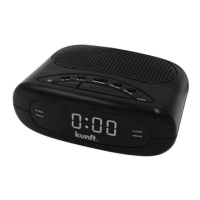

 To Next Page