Getting Started!
First Time Use
Strap
Change the theme
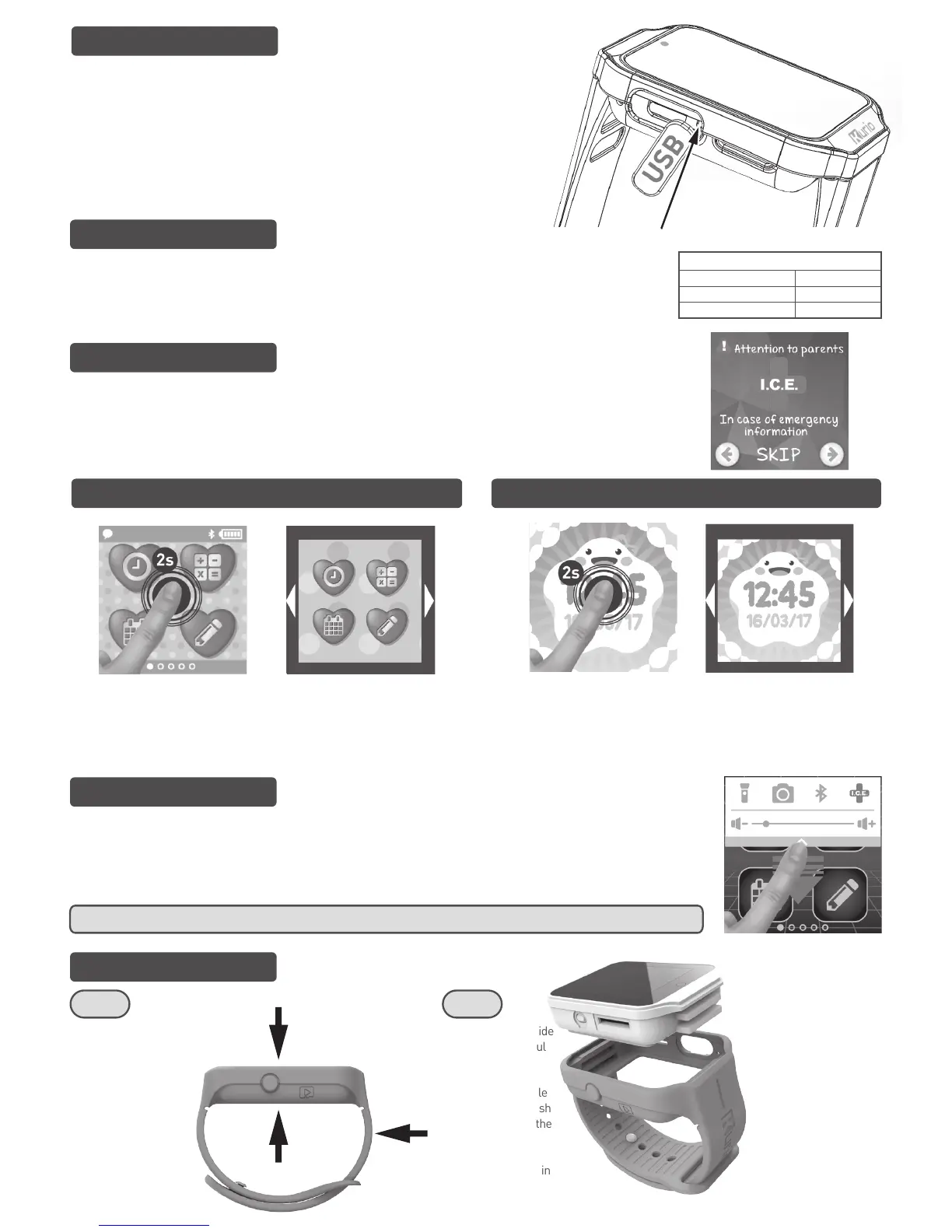
We recommend fully charging your device before use. A full charge takes about 3 hours. To charge your
KURIO Watch, connect it to a USB port with the Micro USB cable included with the product. How long the
battery lasts depends on the device usage. More frequent usage drains the battery more quickly.
Additionally, some activities require more battery consumption, such as games, videos, Bluetooth®
communication, etc.
When you launch your KURIO Watch for the first time, you will follow a quick setup guide and enter your
Child's information. Parental Supervision is ALWAYS recommended for first time use. During setup,
parents can enter their Child's personal information (blood type, medical conditions, emergency
contacts and more). In case of an emergency, this information will be easily accessible! You can edit the
personal information at any time under Settings.
To choose your preferred theme, press and hold anywhere on the
screen for 2 seconds to enter the Customisation Mode. Swipe Left or
Right to select different themes. Then press the screen when you've
found a theme you'd like to choose.
Change the Watch face
You can choose between digital and analog watch faces. To choose one
face, press and hold anywhere on the screen for 2 seconds to enter the
Customisation Mode. Swipe Left or Right to select different watch faces.
Press the screen when you've found a watch face you'd like to select.
Navigation
Swipe Left and Right to navigate the main menu. Press an icon to select it. Swipe down to display the Option bar. In
the Option bar, you can activate or deactivate the flashlight, open the Camera app, use Bluetooth®, see your
emergency information, and adjust the volume. Swipe up or press anywhere on the main screen to remove the
Option bar from displaying. The Option bar is accessible from all screens.
To remove the module
from the Watch Strap,
gently push down on
the top of the watch
and pull the
surrounding strap on
one side to release the
rubber grooves from
the module. This will
release the module
from the strap.
The module is outside
the strap. Be careful
when handling the
module alone.
To insert the module
inside the strap, push
the module inside the
strap until it is
aligned and the
grooves are locked in
to place.
Please note the
colour changing
strap will only work,
once placed on to
your wrist. The strap
will return to its
original colour after
it is removed from
the wrist.
BATTERY TIME FOR REFERENCE
Standby
Normal Use
Heavy Use
10 days
1 day
2 hours
WARNING : On many apps & games, swipe right (from left edge) to go back to previous screen.
Step 1 Step 2
WARNING
Please remove the screen protective film before turning on your KURIO Watch.
If you unfortunately find that the screen freezes during initial setup, and that the device
cannot be turned off by pressing the power button, please press the Reset button.
To do so - please note that the Reset button is located on the left-hand side of the
KURIO Watch, under the USB cover. Once you have lifted the USB cover, you will see a
small hole. Insert a paper clip in to the hole, and press once to Reset. This will
automatically restart the KURIO Watch.


 To Next Page
 Loading...