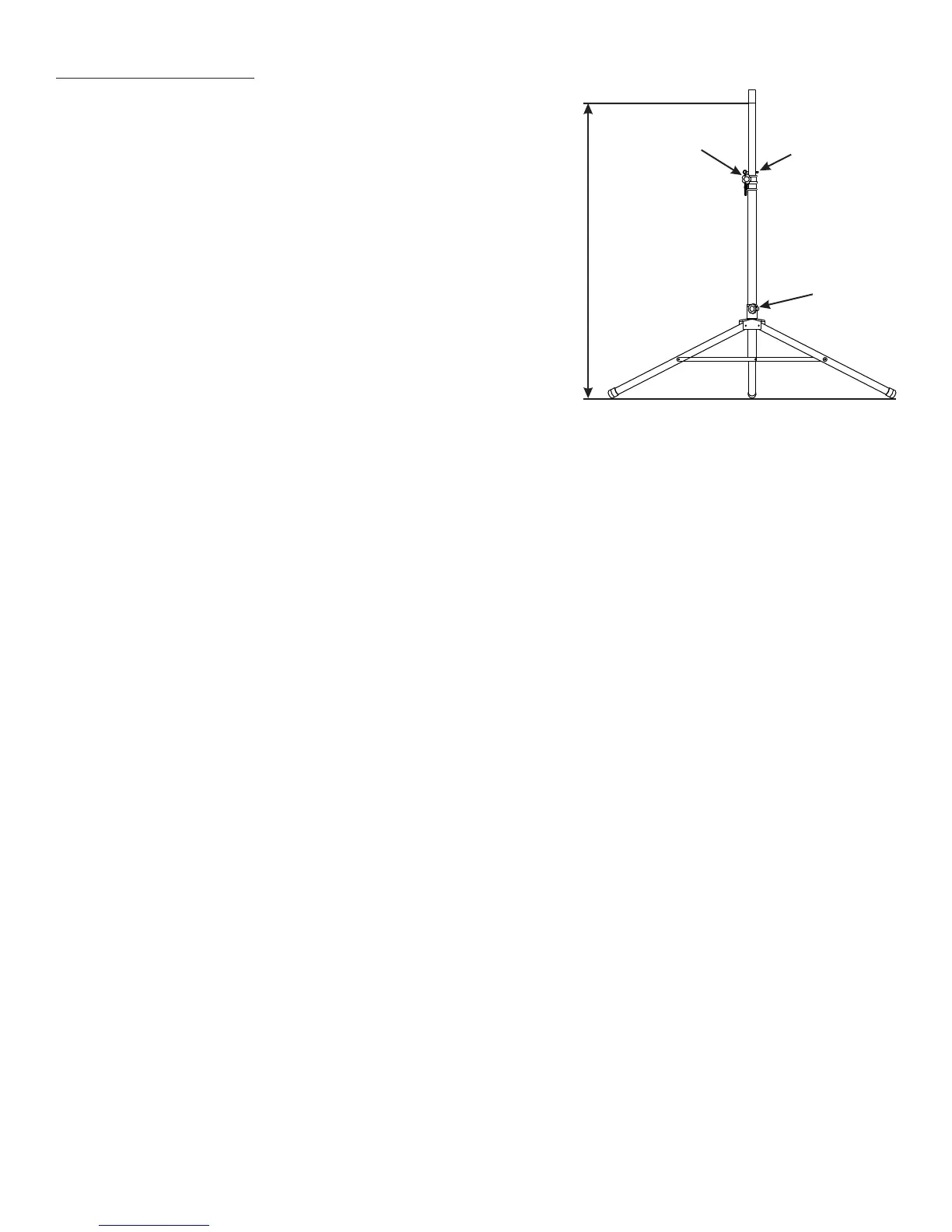
59” (150cm) Max.
Safety pin
Leg position
clamp
Height adjustment
clamp
Setup Instructions:
Making Connections:
Using with KSS1 (optional) speaker stand
•Extend the legs of the KSS1 stand to their maximum
extension position and tighten the leg position clamp.
Place the stand on stable, level ground.
•Using the internal pole, adjust the height of the stand
to a maximum of 59” (150cm). Tighten the height
adjustment clamp. Note: Always insert the safety
pin into the proper hole before placing the
speaker on the stand.
•Place speaker cabinet on the stand and tighten the
securing bolt on the speaker cabinet.
Using with an external mixer
• With the power off on the mixer and the Airplay system, connect an XLR, 1/4” balanced or 1/4”
unbalanced cable to the line output on the external mixer. Connect the other end of the wire to
the combination input jack (1) on channel one or the line input jack (4) on channel two.
Note: When using the combination input jack (1), be sure the pad switch (2) is set to the -
6db position.
•If you are using an audio source, such as a CD player or computer, and want to connect it to
the Airplay system instead of the external mixer, connect the output of the source to the RCA
input jacks (8) or the aux line input jack (9).
•If you are using a microphone with a mini (1/8”) plug, you can use the mic in jack (6) to
connect to the Airplay system instead of the external mixer.
•Be sure that the power switch (C) is set to the “off” position and then attach the AC cable to the
AC input jack (D).
•Connect all microphones and other instruments to the external mixer.
Using without an external mixer
• With the power off on the Airplay system, connect your microphone (if using) to the channel
one combination input jack (1).
•If you are using a line level instrument or a preamp output from an amplifier, connect to the
1/4” line input jack (4) on channel two or the combination input jack (1) on channel one.
Note: When connecting a line level input to channel one, set the pad switch (2) to the -6 db
position.
•If you are using an audio source, such as a CD player or computer, connect the output of the
source to the RCA input jacks (8) or the aux line input jack (9).
•If you are using a microphone with a mini (1/8”) plug, you can use the mic in jack (6) to
connect to the Airplay system.
•Be sure that the power switch (C) is set to the “off” position and then attach the AC cable to the
AC input jack (D).
7



 To Next Page