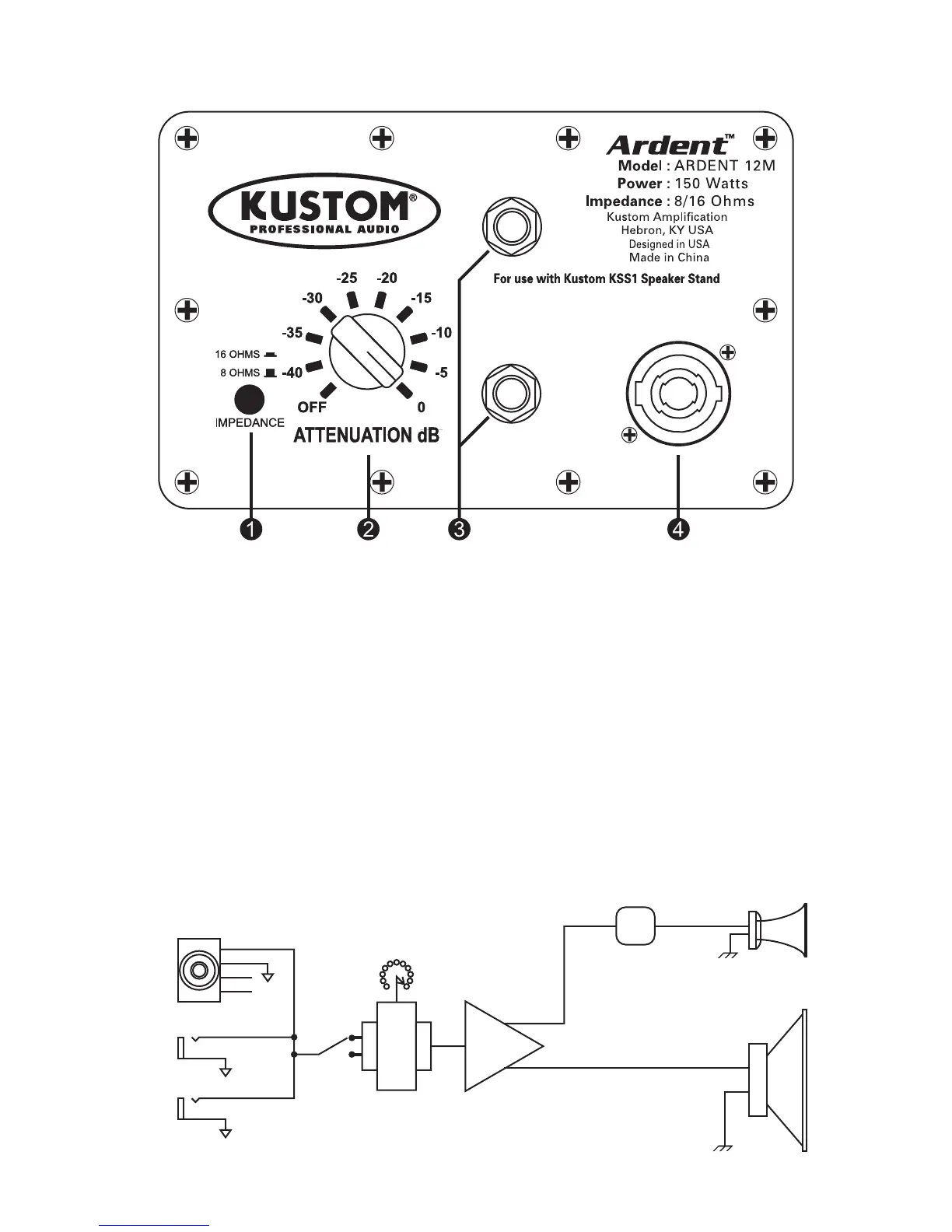
BACK PANEL DIAGRAM
4
1This switch uses the internal matching transformer to select the impedance of your Ardent™
12M. It does not affect speakers plugged into jacks (c d). NOTE: The speaker acoustical
output will drop 3dB when switched to 16 ohms. This is because the load on the amplifier
driving the Ardent™ 12M is ½ that of the 8 ohm setting.
2This Multi-position switch uses the internal matching transformer to attenuate (lower) the
volume of the Ardent™ 12M. It does not affect speakers plugged into jacks (c d). It also
reduces the amplifier load.
3 These 1/4” jacks are used to connect the speaker cabinet to an amplifier, such as a
powered mixer or power amp. These jacks are wired in parallel, so they can be used to
connect to another speaker cabinet.
4 This jack accepts Neutrik Speakon® connector. Pins +1 and - 1 are used. This jack is also
wired in parallel with the 1/4” jacks (c).
Horn
Protection
Crossover
Horn
Speaker
-
+
Speakond Jacks
1/4” Jacks
Impedance
transformer
Attenuator
8 - 16 Ohm
Selector
Block Diagram
+1
-1



 To Next Page