Calendar & Tools 57
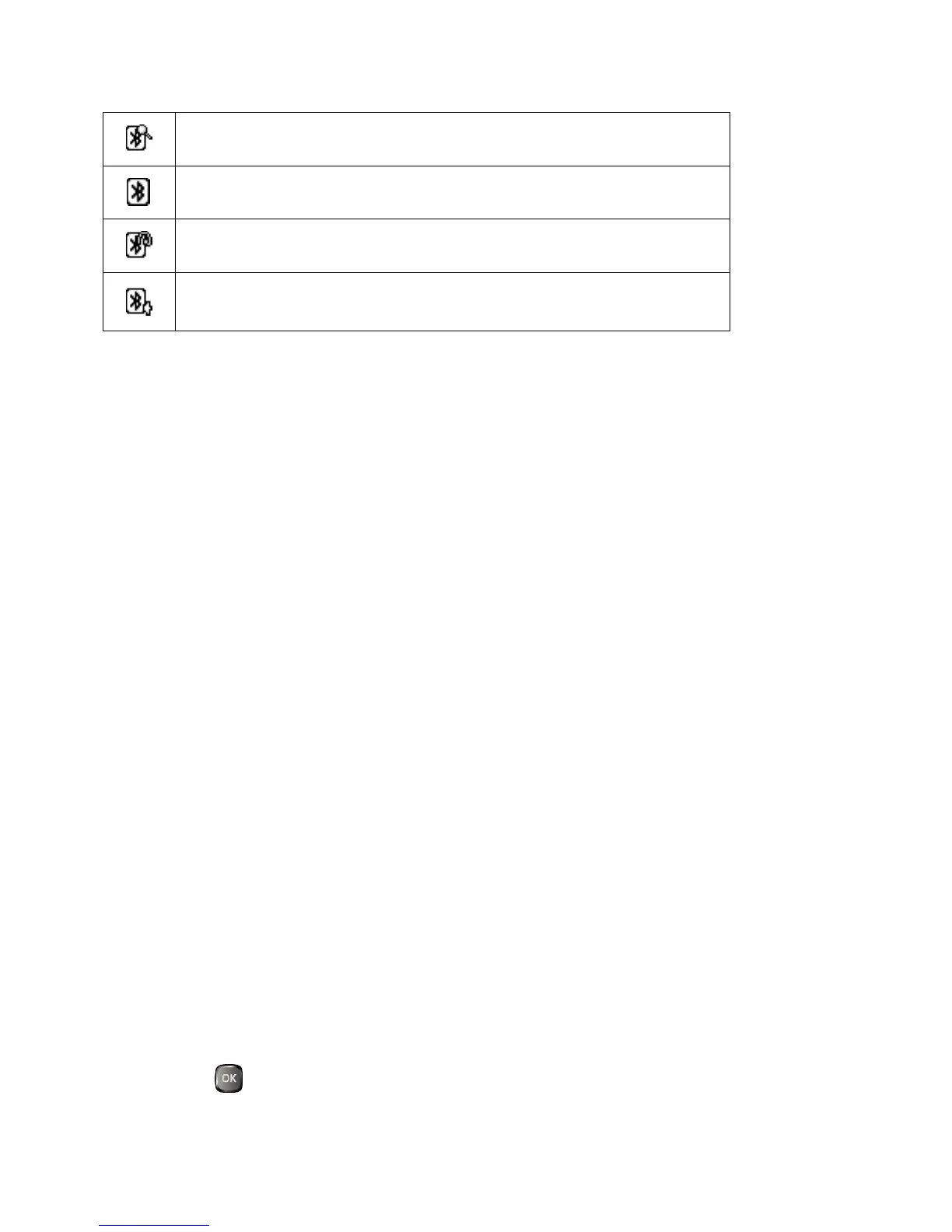
Your phone is visible to other Bluetooth devices.
Your phone is connected to a Bluetooth device.
Your phone is connected to or communicating with a Bluetooth
device via Hands-free Profile (HFP).
Your phone is connected to or communicating with a Bluetooth
device via Advanced Audio Distribution Profile (A2DP).
The above icons will blink while your phone is communicating with a Bluetooth device.
Supported Bluetooth Profiles
You can use different profiles for specific Bluetooth functions. Following Bluetooth profiles
are supported:
● A2DP: Advanced Audio Distribution Profile
● AVRCP: Audio Video Remote Control Profile
● HFP: Hand-free Profile
● HSP: Headset Profile
● OPP: Object Push Profile
● PBAP: Phone Book Access Profile
Bluetooth Menu
The Bluetooth menu allows you to set up many of the characteristics of your phone’s
Bluetooth feature, including:
●
Setting your phone’s visibility (or “discoverability”) for other Bluetooth devices.
●
Adding a new Bluetooth device to your phone.
●
Displaying your Bluetooth trusted devices list.
●
Displaying your phone’s Bluetooth information.
To access the Bluetooth menu:
►
Press > Bluetooth to select from following options:




 To Next Page